From Prototype to Production: How Custom Software Makes It Ready
A spreadsheet, a no-code app, a Figma demo or an AI-built MVP proved the idea. What custom software adds to make it production ready, and what you keep.
Most good software in a small business starts as something scrappy. A spreadsheet with a Google Form in front of it. A Bubble, Glide or Airtable app a manager built over a weekend. A Figma click-through that won the first customer. An MVP an AI builder or a freelancer put together in a fortnight.
That is the right way to start. A prototype is cheap, it answers "will anyone use this?", and it teaches you what the real workflow is. The trouble comes later, when the prototype quietly becomes the thing the business runs on, and nobody ever decided it was ready for that job.
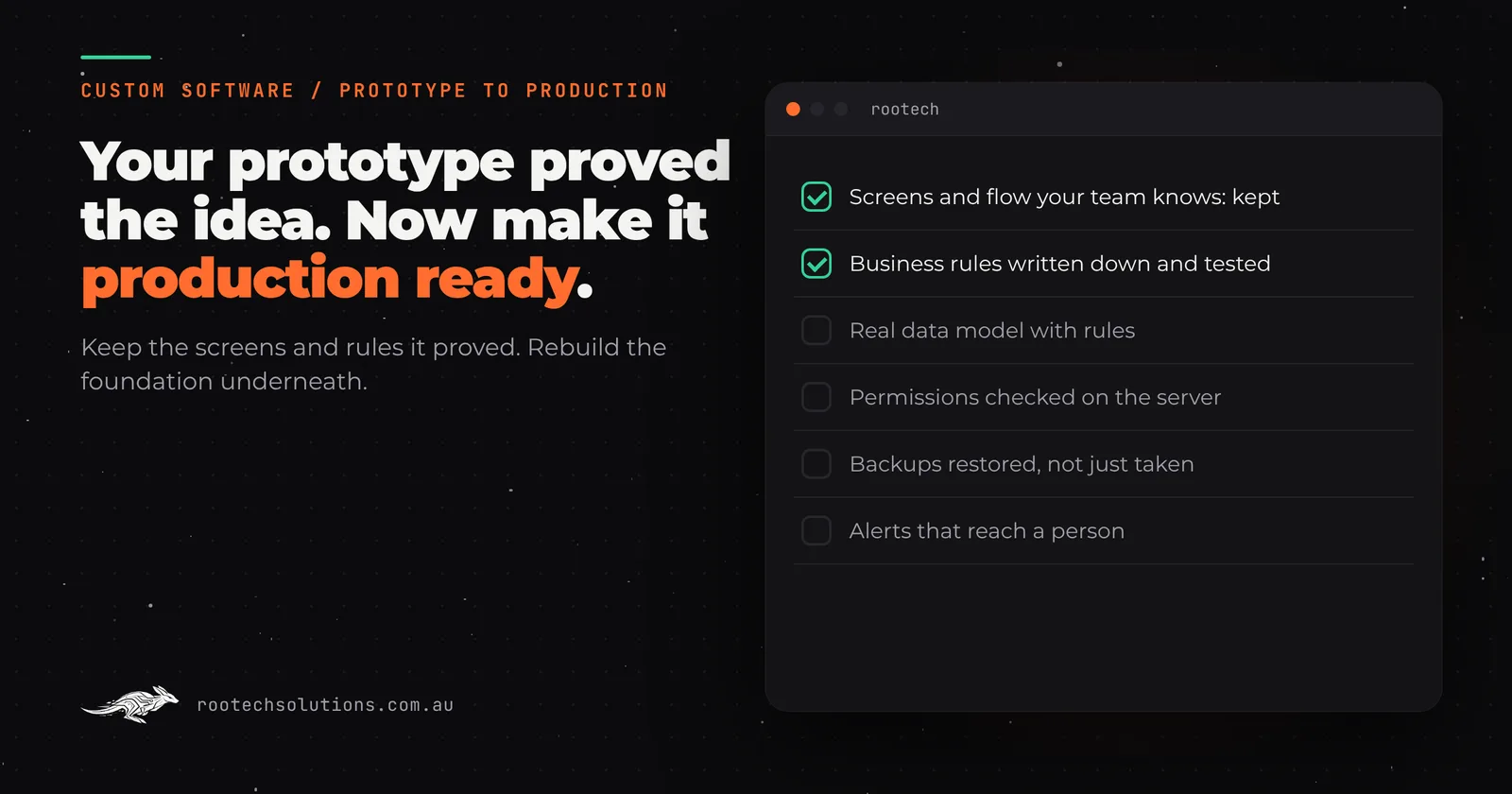
Short answer: A prototype proves the idea; production software has to survive real users, real data and real mistakes. Custom software makes a prototype production ready by keeping what it proved (the screens, the flow, the rules your team already follows) and rebuilding the foundation underneath: a proper data model, permissions checked on the server, backups that have been restored, tests on the paths that earn money, monitoring and repeatable deploys. At Rootech it starts with a review of what you have and a fixed price, the prototype keeps running while we build, and you own the code and every account at the end.
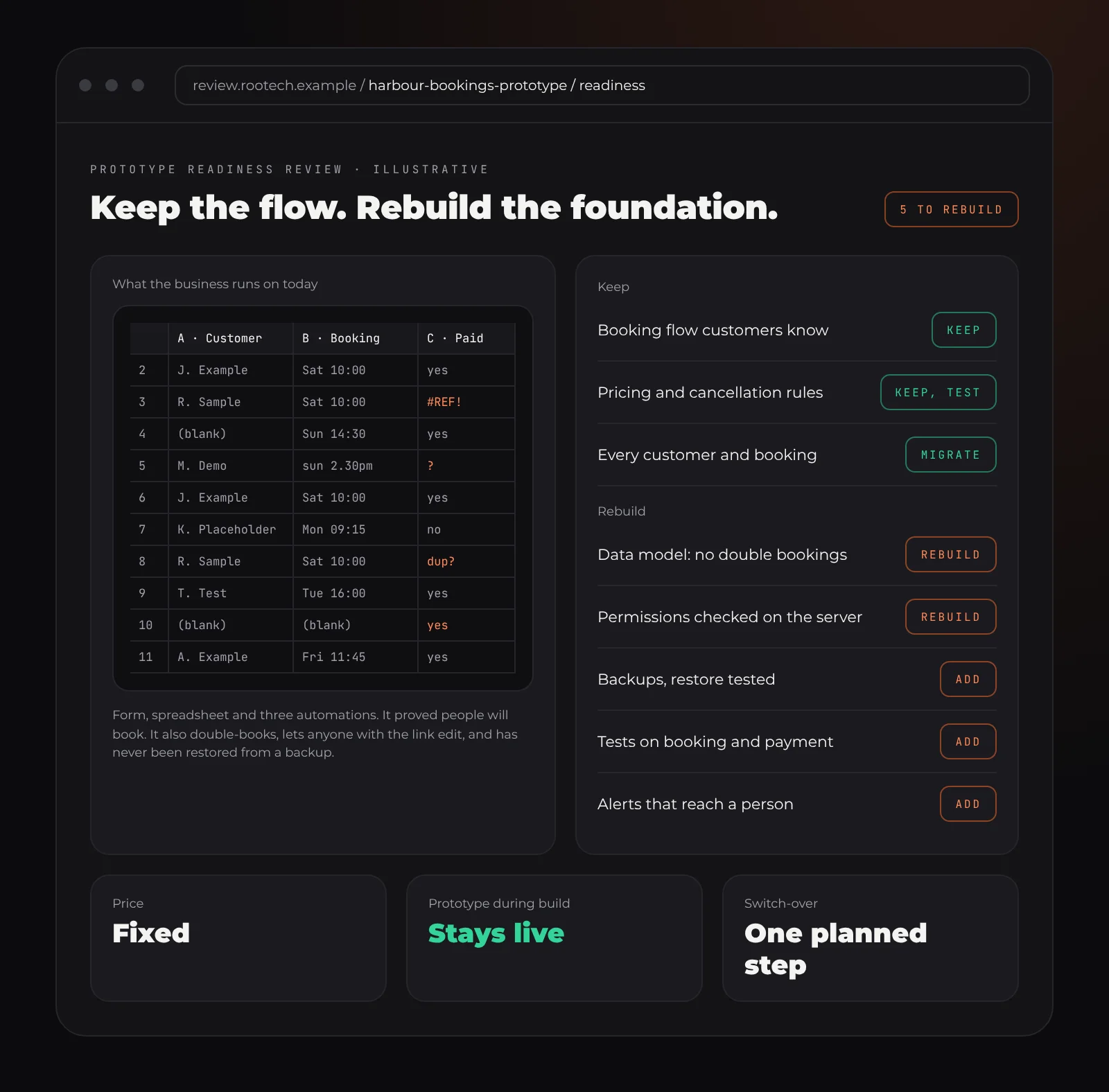
Illustrative. What a readiness review looks like: most of the prototype stays, and the list of what changes is short and specific.
What counts as a prototype?
Anything that proves an idea works before you have paid to build it properly. In our experience they come in four shapes:
- The spreadsheet system. Google Sheets or Excel, often with a form in front and a few formulas nobody wants to touch. It runs the bookings, the quotes or the stock count.
- The no-code app. Bubble, Glide, Softr, Airtable interfaces, Power Apps. Real logins and real data, built by someone who understands the business, not software.
- The clickable demo. A Figma or slide prototype that looks like an app but has nothing behind it. Common when founders are raising money or testing demand.
- The AI-built or freelancer MVP. A working app from Lovable, Bolt, Replit, v0, Cursor or a contractor, usually with real users already. We have written separately about vibe code cleanup for this case.
All four did their job. The question is not whether the prototype was a mistake. It is whether it is still the right thing to run on.
Signs your prototype has become production
You do not get a notification when this happens. These are the signs we look for:
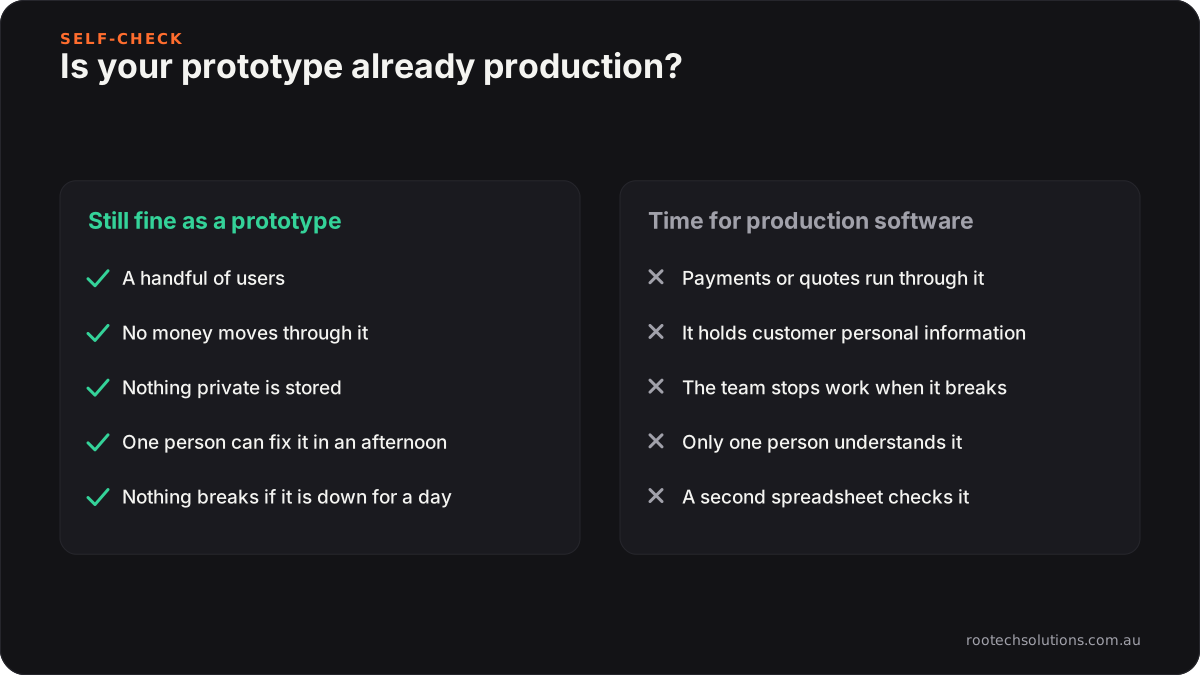
- Money moves through it. Payments, invoices, quotes or payroll depend on it being right.
- It holds personal information. Customer names, phone numbers, health details, addresses, anything covered by the Australian Privacy Principles.
- More than one person relies on it every day. If it breaks at 9am, work stops.
- Only one person understands it. The formula, the Zap, the no-code workflow or the prompt history lives in one head.
- You are working around it. Copying data between tools, fixing the same record twice, keeping a second spreadsheet "just in case".
- The platform limits are the roadmap. Row limits, plan tiers or missing features decide what the business can do next.
Two or more of those and the prototype is already production. It just has not been built like it.
What "production ready" actually means
Production ready is not a feeling, and it is not about how polished the screens look. It is a short list of things that are either true or not:
The data has a shape. Customers, jobs, bookings and invoices live in a real database with rules: a booking always has a customer, a price is always a number, a deleted record is recoverable. Spreadsheets and many no-code tools let anything go in any cell.
Permissions are checked on the server. Every request checks who is asking and whether they are allowed to see or change that record. Hiding a button is not a permission.
Backups have been restored. There are automatic backups, and someone has actually restored one to prove it works.
The money paths are tested. Sign-up, booking, quoting and checkout have automated tests, so a change next month cannot quietly break them.
Someone finds out before your customers do. Errors, slow pages and failed jobs raise an alert that reaches a person.
Changes are repeatable. Every change to the code and the database is recorded, reviewed and can be rolled back. Deploying is a button, not a ritual.
You own it. The code, the hosting accounts, the domain and the data are in your business's name, with documentation someone else could pick up.
What you keep from the prototype
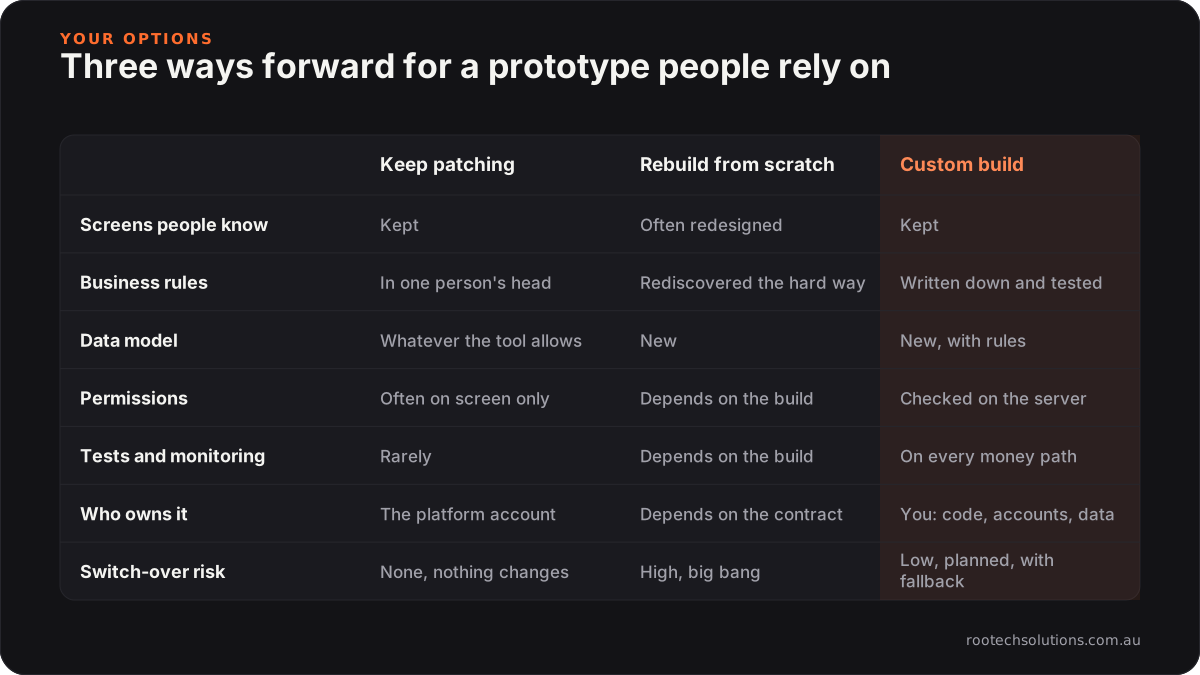
This is where many rebuilds go wrong. The prototype is not throwaway. It is the most accurate specification you will ever have, because your team and your customers have already used it.
What we keep:
- The flow. The order of screens and steps people already know. Retraining staff is a cost nobody budgets for.
- The rules. The pricing logic in the spreadsheet, the edge cases in the no-code workflow, the exceptions someone added after a bad week. We write them down and test them.
- The data. Every customer, job and record moves across in a planned switch-over, checked against the original.
- The good ideas. Often the prototype has a feature that turned out to matter more than anyone expected. That gets built properly first.
What changes is underneath: the database, the permissions, the tests, the hosting and the monitoring. For most users the first visible difference is that it is faster and it stops breaking.
How a prototype becomes production software
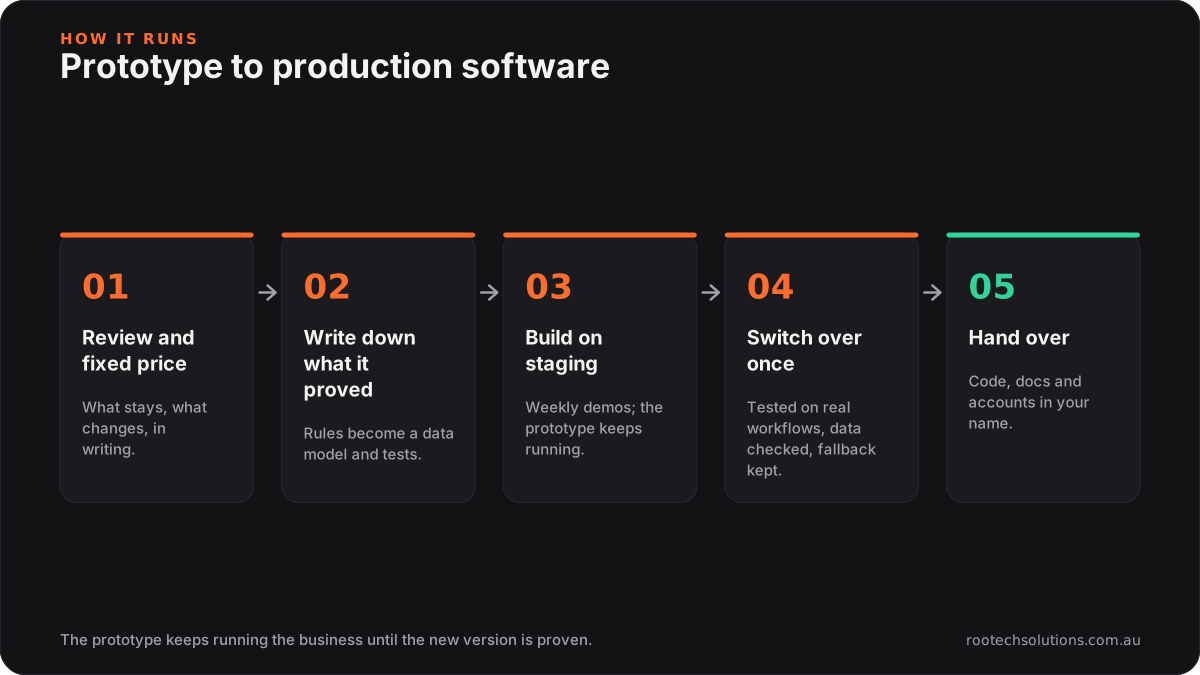
1. Review what you have
We look at the prototype the way your team uses it: the screens, the data, the formulas or workflows, the integrations, and where it hurts. You get a written list of what stays, what changes, and a fixed price before any build starts.
2. Write down what it proved
The prototype's rules become a data model and a set of tests. This step is quick and it is the one that saves the most money, because every "oh, and it also does this" gets found now instead of after launch.
3. Build on a staging copy
The production version is built on a private staging site you can click through as it grows, with a demo each week. The prototype keeps running the business the whole time.
4. Switch over once
When the new version passes the same real workflows your team runs every day, records, users and files move across in one planned switch-over, at a quiet time, with the prototype kept read-only as a fallback.
5. Hand over
Launch comes with the code, documentation and credentials, all in your name. Bug fixes on anything we built are included after launch, and an optional monthly retainer covers monitoring, updates and improvements if you want it.
What it costs to run afterwards
The build is quoted as a fixed price after the review, because it depends on what the prototype does. Running costs are easier to estimate: for a typical small business app, hosting usually comes in under $50 a month, and if the software uses AI, usage typically runs $20 to $200 a month depending on volume. Many businesses find that replaces two or three overlapping subscriptions, which is a big part of the case for custom business software in the first place.
Work we have taken from idea to production
- Kaladi Kitchens: a multi-location booking platform and website for a commercial kitchen collective, with session checklists and photo capture built into every shift.
- Bugaboo Landscaping: a booking system and content platform for a landscaping business and its franchisees, where every finished job sends the client their own before-and-after photos.
- Logic Building Co: an AI estimator that turns plans into measured quantities and a costed estimate, built into how the team already quotes.
Frequently asked questions
Do I have to throw my prototype away?
No. The screens, the flow and the business rules usually stay; they are the best specification you have. What gets rebuilt is the foundation underneath: the database, permissions, tests, hosting and monitoring.
Can you take over a no-code app like Bubble or Glide?
Yes. We review how it is used, export the data, and rebuild it as custom software that keeps the same flow. Some no-code apps should stay on their platform, and the review will say so if that is the case.
How long does it take to make a prototype production ready?
Most builds ship in two to four weeks. Bigger platforms get a fixed timeline agreed up front, after the review.
What happens to my data during the switch?
The prototype keeps running while the production version is built. Users, records and files move across in one planned switch-over, checked against the original, and the old version is kept as a fallback.
Who owns the code at the end?
You do. The code, the hosting accounts and the data stay in your name, with documentation and credentials handed over at launch.
Send us your prototype
If a spreadsheet, a no-code app, a demo or an MVP has quietly become something your business depends on, send us what you have. We review it, tell you plainly what stays and what changes, and give you a fixed price to make it production ready. Melbourne businesses can meet in person; everyone else across Australia works with us over video. Start with the contact form at Rootech Solutions.