Stop Chasing Clients for Tax Documents: The AI Fix
AI document collection for accountants: build each client's checklist from last year's file, read what arrives, chase only what's missing. Costs and scope.
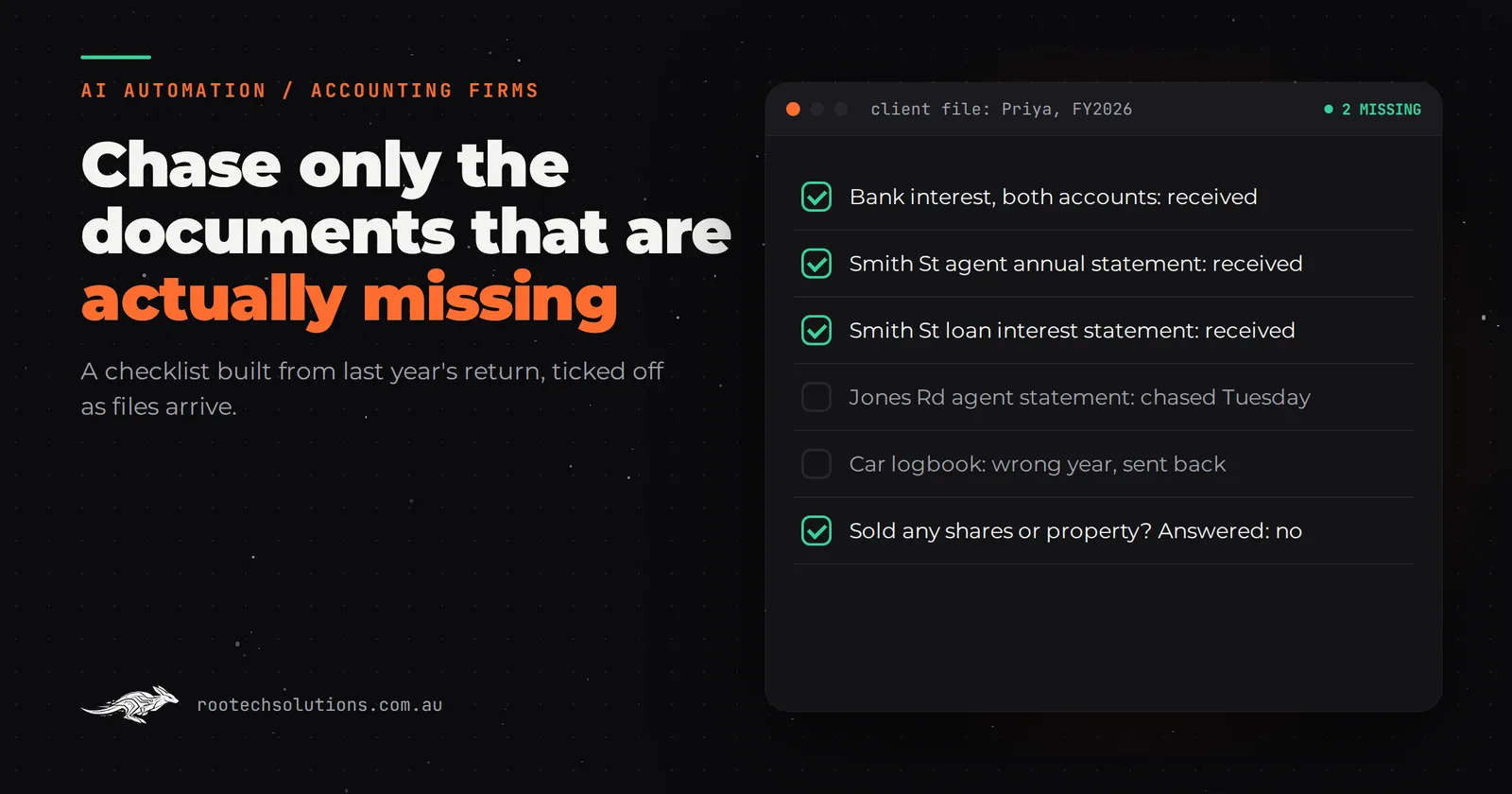
It is August, half your clients have sent "everything", and everything turns out to be a phone photo of one bank statement and a forwarded email from 2024. Your admin team spends the season comparing attachments against checklists, writing the same "we still need..." email, and ringing people who have stopped opening them.
Short answer: AI document collection for accountants works by building each client's checklist from last year's return, reading every file the client sends, ticking off what arrived and chasing only what is still missing, in plain language, until the file is complete. It suits firms with a few hundred individual, rental and small business clients. The accountant still reviews the file and gives all tax advice.
Why is chasing tax documents so slow in the first place?
Because the checklist is generic and the checking is manual. Most firms send every client the same list, so clients cannot tell which items apply to them, and every reply has to be opened, read and compared against that client's situation by a person.
The real failure modes are specific, and you will recognise them:
- The wrong year. A bank statement for the 2025 financial year when you asked for 2026.
- The partial upload. Three of four rental properties, with the fourth "coming".
- The unreadable file. A blurry photo, a password-protected PDF, a screenshot of a screenshot.
- The scattered channel. Half the documents in the portal, the other half emailed to whichever staff member the client last spoke to.
- The silent client. One reminder email, then nothing for three weeks while the file sits at "waiting on client".
Each one costs a round of checking, emailing and waiting. As a rule of thumb, a client needs three or four rounds before the file is complete, at around 15 minutes a round. That is close to an hour of admin per client before anyone does any accounting.
What does a smarter document checklist look like?
It starts from last year's file, not a template. The single most useful thing an AI document agent does is read what the client lodged last year and build this year's request from it, then ask whether anything changed.
| Client type | What last year's file tells the agent | What it asks this year |
|---|---|---|
| Employee with deductions | Work-related car and home office claims | Car logbook or kilometres, home office hours, receipts over your threshold |
| Rental property owner | Each property, the managing agent, the lender | Agent's annual statement and loan interest statement for each property, any repairs, still own it? |
| Sole trader | Bank accounts used for the business, GST registration | Business bank statements for the full year, BAS figures, asset purchases |
| Company or trust | Entities, bank accounts, distributions | Year-end bank balances, loan accounts, trustee resolution details |
| Sold an asset | Nothing yet, so the agent asks | "Did you sell any shares, crypto or property this year?" with a contract or statement if yes |
A client with two rental properties gets a request that names both, by address. A client who sold nothing last year still gets asked the capital gains question, because that is the one that causes amended returns. Your firm decides the lists; the agent applies them per client.
What does AI document collection for accountants do, step by step?
It runs the whole chase loop on its own and only involves your team when a file is complete or a question needs an accountant.
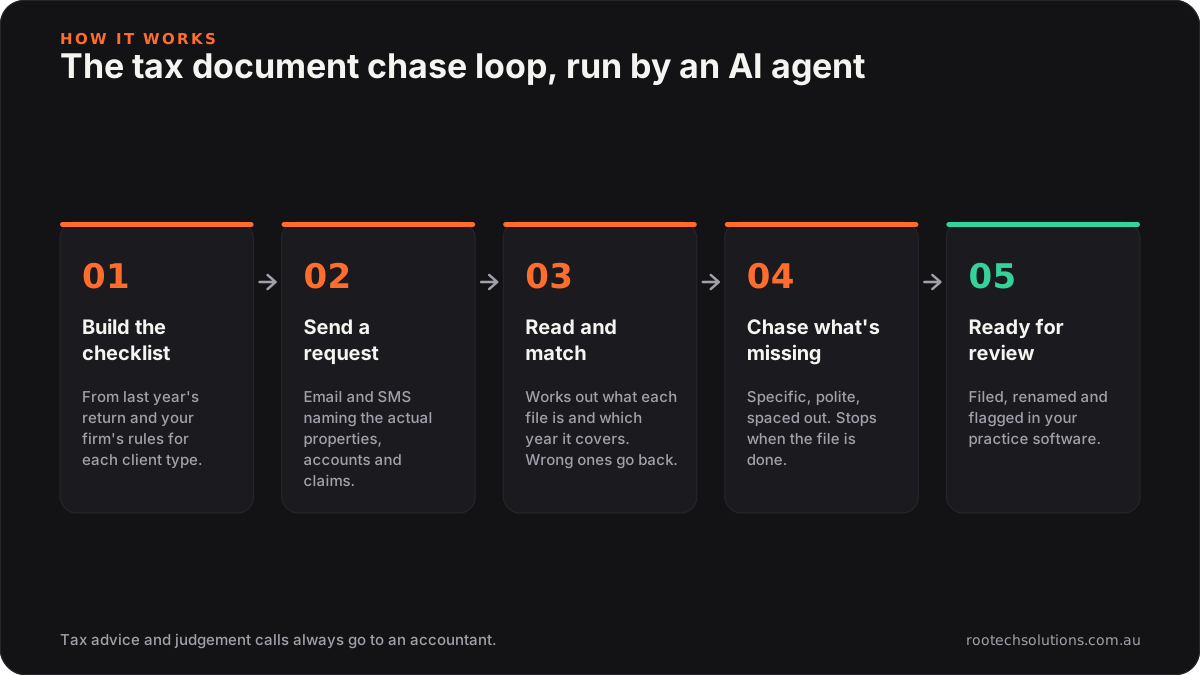
Caption: Your team touches the file twice: when the checklist rules are set, and when the file is ready to review.
- Builds the checklist. From last year's return and the client type, using your firm's rules.
- Sends a personal request. By email and SMS, with an upload link, naming the actual properties, accounts and claims.
- Reads and matches each file. It works out what each document is (a bank statement, a rental statement, a contract of sale), which year it covers and which checklist item it satisfies. Wrong year, unreadable or password-protected files are sent straight back with a specific reason.
- Chases only what is missing. "We have the statement for Smith Street. We still need the one for Jones Road and the loan interest statement from your lender." Polite, specific, spaced out, and it stops when the file is done.
- Answers the admin questions. "Do you need my partner's documents?" "Is a screenshot okay?" It answers from your firm's approved answers, and anything that is really tax advice goes to an accountant.
When everything is in, the file is renamed, filed in your document system and flagged "ready for review" in your practice management software.
Should we buy a document request tool or build a custom AI integration?
Buy first if your problem is only sending checklists and reminders. Build when the problem is reading what comes back. Accounting has good off-the-shelf software and you probably already pay for some of it.
- Practice management software such as Xero Practice Manager, MYOB Practice, Karbon or FYI tracks jobs, stores documents and can send requests and reminders.
- Document request tools such as Content Snare are built for exactly this: a structured request, a client upload page and automatic reminders.
- Proposal and engagement tools such as Ignition handle the engagement letter side.
Check their current features and pricing, because they change. If your checklists are fairly standard and your clients will use a portal, one of these is the right call and a custom build would be wasted money.
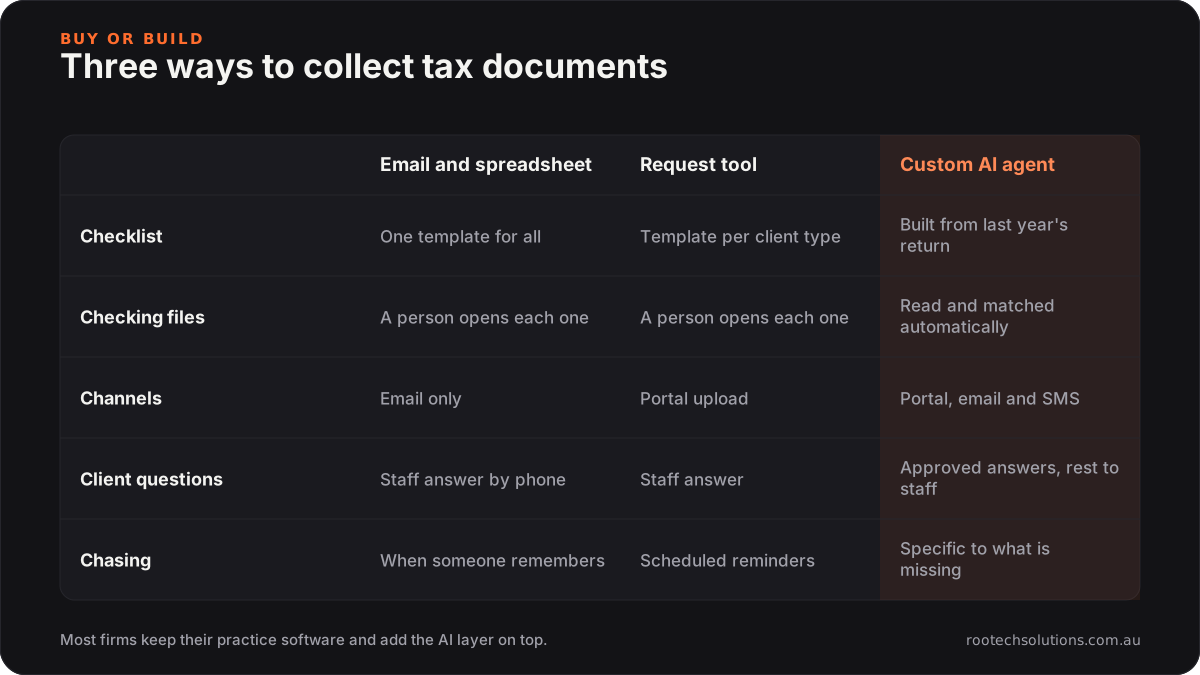
Caption: Request tools solve sending. The gap a custom AI integration fills is reading and judging what comes back.
A custom AI integration earns its keep when:
- your clients send documents by email, photo and text, not just through the portal, so something has to read them;
- the checklist has to be built from last year's return for each client, not picked from a template;
- your team spends more time checking documents than sending requests;
- clients ask the same twenty questions every season.
Often the best answer is both: keep your practice management software as the system of record and put the AI layer on top, reading files and writing status back into it.
What does it cost, and what does the build look like?
As an estimate, an AI document collection agent for a small to mid-size firm costs $5,000 to $12,000 to build at a fixed price, depending on how many client types and systems it touches, and is usually live in three to four weeks. Running costs are hosting, usually under $50 a month, plus AI usage that peaks at tax time, typically $50 to $200 a month for a few hundred clients.
What the build covers:
- Week 1: your rules. The checklist for each client type, your thresholds, the approved answers to common questions, and the list of things the agent must always hand to an accountant.
- Week 2: connections. Your practice management software, your document storage, your email and an SMS service.
- Week 3: reading and matching. Document classification and year detection, tested against a few dozen real files from last season.
- Week 4: pilot. Twenty or thirty friendly clients first, then the whole list.
For scale: a firm with 300 clients at roughly an hour of chasing each is spending around 300 admin hours a season. At $35 to $45 an hour, that is about $10,500 to $13,500 of staff time, before you count the accountants' evenings in October. Those are rule-of-thumb figures, so run your own numbers before you decide.
The same pattern, an AI reading every incoming document against a set of rules and filing the ones that pass, is what we built for Neon Badger's tender pipeline, applied to government tenders instead of tax records.
Where does the accountant stay in the loop?
At every judgement call. The agent collects, reads, sorts and chases. It does not decide what is deductible, whether a document is sufficient evidence, or how to treat a capital gain.
Three hand-off rules most firms use:
- Any question about tax treatment goes to the client's accountant with the conversation attached.
- Anything unexpected in a document (a sale nobody mentioned, a large transfer, an ATO letter) is flagged, not filed quietly.
- The file is never "done" until an accountant opens it and agrees.
How do you keep client documents secure?
Treat this as the first design question, not the last. Tax files hold tax file numbers, bank statements and identity documents, which is exactly what a data breach exposes.
A sound build keeps documents in your existing storage rather than a new silo, uses Australian-hosted infrastructure where possible, restricts what the AI model is allowed to keep, and logs every access. If something does go wrong, the Notifiable Data Breaches scheme requires organisations covered by the Privacy Act to notify affected people and the OAIC when a breach is likely to cause serious harm. Ask any provider, including us, how their design reduces that risk.
If you are also working on how new clients find your firm, our guide to how Melbourne accountants show up in AI search covers the other end of the funnel, and bookkeepers re-keying invoices into Xero covers the same idea for bookkeeping work.
Frequently asked questions
Will clients actually use an upload link instead of emailing documents?
Some will and some never will. That is why the agent should read documents from email and SMS as well as the upload page. Clients who send a photo by reply still get their file ticked off, and nobody on your team has to move the attachment by hand.
Does an AI document agent replace our practice management software?
No. It sits on top of it. Your practice management software stays the place where jobs, deadlines and documents live, and the agent writes its status updates and files back into it.
Can the AI tell the difference between financial years?
Yes, for most documents, because statements print their period clearly. It checks the dates against the financial year you asked for and returns the document if they do not match. Anything it is unsure of is flagged for a person rather than accepted.
Is this worth it for a firm with fewer than 100 clients?
Usually not as a full custom build. A document request tool and a good set of templates will get a small firm most of the way. The custom AI layer pays off when the volume of checking, not sending, is what eats your season.
Want to see where your season goes?
We will look at last year's tax season with you: how requests went out, how documents came back and where the hours went. Book a free AI workflow audit and you will leave with a clear answer on whether to buy, build or leave it alone. If you go ahead, the audit fee comes off your first project.