How Tradies Stop Re-Typing Job Details Into Three Systems
Automate data entry for tradies: what ServiceM8, Tradify and Xero already sync, the re-typing they leave behind, and what a custom integration costs.
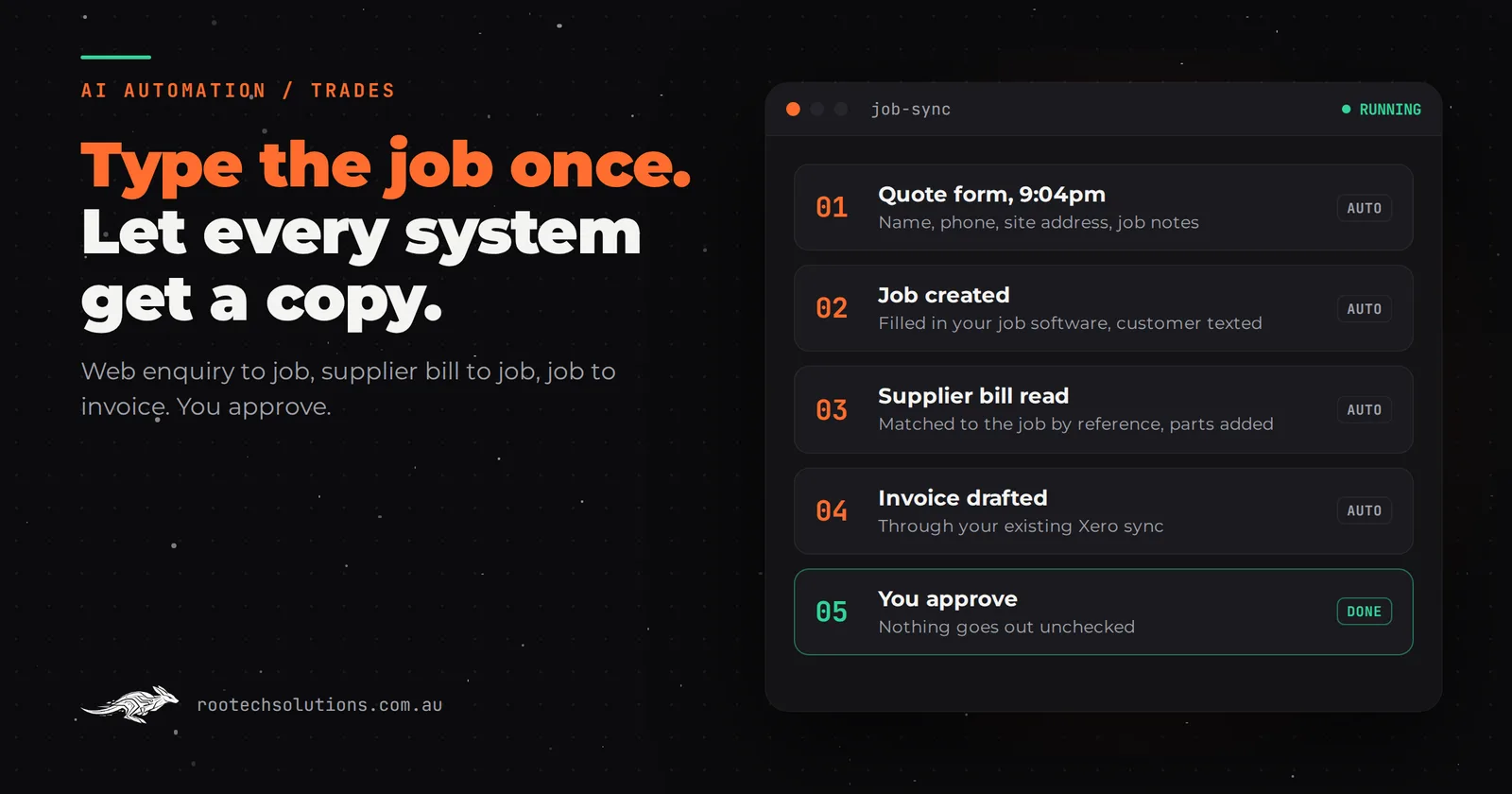
The customer typed their name, address and job into your website at 9pm. Next morning you type it into ServiceM8. When the supplier invoice arrives you type the parts in again, and at month end someone types half of it into Xero. Same job, same details, three or four times, and every retype is a chance to invoice unit 4 instead of unit 14.
Short answer: Tradies automate data entry in two layers. First, switch on the native integrations their job software already has, such as ServiceM8 or Tradify syncing customers and invoices to Xero. Then add a small custom integration for the gaps those leave: web enquiries into jobs, supplier bills onto jobs and site notes into quotes. Most builds take two to three weeks.
Where do tradies actually re-type job details?
In four places, and only one of them is usually solved already. Most tradies assume the whole chain is manual, when the job-to-invoice step often has a free fix sitting in their settings.
| Where the re-typing happens | Native fix in your job software? | What a custom integration does |
|---|---|---|
| Website form or email enquiry into a new job | Partly: some tools have their own booking forms | Creates the job from any form, email or lead site, with address and notes |
| Job into an invoice in Xero or MYOB | Usually yes, through the built-in accounting integration | Nothing extra, if the native sync is switched on |
| Supplier invoices onto the right job | Varies by supplier and tool | Reads the bill, matches the job reference, adds the parts |
| Site notes and photos into a quote | No | Turns a voice note or photo of notes into draft quote lines |
The second row matters. ServiceM8's Xero integration, for example, syncs customers and items both ways, raises invoices into Xero and syncs payments back. If you are still typing finished jobs into Xero by hand, fix that before you pay anyone for anything.
Why is re-typing worse than it looks?
Because the cost is not just the minutes. It is the errors and the delay. A tired retype at 8pm sends a crew to the wrong street, invoices the wrong unit, or misses a part so the job undercharges.
As a rule of thumb, a trade business doing fifteen to twenty jobs a week spends six to eight hours re-keying job details across systems: close to a day of admin. At $40 to $60 an hour for your own time or an office manager's, that is $200 to $400 a week, or roughly $10,000 to $20,000 a year. Those are estimates, and your numbers depend on how many systems you run and how much of the native sync you already use.
The less visible cost is speed. An enquiry that sits in an inbox until you have time to type it into your job app is an enquiry that may already be booked with someone else. We cover that leak in detail in why small businesses lose leads to slow follow-up.
What does the off-the-shelf software already handle?
More than most owners use. ServiceM8, Tradify, Fergus and simPRO are job management platforms widely used by Australian trades, and each offers connections to accounting software such as Xero or MYOB. Check each one's current integrations and pricing, because they change.
When off-the-shelf is enough:
- you take most bookings through one channel, such as phone calls, and type them in once;
- you invoice from the job app and the accounting sync is switched on;
- your suppliers' bills go to your bookkeeper, who handles job costing at month end.
If that describes you, you do not need custom software. Spend an afternoon in your integration settings instead.
When a custom integration earns its keep:
- Enquiries come from several places. Your website, a lead site, Facebook and email, each in a different format.
- Supplier bills need to land on jobs. Plumbers and electricians with dozens of trade supplier invoices a week lose margin when parts never make it onto the job.
- You quote from site. You walk the job, scribble notes, then rebuild them as a quote at night.
- You run two systems that do not talk. A job app plus a separate CRM, rostering tool or compliance register.
What does an automated job workflow look like for a tradie?
Data is typed once, at the source, usually by the customer or the supplier, and every system downstream gets a copy. You approve; you do not retype.
- Enquiry in. A quote form at 9pm creates a job in your job management software with the name, phone, site address and job notes filled in, and texts the customer that you will be in touch during business hours.
- Job booked. You review it in the morning, call if it needs a chat, and schedule it as normal.
- Parts land on the job. When the supplier invoice arrives by email, an AI step reads it, finds the job reference or site address, and adds the parts to that job. Anything it cannot match is held for you, not guessed.
- Quote or invoice drafted. Site notes become draft quote lines; a completed job becomes a draft invoice through your existing accounting sync.
- You approve. Nothing goes to a customer without a person checking it.
The AI part is narrower than people expect. Moving a name from a form into a job does not need AI, it needs a reliable integration. AI earns its place where the input is messy: a supplier PDF in a different layout every time, a voice note recorded in a ute, an email that mixes two jobs.
What should you map before automating anything?
The fields, the formats and the exceptions. Most failed trade automations fail on data mapping, not on technology.
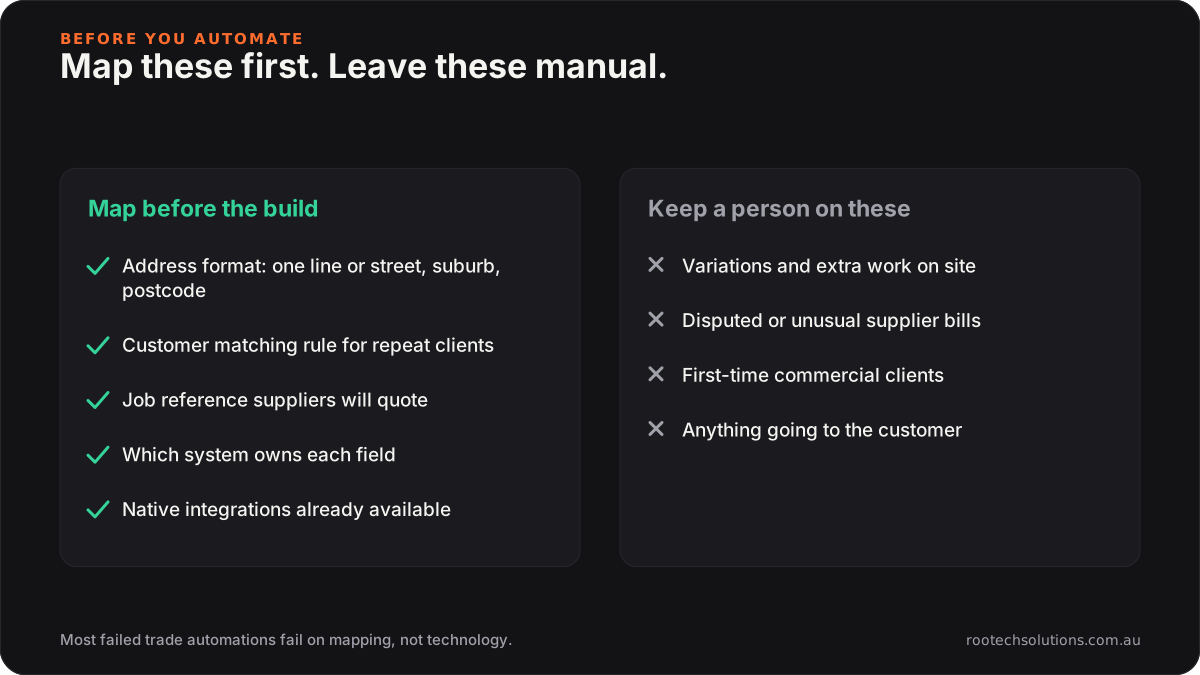
Caption: An hour on this list before the build saves weeks of tidying bad data afterwards.
Address formats are the classic trap. Your web form captures the address as one line; your job app splits it into street, suburb and postcode. A good build handles that split and checks it, so the crew lands at the right house. Customer matching is the next: is "J Smith, Reservoir" the same person as "John Smith" already in your system? Decide the rule up front.
What does it cost to automate data entry for tradies?
As an estimate, a data entry integration for a trade business costs $1,500 to $4,000 to build at a fixed price, depending on how many systems it connects and whether it reads supplier invoices. Most are live in two to three weeks.
Running costs are small: hosting or a workflow platform, usually $20 to $80 a month, plus AI usage of roughly $20 to $100 a month if it reads supplier bills or voice notes. Most job management software publishes an API for exactly this kind of connection; ServiceM8's developer platform describes it as a way to reduce double handling.
The usual shape:
- Week 1: map your fields, formats and exceptions; switch on any native sync you are not using.
- Week 2: connect the enquiry sources and the supplier inbox; build the matching rules.
- Week 3: run it alongside your current process on real jobs, compare the results, then switch over.
Is no-code enough? For a single form into a single job app, often yes, and we compare the options in DIY no-code vs an AI automation agency. Once supplier documents and matching rules are involved, a custom build is usually more reliable. For a sense of what a field-first system looks like when the crew is the data source, see the Bugaboo Landscaping booking system, where crews upload before-and-after photos from site and the system sends them to the client when the job closes.
Frequently asked questions
Do I need to replace ServiceM8, Tradify or simPRO to automate data entry?
No. The integration sits between the tools you already use and moves data between them. Replacing software you know is usually the most expensive and least useful option.
Can AI read supplier invoices from trade suppliers?
Yes, in most layouts, because supplier invoices print a job reference, order number or delivery address the AI can match to a job. Bills it cannot match confidently are held for you to assign. Ask suppliers to quote your job number on orders and the match rate improves.
What happens if the automation gets something wrong?
A good build makes errors visible rather than silent. Unmatched or uncertain items go to a review list, and nothing reaches a customer or your accounts without approval. Running the automation alongside your old process for a week or two catches most problems before you rely on it.
Is this worth it for a sole trader?
Sometimes. If you do fewer than ten jobs a week and your job app already syncs with Xero, probably not. If you are spending evenings rebuilding quotes from site notes, the quote drafting step alone can be worth it.
Find out where your re-typing happens
We will map your week, from enquiry to paid invoice, and show you which retyping you can kill with a settings change and which needs a build. Book a free AI workflow audit. If you go ahead with a project, the audit fee comes off it.