No-Code or Custom Development? DIY vs Hiring an Agency
No-code vs custom development for AI automation: when Zapier, Make or n8n is enough, when to hire an agency, and the middle option most owners miss.
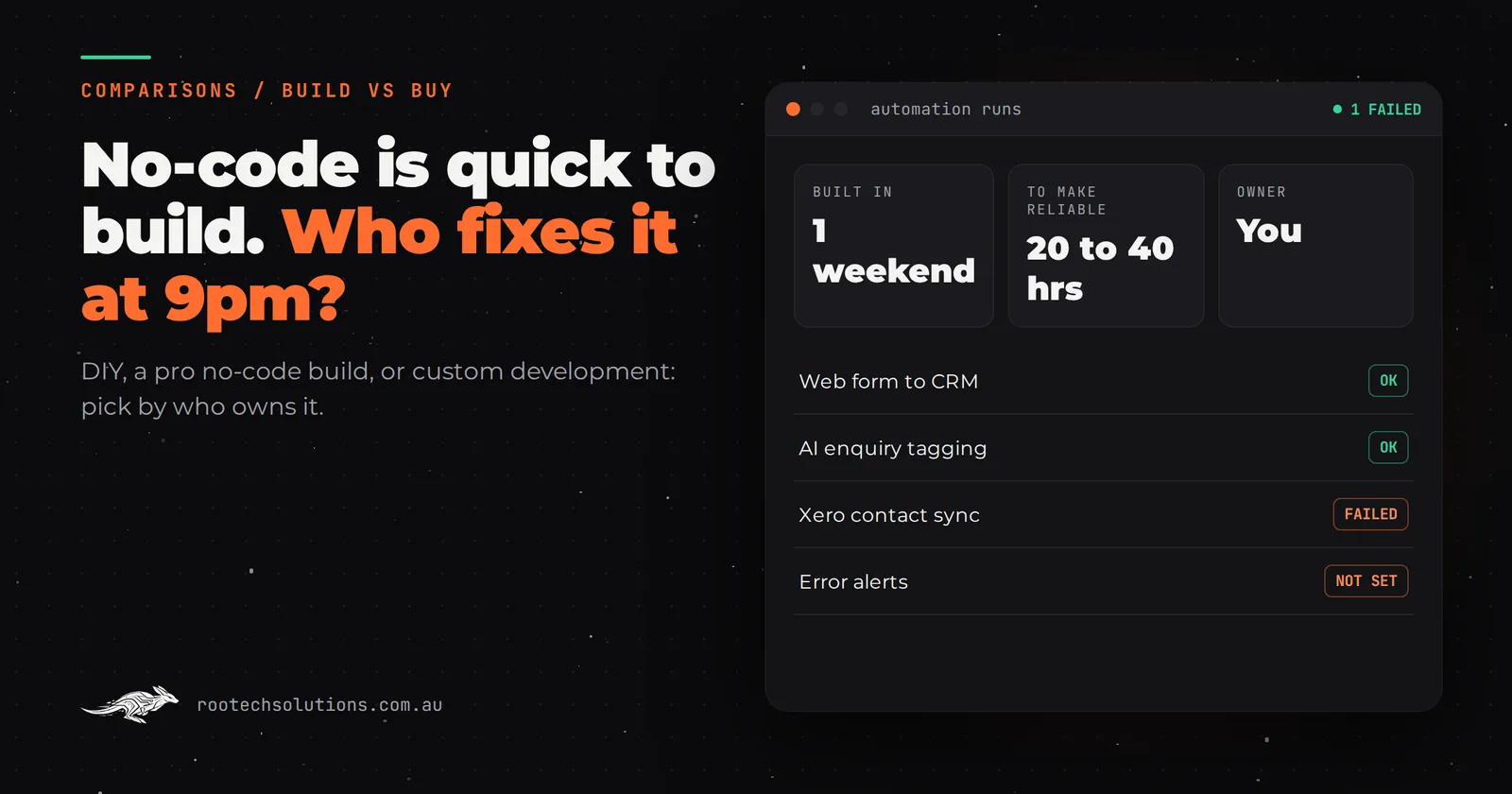
You have watched the videos: someone wires a web form to ChatGPT to a CRM in twenty minutes and calls it an AI agent. You could do that. Or you could pay an agency to build it properly. The real question is not which is cheaper on day one, it is which one is still working, quietly, six months from now.
Short answer: For no-code vs custom development, go no-code (Zapier, Make, n8n or Power Automate) when the automation is internal, has a few simple steps and someone on your team will own it. Hire an agency for custom development when it talks to customers, touches money or bookings, or needs real error handling. There is also a middle option: a professional build on a no-code platform.
What can you realistically build yourself with no-code tools?
Quite a lot, as long as it is a straight line. No-code automation tools connect apps you already use with "when this happens, do that" steps, and most now include an AI step that can summarise, classify or draft text.
Good DIY projects look like this:
- New web form enquiry goes to a Google Sheet, a Slack or Teams message, and your CRM.
- Incoming emails with invoices attached get the attachment saved to a folder and a task created.
- An AI step reads each new enquiry and tags it as a quote request, a complaint or spam.
- A booking in your calendar sends a reminder SMS the day before.
The main tools, described generally (check each vendor's current pricing, which is usually based on how many steps run each month):
| Tool | What it suits |
|---|---|
| Zapier | The widest app library, easiest start for non-technical owners |
| Make | Visual, branching scenarios, more control over data between steps |
| n8n | Workflow automation you can self-host, popular with technical teams |
| Power Automate | Businesses already running on Microsoft 365 |
If your automation fits in one of those and somebody on the team enjoys fiddling with it, start there. You will learn exactly what you need, and that knowledge is valuable even if you hire someone later.
Where do DIY no-code automations break?
They break at the edges, and the edges are where your customers are. A no-code flow that works on the ten test enquiries you tried often fails on the eleventh real one, and nobody notices until a customer chases you.
The failure modes we see most often:
| What happens | Why it happens | What a proper build does instead |
|---|---|---|
| A step fails silently | No error alert was set up | Alerts a named person and retries |
| Duplicate contacts in the CRM | The flow cannot tell a new lead from a returning one | Matches on phone or email first |
| The AI reply promises something you do not offer | The prompt had no limits | Answers only from approved content |
| It stops when an app updates | A connector changed or a login expired | Monitored, with someone responsible |
| Nobody knows how it works | The builder left, or it was you two years ago | Documented and handed over |
| The bill creeps up | Step-based pricing grows with volume | Hosting cost that barely moves |
None of these are reasons to avoid no-code. They are reasons to be honest about who owns the automation once it is live. If the answer is "the owner, at 9pm, when something looks off", the time cost is real. As a rule of thumb, a weekend build often takes another 20 to 40 hours of testing and fixing before you would trust it with customers.
What is the middle option between DIY and custom code?
Paying a professional to build on a no-code platform. You get someone who knows the error handling, testing and AI guardrails, but the result lives in a tool your team can open and understand.
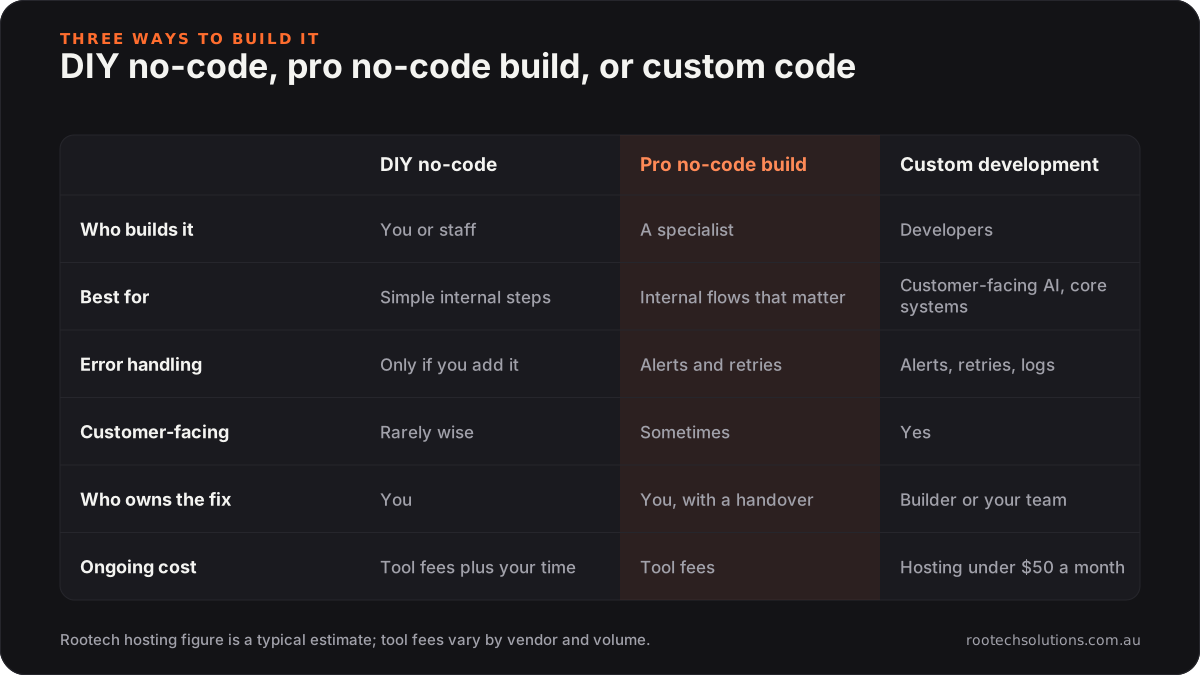
Caption: Most small businesses are choosing between the first two columns, not between no-code and code.
This is often the right answer for internal workflows that matter but do not face customers: invoice processing, job paperwork, reporting. We will tell you when a job belongs here rather than in a custom build, and sometimes we build it in n8n or Make ourselves.
When does custom development beat no-code?
Custom development wins when the automation needs logic, not just plumbing. Four situations where we would steer you away from no-code:
- It talks to customers in real time. A website chat, an AI receptionist or an SMS agent needs fast responses, conversation memory, guardrails and a clean handoff to a person. No-code tools can approximate this; it rarely holds up under real traffic.
- It touches money, bookings or legal records. Writing invoices into Xero or MYOB, booking into Cliniko or ServiceM8, or updating a matter in LEAP needs validation and an audit trail. A silent failure here costs more than the build.
- The rules are yours and they are specific. Quoting from your own price list, deciding which jobs you take, or routing leads by suburb, budget and job type quickly becomes a tangle of filters in a visual editor. In code it is a page of readable rules.
- Volume is high. Step-based pricing that is trivial at 100 runs a month becomes a real line item at 20,000. Custom code on your own hosting usually costs under $50 a month regardless.
Our Neon Badger tender pipeline is a good example of the custom side: it scrapes every new state and federal tender on a schedule, uses AI to score each one against what the studio does, and turns the good ones into leads. That much scraping, scoring and scheduling would be fragile as a chain of no-code steps.
What does it cost to hire an agency instead?
A fixed-price automation or AI integration typically lands between $3,000 and $15,000, depending on how many systems it connects and how much logic it carries. Most ship in two to four weeks. After that you pay hosting (usually under $50 a month) and AI usage (roughly $20 to $200 a month for most small businesses).
Compare that with the DIY cost honestly: tool subscriptions, plus your hours to build, plus your hours to fix it when it breaks, plus the leads lost while it was broken. If your time is worth $100 an hour to the business, a 30 hour DIY project has already cost $3,000 before it handles its first real customer. That is not an argument against DIY, just a reason to price it fairly.
Two things to insist on if you hire anyone: a fixed price for a written scope (see fixed price vs hourly for AI and software projects), and ownership of everything built, in accounts in your name.
How do I decide in ten minutes?
Answer these five questions about the automation you have in mind:
- Does a customer see the output, or only your team?
- If it failed for a day, what would it cost you?
- Does it need to read or write your booking, job, accounting or practice software?
- Will anyone on your team own it, by name?
- Will it run more than a few thousand times a month?
Customer-facing, costly to fail, writes to core systems: hire someone, and lean custom. Internal, cheap to fail, a confident owner on staff: build it yourself in no-code. Anything in between is a candidate for a professional no-code build. If the automation is really a chatbot, the same logic applies, and we go deeper in chatbot platform vs custom AI agent.
Frequently asked questions
Is n8n better than Zapier for a small business?
They suit different people. Zapier is the easier start for a non-technical owner and connects to more apps out of the box. n8n gives a technical team more control and can be self-hosted, which some businesses prefer for cost or data reasons, but someone then has to look after that server.
Can an agency take over a no-code automation I already built?
Usually, yes. A good builder will review what you have, keep the parts that work and either harden them in place or move the critical steps into custom code. Bring a list of what it does and where it has broken; that history is the most useful brief there is.
Will I be locked in to the agency after a custom build?
You should not be. Ask for the code, documentation and hosting accounts in your business's name, and for a handover call that shows you what you can safely change yourself. If an agency resists that, choose another one.
Are no-code AI automations safe for customer data?
They can be, but you are responsible for it. Every connected app is another place your customers' details are stored, so know where data flows, limit who has access, and check that it fits your obligations under the Australian Privacy Principles if they apply to your business.
Want a straight answer on your automation?
Tell us what you are trying to automate and we will tell you whether to build it yourself, build it in no-code with help, or have it custom built, even if the answer is that you do not need us. Book a free AI workflow audit. If you go ahead with a project, the audit fee comes off it.