Will AI Replace Staff at Your Melbourne Childcare Centre?
AI for childcare centres handles enquiries, tours and waitlists, not children, photos or educators. The real fears Melbourne centre owners have, answered.
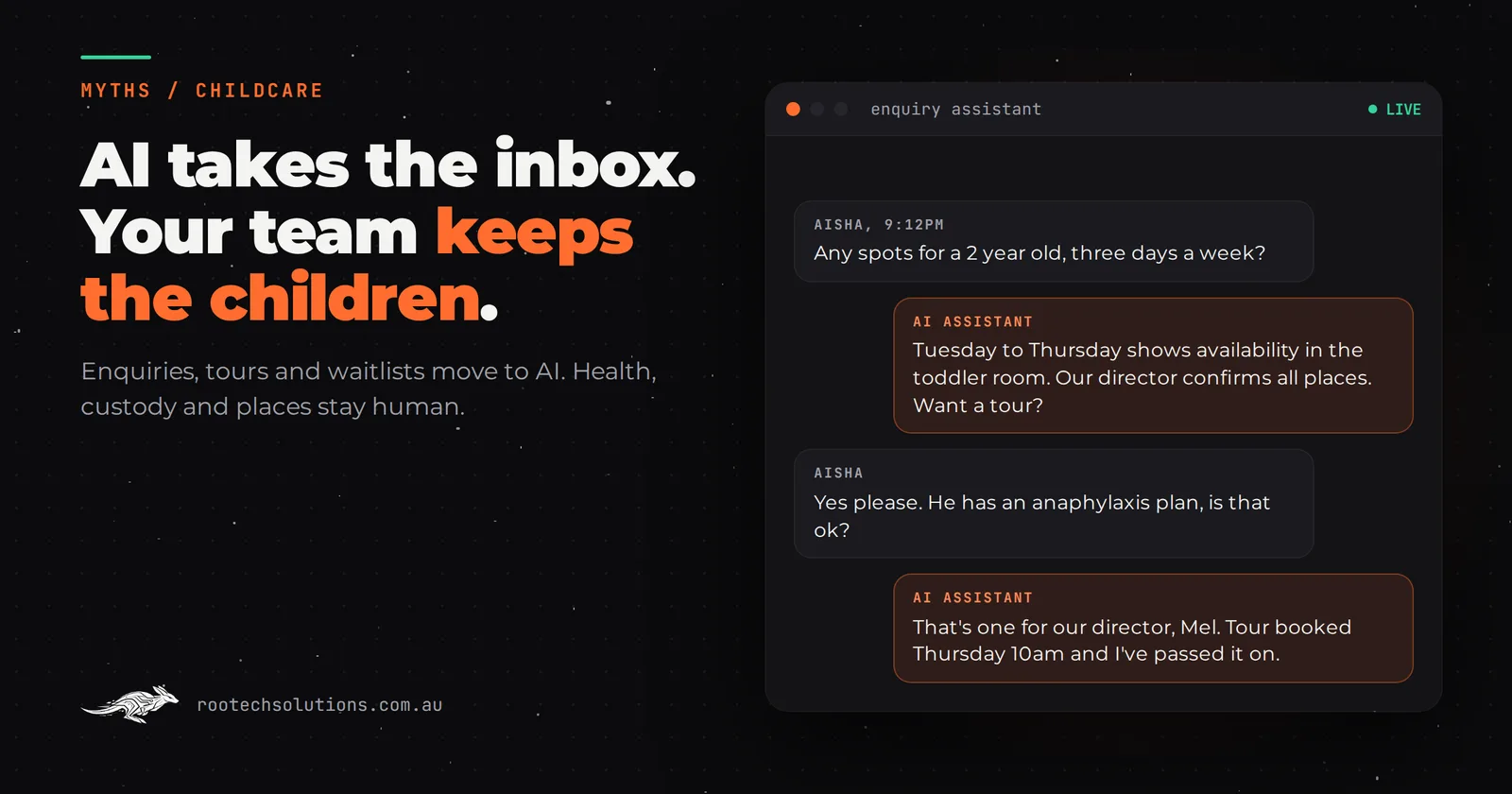
Childcare owners do not lie awake worrying that a robot will change nappies. They worry about a chatbot telling a parent the wrong gap fee, promising a place that does not exist, or going anywhere near photos of children at a time when every centre in Victoria is tightening its device rules.
Short answer: No. AI for childcare centres replaces front-desk admin, not educators or the director. A guarded assistant answers enquiries after hours, books tours, keeps the waitlist moving and chases enrolment forms. It never handles photos of children, never promises a place, never estimates a family's subsidy and never discusses a child's health or custody. Those stay with your team.
Which jobs can AI for childcare centres actually take?
Only the ones in the office, and only the repetitive ones. Your educator numbers are set by the ratios you already work to, so there is no version of AI that changes who is on the floor. What changes is how many hours your director or office manager spends on the phone and in the inbox.
The work that moves is the same every week:
- First enquiries. "Do you have a spot for a two-year-old, three days a week?" "Are you open in the school holidays?" "What are your hours?"
- Tour bookings. Back-and-forth over times, then reminders so the family actually turns up.
- Waitlist upkeep. Checking whether families on the list still want a place, and updating their preferred days.
- Enrolment paperwork. Chasing the enrolment form, immunisation history, and the authorisations you need before day one.
- Repeat parent questions. Public holiday closures, what to pack, late pick-up fees.
Most of these arrive between 6pm and 9pm, when working parents finally sit down to research care. That is exactly when nobody is in your office.
Will parents trust a chatbot with their child's enrolment?
They will trust it with the first five minutes, which is all it should have. Parents choosing care want to meet the director, walk the rooms and watch how educators speak to children. No assistant replaces that, and a good one does not try. Its job is to get the family to the tour.
Where the fear is right: parents share sensitive things early. A child's anaphylaxis plan, a custody arrangement, a developmental concern, a sentence like "his dad isn't allowed to collect him". An assistant that responds to those with a cheerful generic answer does real damage. So the rule is absolute: anything about health, additional needs, custody or family circumstances gets one reply, "That's one for our director, I've passed it on and booked you a time to talk", and goes straight to a person.
Will an AI assistant handle photos or videos of children?
No, and it must be built so it cannot. In Victoria, the Victorian Early Childhood Regulatory Authority expects services to follow the National Model Code on taking images and videos of children: only service-issued devices take images of children, and storage and retention of those images are tightly controlled.
A front-desk assistant has no reason to touch any of that. Daily updates, learning stories and room photos stay in the platform your educators already use, such as Storypark or Xplor's family app, under your existing policies. The assistant does not read, store or send images of children, and if a parent asks for photos in chat, it points them to the family app. Write that boundary into the brief before any build starts, and check it in testing.
Can AI quote fees and Child Care Subsidy to parents?
It can quote your published fees. It should not estimate a family's subsidy. A family's Child Care Subsidy depends on their income, their child's age and their hours of work, study or other recognised activity, and a wrong gap-fee figure given at 9pm becomes a dispute at enrolment.
So the assistant gives the full daily fee for the room and session, explains in one sentence that the subsidy is worked out for each family by Services Australia, and offers to book a time with your office to go through it. Parents get a clear answer. Nobody is held to a number the AI made up.
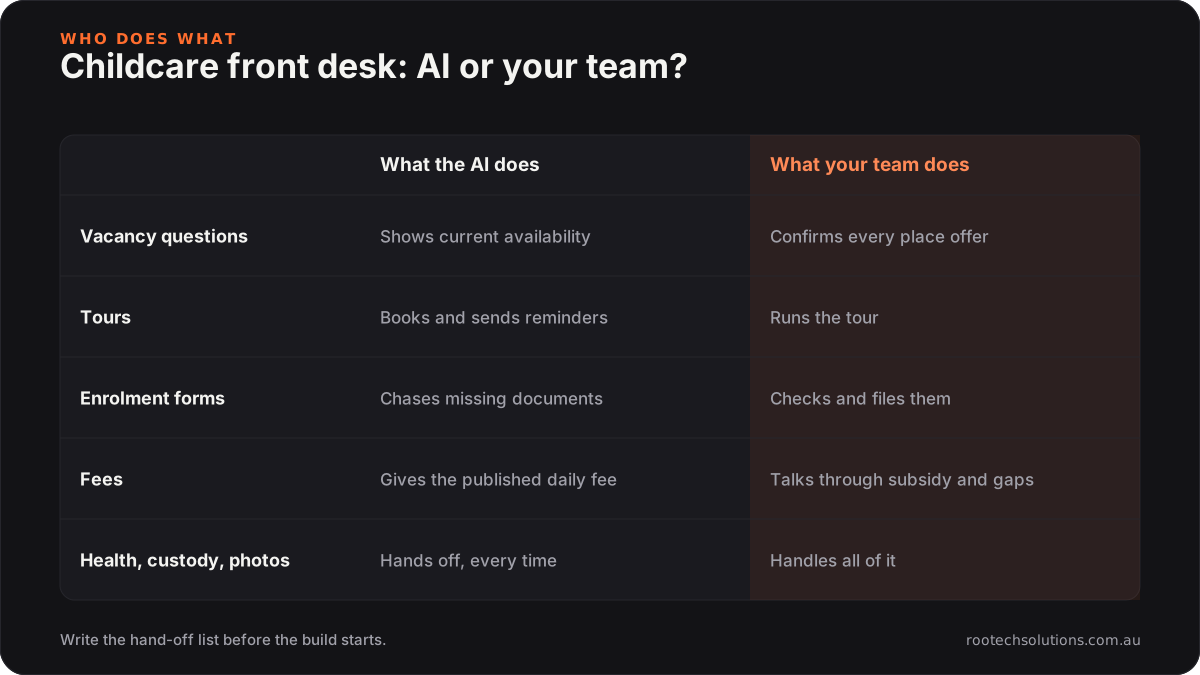
Caption: The AI owns the admin rows. Anything that needs a judgement or touches a child stays with a person.
Will AI promise places you don't have?
Not if it can only read your availability, never write an offer. The assistant can say which rooms and days currently have openings, add a family to the waitlist with their preferred days, and check in every few months to see if they still need care. The actual offer of a place, with a start date, comes from your director.
This matters more than it sounds. A family told "yes, Tuesday and Wednesday are free" by a chatbot reasonably believes they have a spot. The guardrail is wording as much as code: the assistant says "currently showing availability, our director confirms all places", every time.
Where does your team still win, every time?
In everything that builds the trust a family needs before they leave their child with you:
- The tour and orientation. The director showing a nervous parent the sleep room.
- Settling-in. Phone calls in the first fortnight when a child is struggling at drop-off.
- Difficult conversations. Behaviour, development, fees in arrears, a complaint about an educator.
- Anything regulatory. Incident reports, medication records, authorisations and compliance decisions.
The honest pitch to your staff is that the assistant takes the inbox, not their job. In a centre where the director is also the person answering the phone during rest time, that is a real change.
Does your childcare software already do this?
Partly, and you should use what you have before building anything. Childcare management systems such as Xplor, OWNA, Kidsoft and QikKids handle enrolments, attendance, CCS submissions and billing, and family apps such as Storypark handle learning updates. Several include online enrolment forms and waitlist tools. Check their current features and pricing.
Where they usually fall short is the front of the funnel: the conversation with a parent who has not enrolled yet. A custom AI integration fits in front of your existing software:
- answering after-hours enquiries on your website, Facebook and SMS in your centre's voice;
- booking tours into the director's calendar with reminders;
- writing the family's details into your waitlist or enquiry list so nobody retypes them;
- chasing missing enrolment documents with polite, timed reminders.
If your centre is full with a two-year waitlist and the phone is quiet, you may not need any of this. The cost side, including when it does not pay back, is worked through in what AI automation costs a Melbourne childcare centre.
What would the build look like for a single centre?
Most single-centre builds are live in two to four weeks. The first week is policy, not code: your fee schedule, room ages, opening hours, closure dates, and the written list of topics the assistant must hand off. Then the build connects to your calendar, your enquiry or waitlist list, and your SMS provider, and is tested against real past enquiries, including the awkward ones.
As estimates, one workflow such as enquiry replies plus tour booking typically costs $2,500 to $4,500 to build, and a fuller first build covering enquiries, tours, waitlist check-ins and document chasing typically $5,000 to $8,000. Running costs are usually hosting under $50 a month plus AI usage of $20 to $200 a month, plus SMS charges. Your office reviews every handed-off conversation, and the assistant never sends anything about a child, a place offer or money owed without a person approving it.
For a sense of how a booking system with checklists works in another setting, the multi-location booking platform we built for Kaladi Kitchens gives members live availability and a checklist at the start and end of every session. Same principle, different building. For more on why the reply speed matters, see why slow follow-up loses leads.
Frequently asked questions
Will the AI talk to parents on the phone?
It can, but most centres start with website chat and SMS, because that is where evening enquiries arrive. A phone agent can be added for after-hours calls once the written answers have been tested and the hand-off rules are working.
Where is parent information stored?
In your existing systems wherever possible, with the assistant keeping only what it needs to book a tour or add a waitlist entry. Ask any provider where conversation logs are hosted and how long they are kept, and keep that retention period short.
Can it remind families about overdue fees?
It can send a polite scheduled reminder using the wording you approve. Any conversation about hardship, payment plans or disputed amounts goes to your office, because those need care and discretion that a script should not attempt.
Is this only for large centres?
Smaller independent centres often benefit more, because they rarely have a dedicated enrolments officer. A 40-place centre where the director also answers the phone is where an after-hours assistant saves the most time.
Want a clear view of what is safe to automate?
Book a free AI workflow audit. We will look at how enquiries, tours and enrolment paperwork run through your office today, mark the jobs that must stay with your team, and show what is left to automate. The audit fee comes off your first project if you go ahead.