What AI Automation Costs a Melbourne Childcare Centre
What AI automation for childcare centres costs in Melbourne: build and running costs in AUD, payback measured in vacancy days, and when to skip it.
A childcare place is perishable. Every day a room sits one child under its licensed number is a day of fees you never get back, and in most centres that gap opens because a family on the waitlist was not offered the spot quickly enough, or an enrolment pack sat half-finished for three weeks.
That is why AI automation for childcare centres has to be costed differently from a trade or a clinic. You are not mainly buying faster replies to new enquiries. You are buying a waitlist that moves on its own and enrolment paperwork that finishes itself, so vacancies close in days instead of weeks.
Short answer: AI automation for a Melbourne childcare centre typically costs $2,500 to $4,500 for one workflow, $5,000 to $8,000 for a full first build, and $150 to $400 a month to run. It pays back in roughly four months if it fills each vacancy about two weeks sooner. A full centre with a long waitlist recovers far less, and may not need it.
Why do childcare centres need a different payback sum?
Because your revenue is occupancy, not transactions. A plumber recovers a job; a centre recovers days. The useful unit is a vacancy day: one place, empty for one day, at your daily fee.
Three things make childcare different:
- Enquiries arrive months early. Families often start looking long before the start date, so the waitlist is your sales pipeline. A pipeline nobody works goes stale: families find somewhere else and never tell you.
- Families compare centres side by side. StartingBlocks.gov.au is the free government site where families find and compare services by quality ratings, fees, vacancies and inclusions, and estimate their Child Care Subsidy. The centre that answers clearly and books the tour quickly is the one that gets visited.
- Paperwork gates the start date. A family can say yes on Monday and still not start for three weeks because the enrolment form, immunisation record and authorisations are incomplete.
What does AI automation for childcare centres cost?
Most centres start with one workflow and add the rest once it works. These figures are estimates for a centre of roughly 60 to 120 places, built at a fixed price.
- One workflow (for example enquiry replies plus tour booking): roughly $2,500 to $4,500.
- Full first build covering enquiries, tour booking, waitlist offers, enrolment document chasing, fee reminders and parent FAQs across email, SMS and web chat: roughly $5,000 to $8,000.
- Connecting to your childcare management software where it has an API: add roughly $1,500 to $3,000.
- Running costs: $150 to $400 a month for AI usage, SMS and hosting (hosting itself is usually under $50), plus light maintenance that is often included for the first few months.
How do I calculate the payback for my centre?
Add up vacancy days filled sooner and admin hours handed back, then divide the build cost by the monthly gain. Every number in the example is an assumption you should replace with your own.
| Line | Example assumption | Your number |
|---|---|---|
| Build cost | $6,000 | |
| Running cost | $275 a month | |
| Daily fee per place | $150 | |
| Vacancies a year that sit empty while you find a family | 8 | |
| Days sooner each is filled with a moving waitlist | 10 | |
| Vacancy value recovered (8 x 10 x $150) | $12,000 a year, about $1,000 a month | |
| Office hours handed back | 6 a week at $35 loaded, about $910 a month | |
| Net monthly gain ($1,000 + $910 minus $275) | $1,635 | |
| Payback ($6,000 / $1,635) | about 4 months |
Now look at the two lines that do the work. If your centre runs at capacity with a waitlist two years long, the vacancy line is close to zero and the payback rests on admin time alone: $910 less $275 is $635 a month, so about nine and a half months. That is still positive, but only if the reclaimed hours go somewhere useful, such as programming, family meetings or covering the floor. If they just disappear, the real payback is never.
If you have spare places and a steady flow of enquiries, the vacancy line dominates and the build pays back quickly. Check your own occupancy report for last year: how many days did each room sit below its number, and why?
Where does the time and money actually leak?
Between the yes and the first day. Most centres reply to enquiries reasonably well. Where they lose ground is the slow middle of the process.
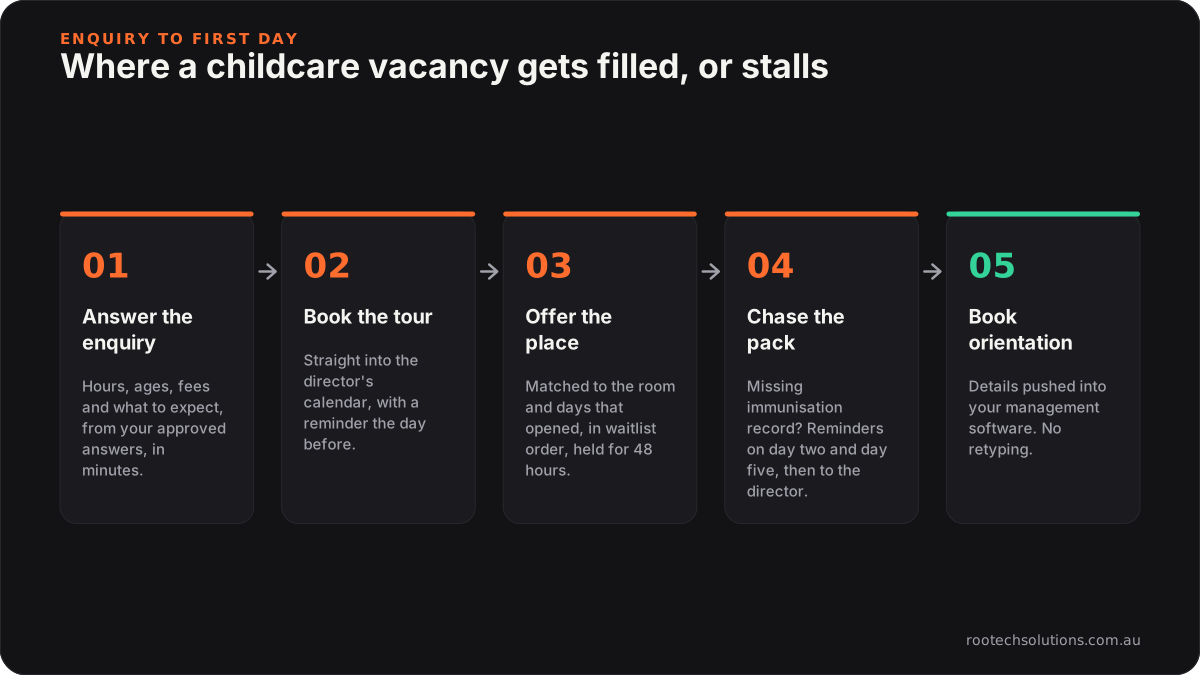
Caption: Steps three and four are where vacancy days pile up, so automate those before the chatbot.
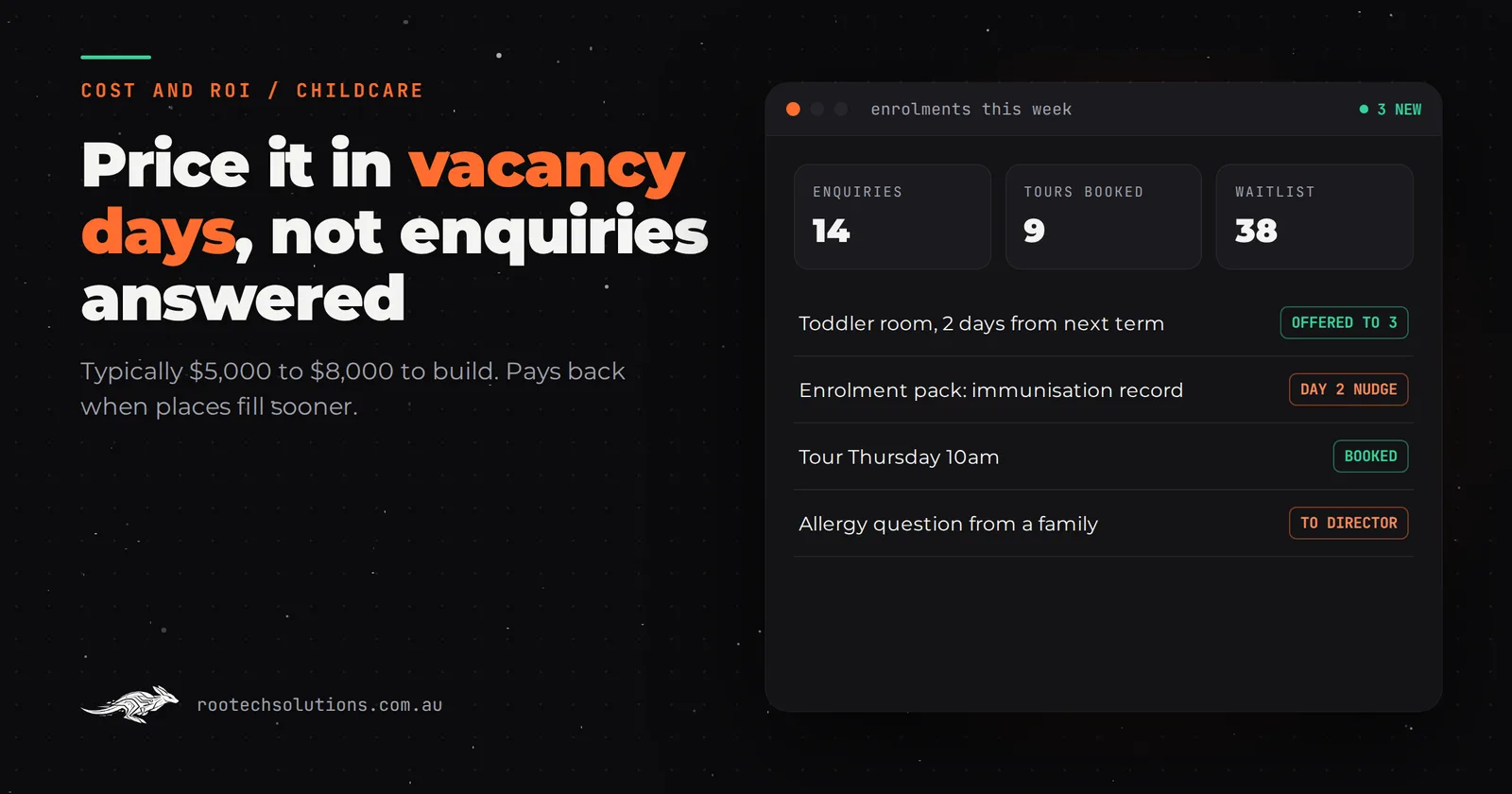
A typical Monday view for a director once this runs: 14 new enquiries over the week, 9 tours booked straight into the calendar, 38 families on the waitlist. When the toddler room has two days free from next term, the system offers them to the three families whose preferred days match, in waitlist order, and holds the place for 48 hours. An enrolment pack missing an immunisation record gets a polite reminder on day two and day five, then lands on the director's list. Nobody spends the morning ringing families who changed their plans months ago.
Is my childcare management software enough on its own?
For the core records, yes, and you should not replace it. Childcare management platforms such as Xplor, OWNA, Kidsoft and QikKids handle attendance, billing and subsidy administration, and family apps such as Storypark handle learning documentation and day-to-day communication. Some include online enrolment forms and basic waitlist tools. Check what your current plan includes before paying for anything new.
Where a custom AI integration earns its keep is the front of the funnel and the gaps between systems:
- answering the questions every family asks (hours, ages, what to bring, orientation dates, how to estimate their subsidy) at 9pm, in plain language, from your approved answers;
- matching waitlisted families to the exact days and room that opened, rather than sending a blanket email;
- reading a returned enrolment pack and flagging what is missing, instead of someone checking every page;
- pushing the finished details into your management software so nobody retypes them.
If your platform's waitlist and enrolment tools already do this well, you may only need the enquiry layer. We cover the wider version of this decision in chatbot platform vs custom AI agent.
What should never be automated in a childcare centre?
Anything about a specific child's care, safety or wellbeing stays with a person. Centres operate under the National Quality Framework, and child safety reforms that strengthen it are now in force, so the line has to be drawn deliberately rather than left to the AI.
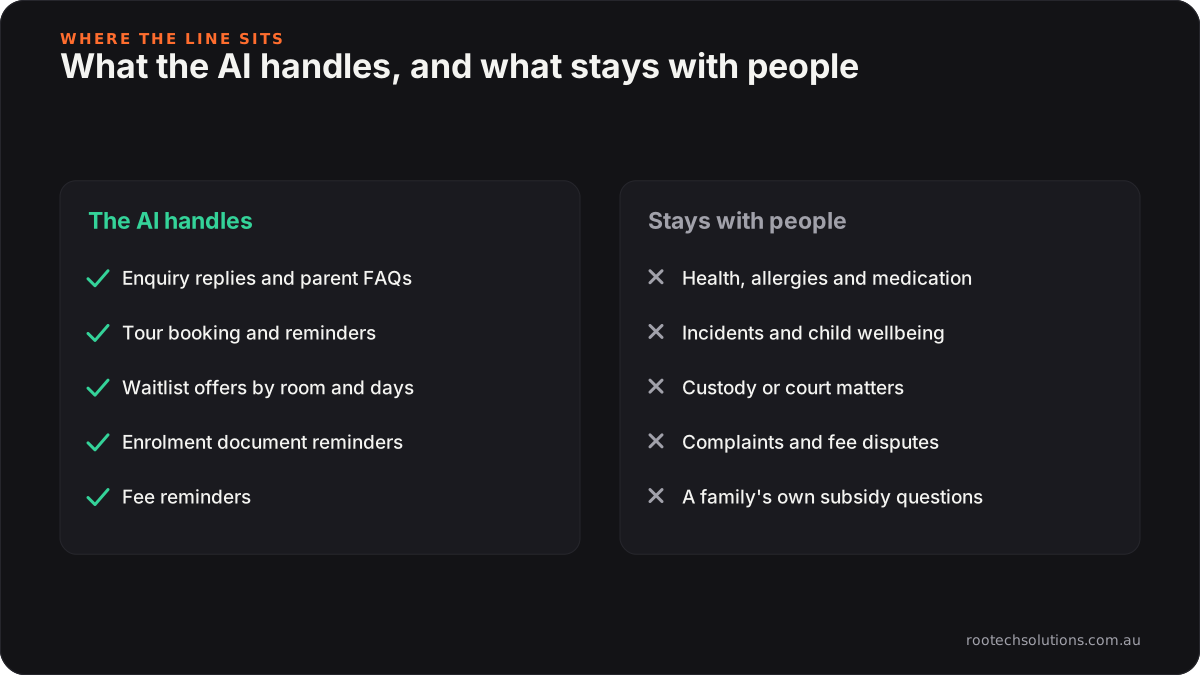
Caption: The AI does the admin around a child's place, never the conversations about the child.
In practice, the AI hands over immediately when a message mentions allergies, medication, an incident, a custody or court matter, a complaint, or a family's individual subsidy situation. It also only sees what it needs for admin. Enrolment forms carry health and family details, so ask any provider where the data is stored, who can see it, and how long it is kept. We expect those questions; we answer them before the build starts. For the worries directors raise most often, see AI myths for Melbourne childcare centres.
What does the build look like?
A first build usually takes three to four weeks at a fixed price, slightly longer than a trades build because the enrolment pack and privacy review take care.
- Week one: map your enquiry, tour, waitlist and enrolment steps; write the approved answers; agree the hand-over list with the director.
- Weeks two and three: build the enquiry and tour booking, the waitlist matching and the document chasing; connect them to your calendar and, where possible, your management software.
- Week four: test with real past enquiries and a handful of live families, then switch on.
Your director approves every waitlist offer rule and every template before it goes out, and can pause any automation from one screen.
When is it not worth it?
Skip it, or start very small, if:
- you receive only a few enquiries a month and your office has spare capacity;
- your centre is full for years and the waitlist is managed well already, so the vacancy line in the sum is zero;
- your point of difference is that the director personally answers every enquiry. In that case use automation only for document chasing and after-hours replies, not as the front door.
Frequently asked questions
Can an AI tell families what their Child Care Subsidy will be?
It should not calculate an individual family's subsidy. The safer pattern is to explain your fees clearly, point families to the official estimator on StartingBlocks.gov.au, and hand any detailed question about their own entitlement to the director.
Will families mind getting a reply from an AI?
Most care far more about a quick, accurate answer and an easy tour booking. Tell them up front that the first reply is automated and that a person follows up, and keep anything personal or sensitive with your team.
Does this replace our childcare management software?
No. Attendance, billing and subsidy administration stay in the platform you already use. The automation sits in front of it, handling enquiries, tours, waitlist offers and paperwork, and passes clean details into it.
How long before we see a result?
Enquiry replies and tour bookings change in the first week after launch. Vacancy days take longer to show, because you only see them when places open, so compare one full term before and after rather than judging it in the first month.
Find out what an empty place is costing you
We build enquiry, waitlist and enrolment automation for centres across Melbourne, and remotely across Australia, at a fixed price agreed before we start. Book a free AI workflow audit and we will go through your occupancy, your waitlist and your enrolment steps with you, and tell you plainly whether the payback stacks up. The audit fee comes off your first project.