What AI Automation Costs a Melbourne Bookkeeper
AI automation cost for a Melbourne bookkeeper: build and running costs in AUD, and why saved hours pay back differently on fixed fees and hourly billing.
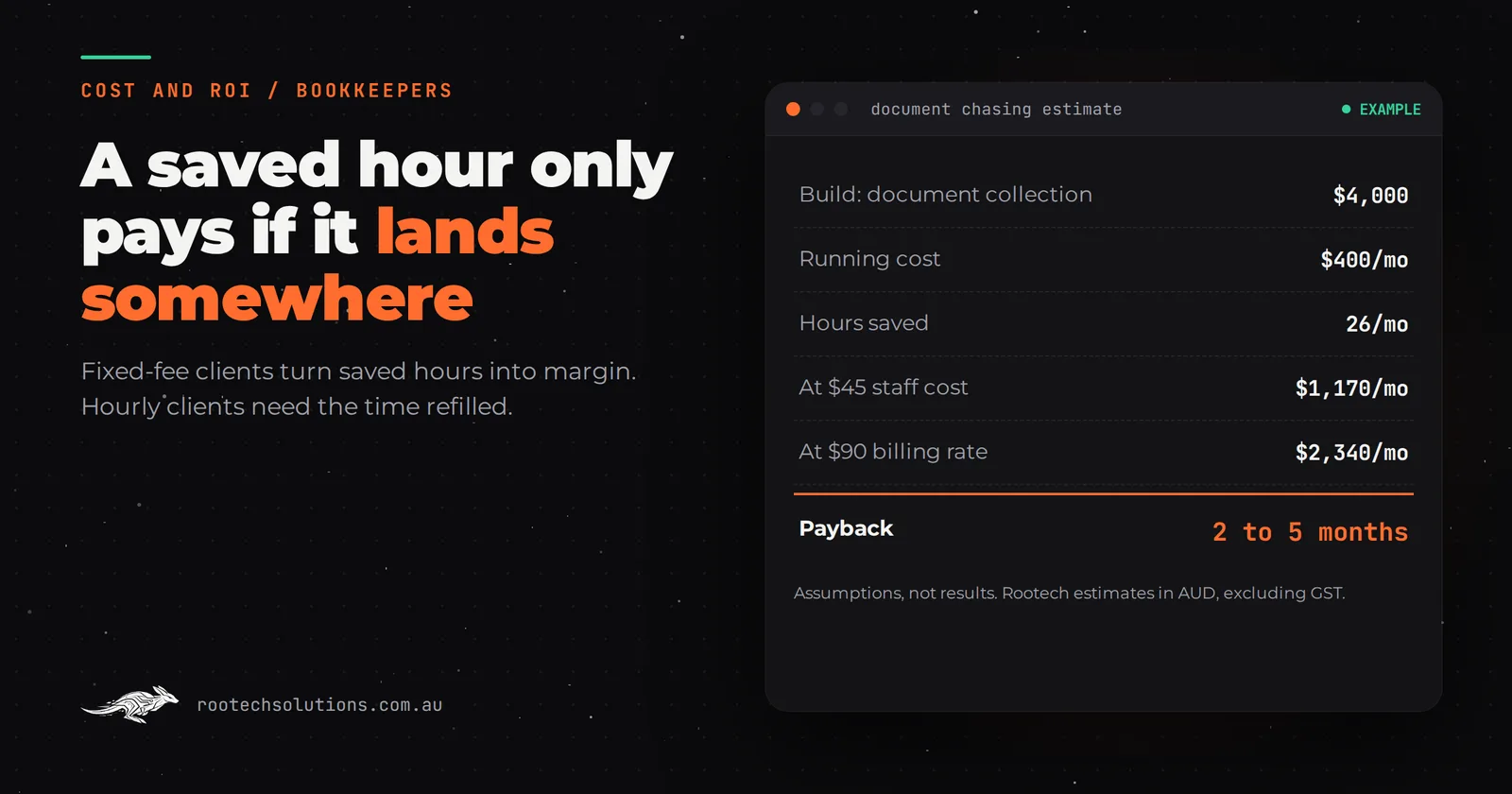
It is three weeks before the BAS deadline and the same four clients still have not sent their receipts. Someone on your team is coding bank feed lines that look identical to last quarter's. Before you pay for AI to take that on, you want the real AI automation cost for a Melbourne bookkeeper, and an honest way to tell whether the hours it saves turn into money.
Short answer: AI automation for a small Melbourne bookkeeping firm typically costs $2,500 to $6,000 to build one workflow, such as client document chasing, and $300 to $800 a month to run. Payback is usually two to five months. It is faster on fixed-fee clients, where saved hours become margin, than on hourly clients, where they only pay if you refill the time.
Why is a bookkeeper's payback different from other businesses?
A bookkeeper does not lose bookings or miss calls. You lose hours, and an hour saved is only worth money if it lands somewhere useful. That makes the payback maths unusual.
Most small-business AI is sold on recovered revenue: the job that would have gone to a competitor. A bookkeeping firm rarely loses a client because of a slow reply. The cost is internal, in staff time spent chasing documents, coding repetitive transactions and answering "what do you need from me this quarter?" by email. So the return is measured in hours, and how you value those hours decides the answer.
On fixed-fee clients, every hour saved is margin. The fee does not change, the work takes less time, and the difference is profit. On hourly clients, an hour saved is an hour you can no longer bill, so it only pays if you fill it with new client work or with work you were turning away. Many firms have both, and the honest payback sits between the two.
The other difference is timing. Bookkeeping work bunches up around BAS quarters and the end of the financial year. An automation that saves six hours in a quiet week is pleasant. One that saves six hours in the fortnight before lodgement is what stops you working weekends.
What does AI automation cost a bookkeeping firm?
One workflow typically costs $2,500 to $6,000 to build, and all three connected costs $8,000 to $15,000. Running costs are $300 to $800 a month. These are Rootech estimates in AUD, excluding GST, for a firm with roughly 30 to 150 clients.
| Workflow | What it does | Build (estimate) |
|---|---|---|
| Client document collection | Sends reminders by email and SMS on your schedule, accepts photos and PDFs, reads them, files them and flags what is still missing | $2,500 to $5,000 |
| Transaction categorisation | Learns each client's past coding and pre-codes bank feed lines with a confidence score for a person to approve | $3,500 to $6,000 |
| Client question assistant | Answers routine questions from your approved answers ("what do you need this quarter?"), hands anything advisory to a person | $2,500 to $4,500 |
| All three, connected | $8,000 to $15,000 |
The main driver is how many systems the automation touches. A firm on Xero with a cloud practice manager is cheaper to connect than one running older desktop software or a web of spreadsheets.
How do I work out whether the saved hours pay?
Count the hours the workflow saves each month, value them at the right rate, subtract running costs, and divide the build by the result. The right rate is the key decision. Here is a worked example for document collection, with every assumption laid out for you to swap.
| Assumption | Example | Yours |
|---|---|---|
| Build cost | $4,000 | |
| Running cost | $400 a month | |
| Hours a week spent chasing and filing client documents now | 8 | |
| Hours a week the automation saves | 6, about 26 a month | |
| Value of an hour on fixed-fee work (staff cost, loaded) | $45 | |
| Value of an hour you can refill with billable work | $90 |
Fixed-fee view: 26 hours x $45 = $1,170 a month. Minus $400 running costs leaves $770. Payback: $4,000 / $770 = about five months.
Refilled-hours view: 26 hours x $90 = $2,340 a month. Minus $400 leaves $1,940. Payback: $4,000 / $1,940 = about two months.
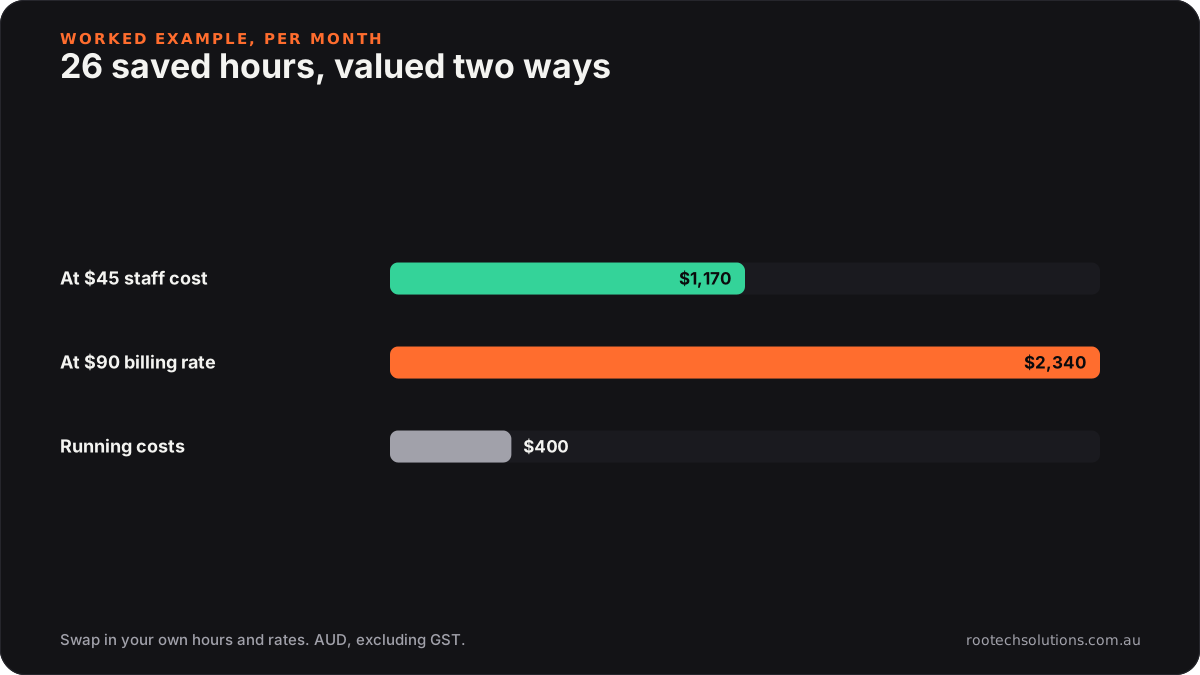
Caption: The same 26 hours are worth twice as much if you have billable work waiting to fill them.
To find your starting number, ask each team member to tag their time for two weeks around a BAS quarter: chasing, coding, client emails. Most firms are surprised by the chasing figure. If your total is two or three hours a week, the build will take years to pay back and you should not do it yet.
Do Dext, Hubdoc and Xero's own rules already cover this?
Often they cover a lot, and you should squeeze them first. Xero and MYOB have bank rules, and receipt capture tools such as Dext and Hubdoc read receipts and push them into the ledger. Practice managers such as Karbon, FYI and Xero Practice Manager run job lists and some client reminders. If your team uses them well, a custom build has less to add. Check each product's current features and pricing before you decide.
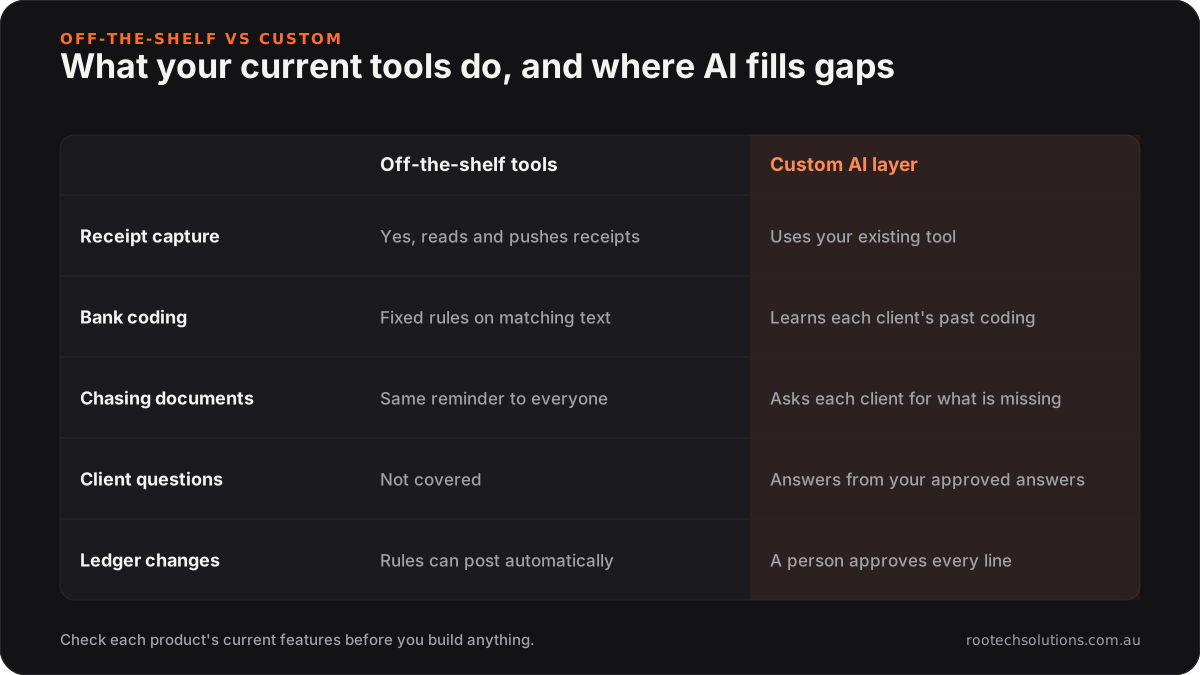
Caption: Use the tools you already pay for; build only for the gaps between them.
Custom AI earns its keep in the gaps:
- Chasing that knows each client. Off-the-shelf reminders go to everyone on a date. A custom workflow knows that one client always sends a bank statement but forgets the fuel receipts, and asks for exactly what is missing.
- Coding that learns per client. Bank rules match fixed text. A model trained on each client's past coding handles the variations rules miss, and shows a person its confidence so low-certainty lines get a closer look.
- Answers in your words. A client question assistant answers from your own approved answers, in your tone, and hands off anything that sounds like advice.
We go deeper on the coding and re-keying side in how bookkeepers stop re-keying invoices into Xero, and the accountant's version of document chasing is in stop chasing clients for tax documents.
What does the build look like?
Most single workflows ship in two to four weeks at a fixed price. Week one maps how documents and questions move today: who sends what, in which format, and where it ends up. The middle weeks build the workflow and connect it to Xero or MYOB, your practice manager and your email and SMS. The last week runs it in parallel with your team on real client files before anything goes to a client.
Running costs are hosting (usually under $50 a month), AI usage (typically $20 to $200 a month with document volume), SMS and any connector fees. A person approves everything that touches the ledger. The AI pre-codes; a bookkeeper approves. The AI drafts the reminder; it only goes out on rules your team set. Anything that sounds like tax advice ("can I claim my car?") goes to a qualified person, because that call is yours, not software's.
When is it not worth it for a bookkeeper?
Hold off if you have fewer than about 20 clients and their documents already arrive on time, because a $4,000 build saving two hours a week takes years to recover. Hold off, too, if most clients still hand over a shoebox of paper: that is a client-onboarding change, and software on your side will not fix it. And if you cannot describe in a sentence how a receipt gets from a client to the ledger, map that process first. Automating a messy process just makes the mess faster.
Frequently asked questions
Is AI bookkeeping automation accurate enough to trust?
It is accurate enough to draft, not to decide. Pre-coding with a confidence score lets a bookkeeper approve the easy lines quickly and spend their attention on the uncertain ones. Nothing should post to the ledger without a person's approval.
Will clients use an automated document request?
Most will, if replying is easier than the current process. A text that says exactly what is missing, with a link to upload a photo, gets better responses than a generic monthly email. Clients who never engage digitally will still need a phone call.
Where is client data stored?
In the systems you already use, such as Xero, MYOB and your practice manager, wherever possible. The automation should pass documents through rather than keep its own copy. Ask any provider where data sits, who can access it, and how it is deleted.
Should I automate document chasing or coding first?
Start with whichever eats more hours in your time tagging. For most small firms that is document chasing, because it is pure waiting and nagging. Coding automation pays better for firms with large transaction volumes across similar clients.
Want to know what your hours are worth?
Book a free AI workflow audit. We look at where your team's time goes around a BAS quarter, name the one workflow with the fastest payback, and give you a fixed price before any work starts. The audit fee comes off your first project if you go ahead.