What Melbourne Cafés Should Automate First with AI
AI automation for cafes, in order: catering order intake first, supplier invoice checks second, phone checklists third. What to leave to your POS.
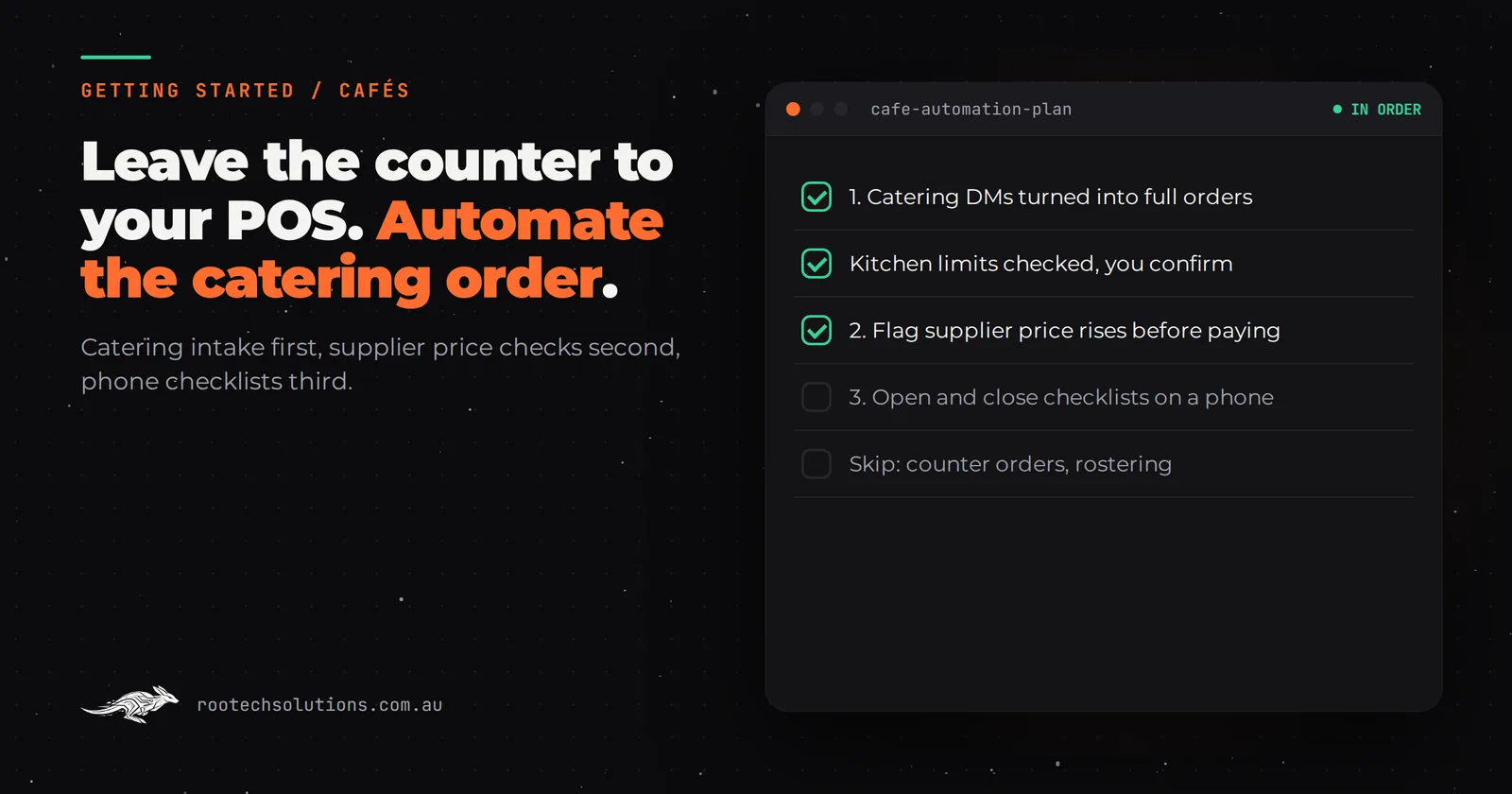
A café's day is decided at the counter, and that is the one place AI has least to add. Your POS already takes the orders and the payments. The money that slips away is somewhere else: the 30-person catering order sitting unanswered in Instagram DMs while you pull shots, and the supplier who quietly put the price of milk up three invoices ago.
Short answer: The first AI automation for most cafés is catering order intake: an agent that turns a DM, email or form into a complete order with items, quantities, pickup time and dietaries, checked against your kitchen's limits, for you to confirm. Second is checking supplier invoices for price changes. Third is opening and closing checklists on a phone. Leave the counter to your POS.
Why shouldn't a café start with the counter?
Because the counter is already solved. Point-of-sale systems such as Square, Lightspeed and Abacus take orders and payments, and many connect to online ordering, loyalty and your accounting software. An AI layer there adds little for a single café, and anything that slows the morning queue costs more than it saves. We go through when AI ordering does make sense in AI ordering vs delivery apps for Melbourne restaurants.
The work that is not solved happens away from the counter, usually by the owner, usually at night:
- catering and group orders that arrive by DM, email and phone, half-complete, while you are flat out;
- supplier invoices that get paid without anyone checking the price against last week;
- the opening and closing routine that lives on a laminated sheet nobody signs.
That is where your first automations belong.
What should a café automate first, second and third?
Catering intake first, supplier invoice checks second, phone checklists third. The first wins revenue, the second protects margin, and the third saves the owner from checking everything personally.
- Catering order intake. A catering enquiry is a small order form hiding inside a conversation: which items, how many, what time, pickup or delivery, dietaries, and who is paying. An agent replies within a minute, asks for whatever is missing, checks it against your rules (for example, a cap on platters before 9am, or 24 hours' notice for orders over a certain size), and sends you a complete order to confirm, with a deposit link if you take one. You stay on the machine; the order still gets taken properly.
- Supplier invoice checks. Capturing the bill is the easy part: Xero's Hubdoc is included in Xero's Starter, Standard and Premium plans in Australia and pulls supplier names, amounts and due dates from bills you email or photograph. Use it before building anything. What capture alone does not give you is a check. A small automation compares each invoice's line prices with the last few, and flags the milk, beans or eggs that went up so you can ring the supplier before you pay.
- Opening and closing checklists on a phone. The cleaning, fridge temperature and close-down checks you already do, moved from paper to a phone, with a photo where it matters and a time stamp on every tick. The owner sees at a glance whether last night's close was done, without being there.
What to skip for now:
- AI at the counter or a voice ordering bot. Your POS does this.
- Rostering. Rostering apps such as Deputy already exist, and rostering is tied to your team's lives in ways a first automation should not touch.
- AI-written social posts. Your feed is your voice. Draft help is fine; automation is not where your money is leaking.
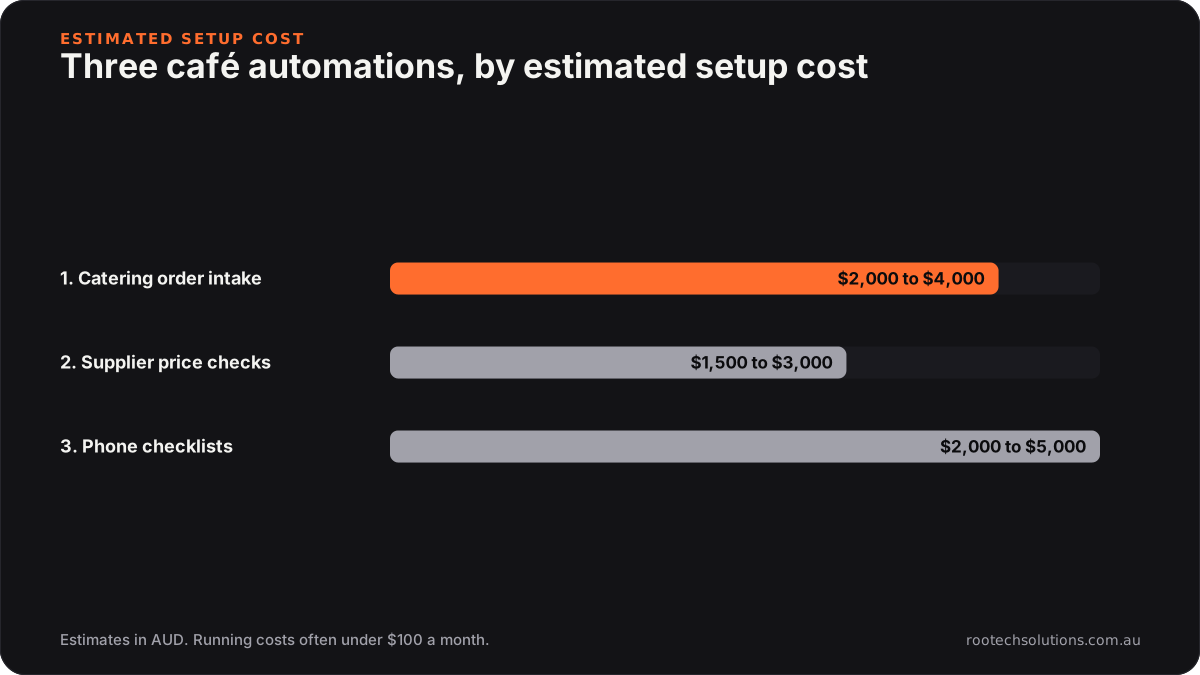
Caption: The first automation is the one that brings in revenue, and it is not the most expensive of the three.
How do I find my own first automation this week?
Keep two lists for seven days. It costs nothing and it tells you whether to start with catering, invoices, or neither.
- The catering list. Every catering or group enquiry: the channel (Instagram, Google, phone, email, someone at the counter), the time it arrived, how long until you replied, and whether it became an order.
- The invoice list. Take last month's supplier invoices and write down the price of your five biggest items (milk, coffee beans, eggs, bread, whatever yours are) on each one. Did any go up without anyone noticing?
If several catering enquiries waited hours and some went elsewhere, start with catering intake. If you found price rises nobody caught, start with invoice checks; the bookkeeper's guide to stopping invoice rekeying in Xero covers the capture side. If neither list turned anything up, you may not need an automation yet, and that is a fine answer.
Where does custom software beat the apps a café already uses?
Custom earns its keep when the job is specific to your café and sits between the apps you already have. If one app already does the job, use it.
| Job | Off-the-shelf is enough when... | Custom or an AI integration earns its keep when... |
|---|---|---|
| Catering orders | Orders come through one online ordering page that already captures everything | Orders arrive by DM, email and phone, and need your kitchen rules applied |
| Supplier bills | You only need bills captured into Xero | You want price changes against previous invoices flagged before you pay |
| Opening and closing checks | A shared checklist app covers it | You want photos, time stamps and an owner view across sites or shifts |
| Counter orders and payments | Always: your POS does this | Rarely, for a single café |
| Rostering | Always: rostering apps do this | Rarely |
The checklist idea is not hypothetical. For Kaladi Kitchens, a commercial kitchen collective with several locations, we built session start and finish checklists that members complete on their phones, with photo capture wired in, so the state of the kitchen is recorded at both ends of every booking. The same pattern fits a café close-down: the checklist proves the job was done, rather than trusting that it was.
What does the build look like, and what does it cost?
A catering intake agent is typically a two to three week build at a fixed price. It connects to Instagram and Facebook messages, your email and website form, and hands complete orders to you by text or email. It does not touch your POS.
What gets built:
- an intake agent that knows your catering menu, quantities and prices;
- your rules: lead times, daily caps, delivery area, deposit;
- a confirmation step where you approve every order before the customer is told it is booked;
- a simple order list for the kitchen, in the format you already use.
What it costs, as estimates: catering order intake typically costs $2,000 to $4,000 to set up, depending on how many channels it covers. A supplier invoice price check is usually smaller, around $1,500 to $3,000, because Hubdoc does the capture. Phone opening and closing checklists with photos land around $2,000 to $5,000, depending on how many sites and checklists. Running costs are modest, often under $100 a month for hosting and AI usage.
As a rule of thumb, a single corporate catering order can be worth hundreds of dollars, so catching one or two a month that would otherwise have gone to the café down the road covers the running costs many times over.
Where a human stays in the loop: you confirm every catering order, you decide what to do about a price rise, and you or your manager review any checklist item that was missed.
Frequently asked questions
Will regulars feel like they are talking to a bot?
Regulars talk to you at the counter, and nothing here changes that. The agent handles catering and group enquiries, says it is the café's assistant, and hands anything personal or unusual to you. Most catering customers care more about a fast, clear answer than who typed it.
Can the AI take payment for catering orders?
It can send a deposit or payment link through the payment provider you already use, once you have confirmed the order. It should not charge anyone for an order you have not approved.
What if a catering order clashes with a busy morning?
That is what your rules are for. Set caps by time of day and minimum notice, and the agent offers a different pickup time or flags the order for you instead of accepting something the kitchen cannot make.
Is this worth it for a small café with one site?
Catering intake can be, if catering is a real part of your revenue. The checklists matter more once you have managers closing without you or more than one site. If you get a handful of catering enquiries a month, a saved reply template on your phone may be all you need for now.
Not sure where your café is leaking money?
We run a free AI workflow audit: we look at your catering enquiries, your supplier invoices and the apps you already pay for, and tell you plainly which, if any, is worth automating first. Book a free AI workflow audit. The audit fee comes off your first project if you go ahead.