AI Automation for Builders: Stop Losing Renovation Leads
Builders lose renovation leads to slow replies and slow estimates. AI automation for builders qualifies enquiries on site days and drafts takeoffs.
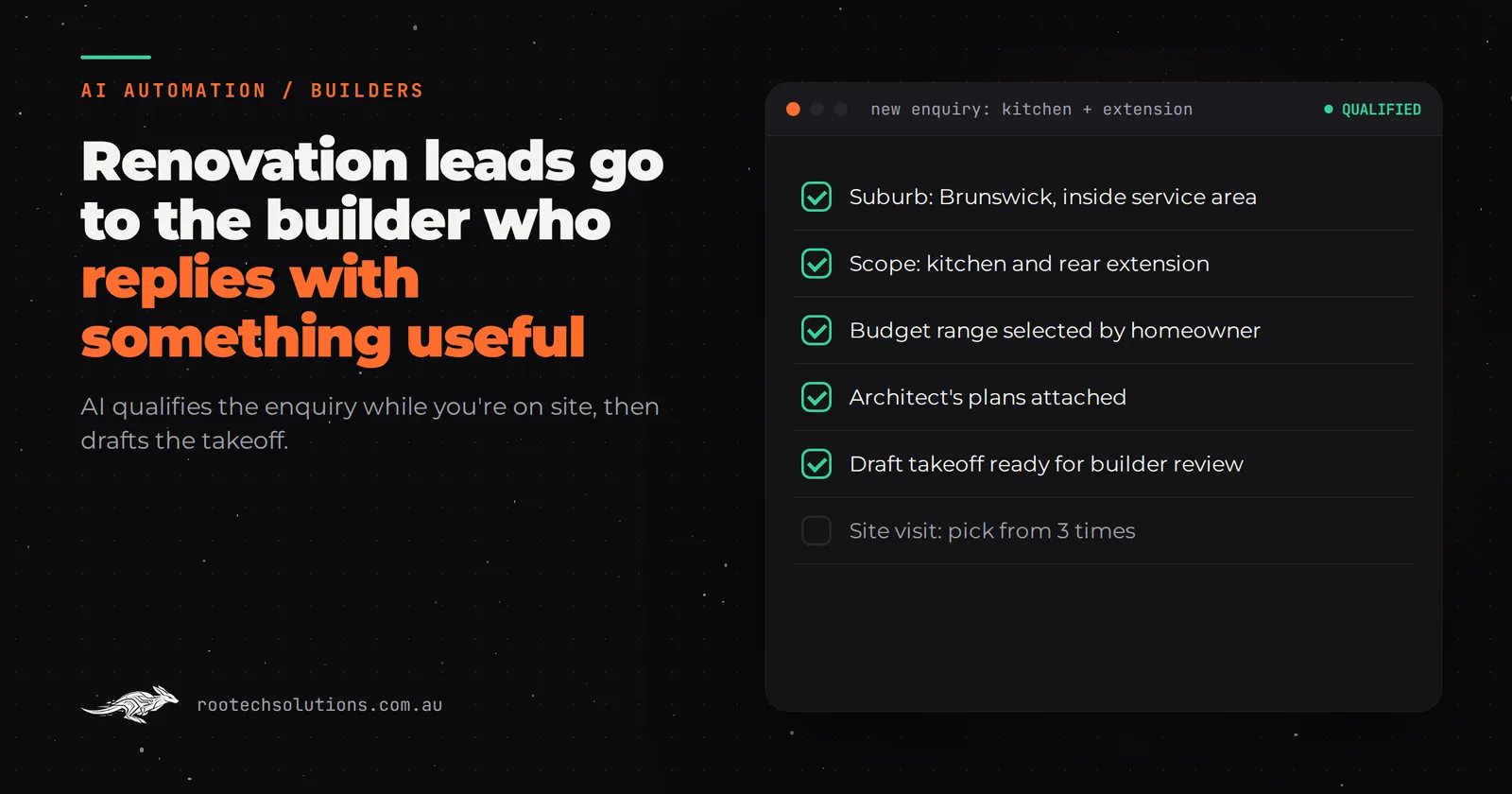
You're halfway through a bathroom in Fitzroy when a homeowner in Brunswick sends an enquiry about a kitchen and rear extension. You call back at six, tired, and she's already booked a site visit with someone else. AI automation for builders won't swing a hammer, but it can make sure the first useful reply, and often the first rough number, comes from you.
Short answer: Renovation builders lose leads at two points: the first reply, which waits until you're off the tools, and the estimate, which waits until you've measured. AI automation fixes both. It answers and qualifies every enquiry within minutes (scope, suburb, budget, plans, timing), books site visits for the right jobs, and can draft a takeoff from plans for you to check. You still quote, contract and build.
Where do renovation leads actually leak?
At the first reply and at the estimate. Most small builders and renovation contractors run the same workflow: an enquiry arrives through the website, Instagram or a quoting platform, sits until the evening, gets a "can I come and have a look?" reply the next morning, and then waits again for a site visit, measurements and a quote that takes a week to put together.
Each of those gaps is a chance for the homeowner to go elsewhere, because a homeowner planning a renovation usually contacts more than one builder. The one who responds with something useful, not just "I'll get back to you", tends to get the site visit.
There's a second, less obvious leak: the wrong jobs. A builder who drives to every enquiry spends hours a week on site visits for a $15,000 job from someone with a $5,000 budget, or for an extension in a suburb they don't service. Every one of those hours is time not spent on a job that would have converted.
What should an AI intake ask a renovation enquiry?
The same five or six things you'd ask on the phone, captured in writing before you've even seen the enquiry. Renovation enquiries are vague by nature ("thinking about doing the kitchen, maybe the back of the house"), so the job of the intake is to turn vague into scoped.
- What's the project? Kitchen, bathroom, extension, second storey, whole-house. Rooms involved.
- Where is it? Suburb, so it can check your service area automatically.
- What's the budget range? Asked politely, with ranges to tap rather than a blank box. This alone filters out a lot of mismatched jobs.
- Are there plans or photos? Architect's drawings, a sketch, or photos of the space. Attachments go straight to the summary.
- When do they want to start? And whether a permit or drawings are already underway.
- How do they want to be contacted? So you call the people who want a call.
The AI asks these in a short, friendly conversation by text or web chat, not a 20-field form. Answers land in your inbox or job management app as a one-screen summary, and for jobs that fit (right suburb, right scope, realistic budget), it offers the homeowner two or three site visit times from your calendar. Jobs that don't fit get a polite, honest reply, so nobody is left hanging and your evening isn't spent writing rejections.
Can AI do the takeoff from plans?
Yes, with a builder checking the result. Measuring plans by hand is the slowest part of pricing a renovation, and it costs the same hours whether the job converts or not. An AI estimator can read the plans, pull out the rooms, areas and quantities, and turn them into a draft costed estimate for you to review.
That's exactly what we built for Logic Building Co: an agentic AI estimator that reads construction plans, extracts the rooms, areas and quantities a takeoff needs, checks the extracted measurements against each other so a misread wall doesn't silently become a wrong quote, and produces a costed estimate ready for a human to review and send. Every prospective job gets a measured takeoff and a draft estimate before anyone picks up a scale ruler.
For a renovation builder, the practical effect is that an enquiry with plans attached can have a draft number waiting for you before the site visit. You walk in knowing roughly what the job is worth, and you can tell the homeowner early if their budget and their plans don't match.
Should builders use off-the-shelf software or custom AI?
Use both, for different jobs. Builders already have good software for running jobs: Buildxact for estimating and quoting, Tradify, Fergus, simPRO or ServiceM8 for job management on the trade side, and Xero or MYOB for the books. Keep them. They're mature and your team knows them.
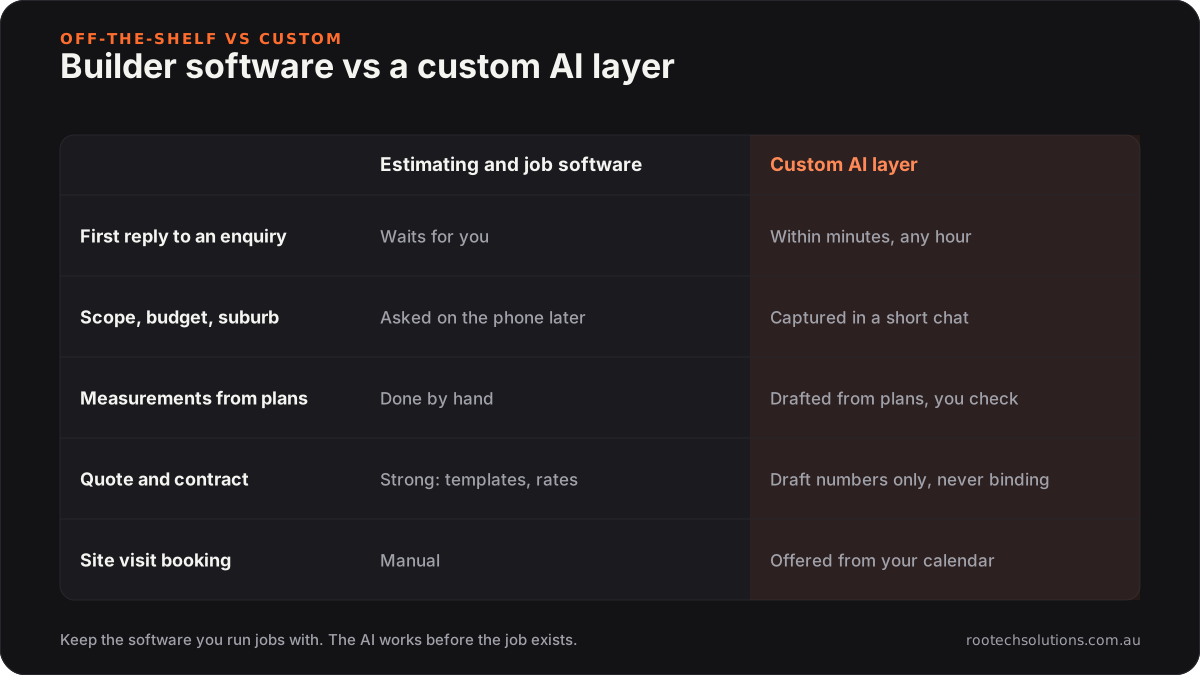
Caption: Off-the-shelf software runs the job once it exists. The AI layer works on the part before that.
Off-the-shelf is the right call for estimating templates, quoting, scheduling, variations and invoicing. If your problem is that quotes look messy or jobs are hard to track, buy the software and check its current pricing.
A custom AI integration earns its keep before the job exists: answering and qualifying enquiries while you're on site, reading plans to draft quantities, and pushing a clean lead and a draft takeoff into the tools you already use. Those steps depend on your service area, your rates and your kind of work, which is why generic tools leave them to you. We compare the two approaches in more depth in Buildxact or AI automation for builders.
What does the AI never do?
It never quotes a binding price, signs anything or promises a start date. In Victoria, domestic building work worth more than $10,000 needs a written major domestic building contract from a builder registered with the Building and Plumbing Commission, and domestic building insurance is required for work worth more than $16,000, as Consumer Affairs Victoria sets out. That's your job and your registration, not a chatbot's.
So the guardrails are simple. Any number the AI shares is labelled as an indicative range, subject to a site visit. Draft takeoffs go to you, not to the homeowner. Anything about defects, disputes, insurance or variations goes straight to a person. And the AI says it's an AI.
What does AI automation for builders cost?
An AI enquiry intake and site-visit booking system for a small building business is typically a fixed-price build of $4,000 to $8,000, live in two to three weeks. A plan-reading takeoff estimator is a larger project, scoped separately after we've seen your plans and your cost data, because its accuracy depends on both. All of these are estimates, not quotes.
Running costs are usually hosting under $50 a month plus AI usage of $20 to $200 a month, depending on enquiry volume and how many plan sets go through the estimator.
What the build covers:
- Enquiry channels: website form, Instagram and Facebook messages, and a missed-call text-back for the phone, all feeding one place.
- The qualifying conversation: your questions, your service area, your budget bands, in a tone that sounds like you.
- Calendar and job management: site visits booked into your calendar, and qualified leads created in your job management or estimating software where it has an API.
- Testing on real enquiries: we run your last few months of enquiries through it before a homeowner ever sees it.
If you're also deciding what to automate first across the business, our guide for Melbourne builders works through the options in order.
Frequently asked questions
Will homeowners be put off by an AI replying to their renovation enquiry?
Most are more put off by silence. A quick, useful reply that asks sensible questions and books a time reads as organised. The AI should say it's an assistant working for you, and anyone who asks for a call should get one.
How accurate is an AI takeoff from plans?
Accurate enough to be a strong first draft, which is how it should be used. A good estimator cross-checks its own measurements and flags anything that doesn't add up, and a builder reviews every takeoff before a number reaches a client. Poor-quality scans or hand sketches lower the accuracy, and the system should say so rather than guess.
Does this work if most of my enquiries come through quoting platforms?
Partly. Enquiries from quoting platforms can usually be forwarded into the same intake, so the AI replies and qualifies them quickly, which matters on platforms where several builders see the same job. Check each platform's terms on how you contact leads.
Is this worth it for a one-person building business?
Often more so. A solo builder is the receptionist, estimator and site supervisor at once, so every enquiry answered and every takeoff drafted without them is time back on the tools or at home. If you get only a couple of enquiries a month, it's probably not worth building yet.
Find out where your leads are going
We're a Melbourne studio that builds custom software and AI integrations for businesses like yours, including the estimator for Logic Building Co. Book a free AI workflow audit and we'll trace how your enquiries come in, where they stall, and whether intake, takeoff or both would pay for themselves. The audit fee comes off your first project if you go ahead.