What Melbourne Builders Should Automate First with AI
AI automation for builders, in order: qualify enquiries before the site visit, then AI takeoffs from plans for a draft estimate. What to keep human.
A builder's most expensive admin is not paperwork. It is the half day spent driving to a site visit for a renovation that was never going to go ahead, and the evening spent measuring plans for a quote that loses to a cheaper number. Both happen before a single dollar is earned, and both are where AI automation for builders pays off first.
Short answer: Most builders should automate enquiry qualification first: an AI agent that replies straight away and asks scope, budget, plans and timing, so you only drive to site visits worth doing. Second, use AI takeoffs to turn plans into measured quantities and a draft estimate your estimator checks. Contracts, variations, permits and final prices stay with a person.
Why is a builder's first automation different from a tradie's?
Because a builder's jobs are bigger, slower and more expensive to quote. A plumber loses a job to a slow reply in an hour. A builder loses money on the jobs they do reply to: the site visit, the takeoff and the estimate for work that does not convert.
So the first automation is less about speed for its own sake and more about spending quoting time on the right jobs. Speed still matters, because the homeowner messaging four builders books the visit with whoever replies with real questions first. But the bigger win is filtering before you get in the ute.
What should a builder automate first, second and third?
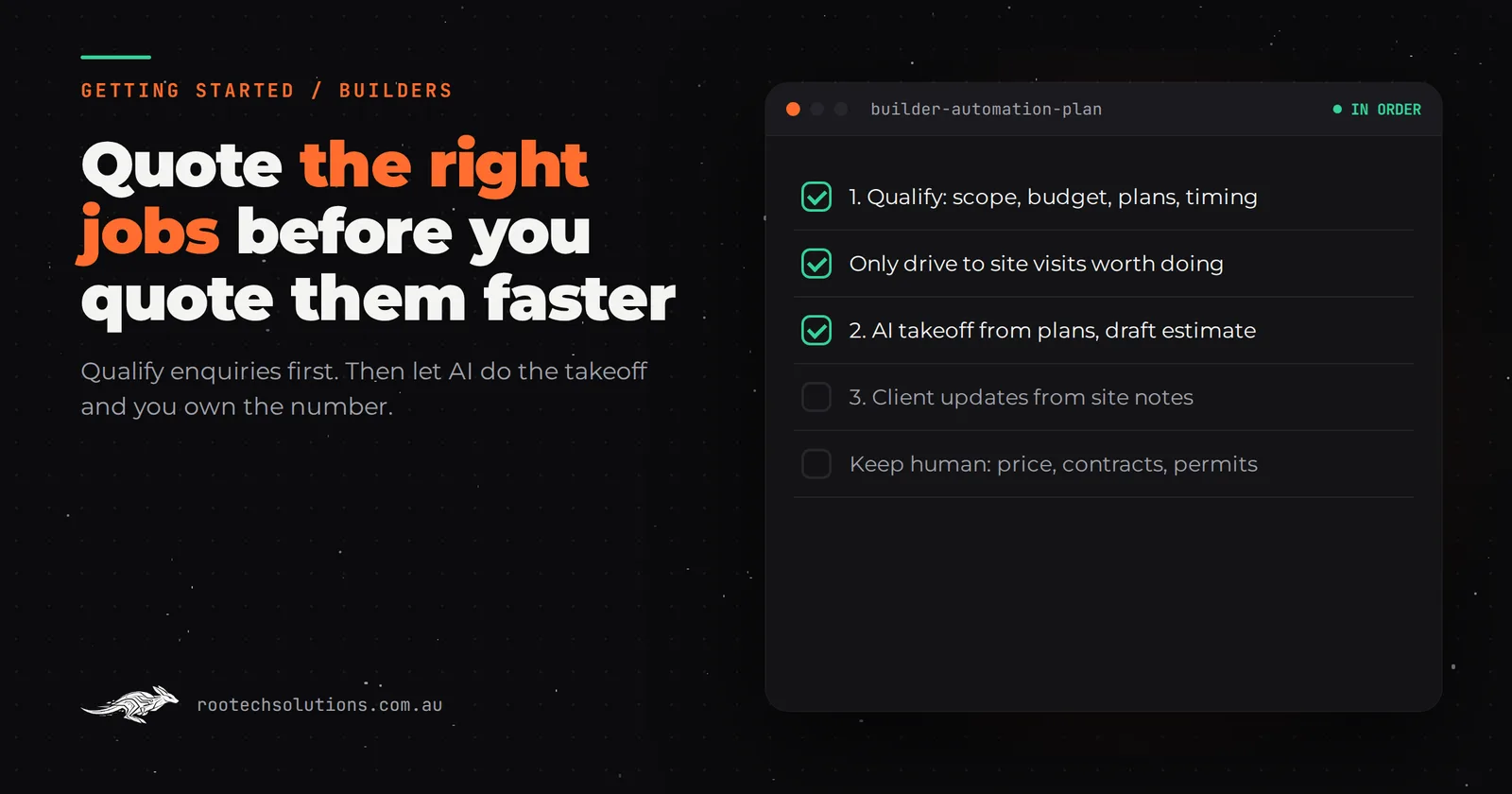
Qualify enquiries first, automate takeoffs and draft estimates second, and draft client updates from your site notes third. Each step uses the information the step before it collected.
- Enquiry qualification. An agent replies within minutes to website forms, Google Business Profile messages and missed calls. It asks the questions you ask anyway: what the job is (kitchen, bathroom, extension, new build), the suburb, the budget range, whether there are plans or the client needs design, and when they want to start. It sorts each enquiry into "book a site visit", "call first" or "not a fit", by your rules, and gives you the summary.
- Takeoffs and a draft estimate from plans. For jobs that come with plans, AI can read the drawings, pull out rooms, areas and quantities, check them against each other, and produce a costed draft from your rates. Your estimator reviews and adjusts it instead of building it from scratch.
- Client updates from site notes. Homeowners on a renovation want to know what happened this week. A short update drafted from your site diary and photos, approved by you before it goes, cuts the "just checking in" calls.
What to keep human:
- The price that goes to the client. AI drafts, a person decides. A takeoff can misread a drawing, and only someone who has been to site knows what is behind the wall.
- Contracts and variations. In Victoria, most domestic building work worth more than $10,000 needs a written major domestic building contract. That document is yours to prepare and sign, not an AI's.
- Permits and surveyor submissions. Anything carrying your registration stays with you.
How do I tell which one to start with?
Look at your last ten site visits and your last month of quotes. That is a free, one-evening exercise that tells you where your unpaid hours go.
| Question | Where to find it | If the answer is... | Start with |
|---|---|---|---|
| How many of the last 10 site visits turned into a quote the client took seriously? | Your calendar and inbox | Fewer than half | Enquiry qualification |
| How long did your last five takeoffs take? | Your own memory, honestly | Most of an evening each | AI takeoffs |
| How many enquiries took more than a day to get a proper reply? | Your inbox and missed calls | More than a couple a month | Enquiry qualification |
| How often do clients ring for a progress update? | Your phone log | Several times a week | Client updates (later) |
As a rule of thumb, if site visits that go nowhere are eating a day a week, qualification pays first. If you visit only good jobs but quote on a lot of plans, takeoffs pay first. Write your qualification questions down either way: a written list of "what I need to know before I visit" is useful to your office staff today, automated or not.
How does an AI takeoff estimator actually work?
It reads the plans, extracts quantities, checks them, and costs them from your rates, then stops for a person. The important part is the checking, because a single misread wall should not quietly become a wrong quote.
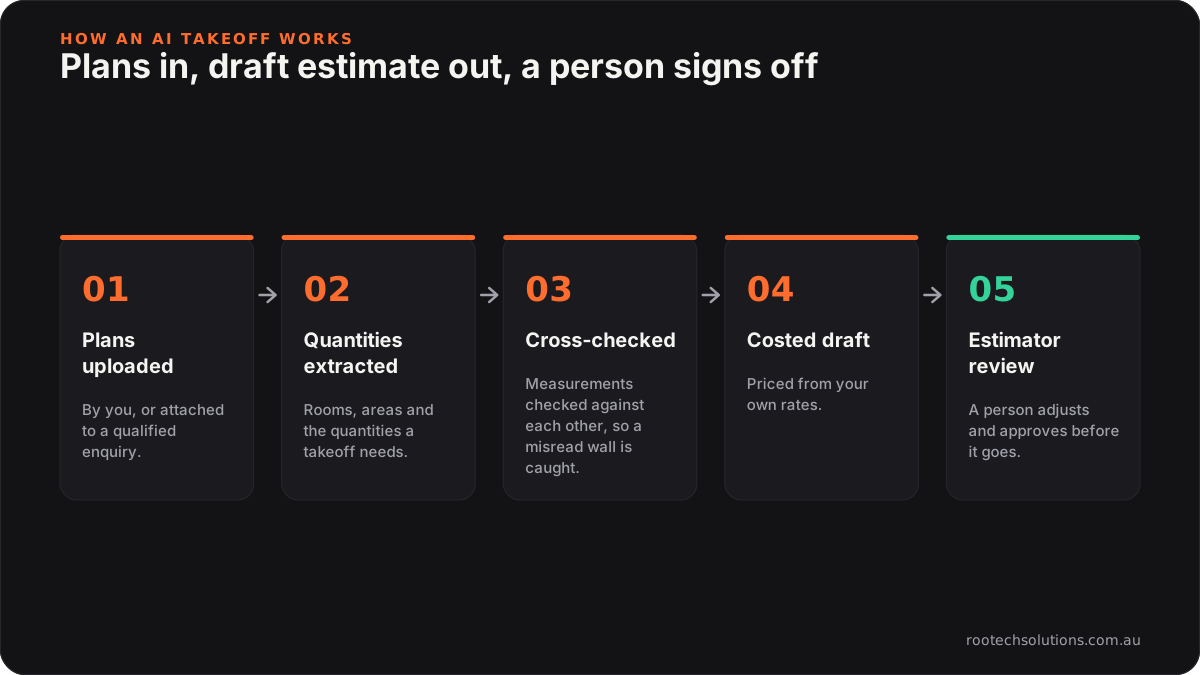
Caption: The AI does the measuring. The estimator still owns the number.
This is exactly what we built for Logic Building Co: an agentic AI estimator that reads construction plans, extracts the rooms, areas and quantities a takeoff needs, runs reasoning steps that check the measurements against each other, and produces a costed estimate ready for a human to review and send. Every prospective job gets a measured takeoff and a draft estimate before anyone picks up a scale ruler.
Is Buildxact enough, or do I need custom AI?
For many residential builders, estimating software is the right foundation and you should use what it offers before building anything. Buildxact, for example, is estimating and job management software for small to medium residential builders and renovators, and it now includes AI-assisted takeoff and estimating tools. Check what your plan includes and their current pricing.
Off-the-shelf is the right call when:
- your jobs are fairly standard and the software's templates and recipes fit how you price;
- you are happy to work inside the software's takeoff screen and price book.
Custom AI earns its keep when:
- your pricing logic lives in your head or your spreadsheets, with rates and allowances the software cannot hold;
- you want qualification and estimating joined up, so the enquiry agent's answers (scope, budget, suburb) arrive with the plans and shape the draft estimate;
- you want checks specific to your work, for example flagging any room whose measured area does not match the area schedule on the plans.
We go deeper on this in Buildxact vs AI automation for builders. And if your problem is the volume of renovation enquiries rather than the quoting, read how Melbourne builders handle renovation leads with AI.
What does the build look like, and what does it cost?
An enquiry qualification agent is a two to four week build. A takeoff estimator is a bigger project, scoped once we have seen your plans, rates and how you build an estimate today.
Enquiry qualification:
- replies to website forms, Google Business Profile messages and missed calls;
- asks your questions, sorts the enquiry by your rules, and sends you a summary;
- offers site visit slots from your calendar for the jobs that qualify;
- logs everything in your CRM or a shared spreadsheet.
Setup typically lands in the low thousands at a fixed price, and most builders have it live in two to three weeks.
AI takeoff and draft estimate:
- plans uploaded by you or attached to a qualified enquiry;
- extraction of rooms, areas and quantities, with cross-checks;
- a costed draft from your rates, exported to your estimating software or a spreadsheet;
- a review screen where your estimator adjusts and approves.
This is quoted at a fixed price after discovery, because the work depends on your plan formats and how many trades you price. Running costs for either are estimates: hosting usually under $50 a month, and AI usage of roughly $20 to $200 a month depending on volume, with plan reading toward the top of that range.
Where a human stays in the loop: every qualified enquiry is your call to visit or not, every estimate is reviewed before it goes, and contracts, variations and permits never leave your hands.
Frequently asked questions
Will homeowners mind answering questions from an AI before a site visit?
Most prefer it to waiting two days for a reply. The questions are the same ones you would ask on the phone, and a clear reply that says what happens next shows them you are organised. The agent should say it is an AI assistant and offer a call with you if they would rather talk.
How accurate is an AI takeoff?
It depends on the plans and the build. Clear, scaled drawings give good results, while hand sketches and incomplete sets do not. That is why the estimator design includes cross-checks and a human review: the AI saves the measuring time, and a person catches anything it misread.
Should the AI ever send a price to a client?
Not on a build or renovation. It can tell a client how your pricing works, or a typical range you choose to publish, but the estimate that goes out should always be reviewed by someone who knows the job.
Do I need to replace my estimating or job management software?
No. The qualification agent sits in front of it, and a takeoff estimator can export its draft into the software you already use or a spreadsheet. Replacing your core software is a separate decision.
Spending your evenings measuring plans?
We run a free AI workflow audit: we look at your last few enquiries, site visits and takeoffs, and tell you whether qualification, an AI takeoff or the tools you already pay for will give you the most time back. Book a free AI workflow audit. The audit fee comes off your first project if you go ahead.