AI for Mechanic Workshops: Which Job to Automate First
AI for mechanic workshops, in order: after-hours quotes for fixed-price jobs, then extra-work approvals by text. What your workshop software does already.
A car is on the hoist, the pads are worn past the service, and the owner isn't answering. The car sits, the bay sits, and the next booking backs up behind it. Meanwhile last night's three website enquiries for a logbook service are still unanswered because everyone has been under a bonnet since 7:30. AI for mechanic workshops should fix both problems before it does anything clever.
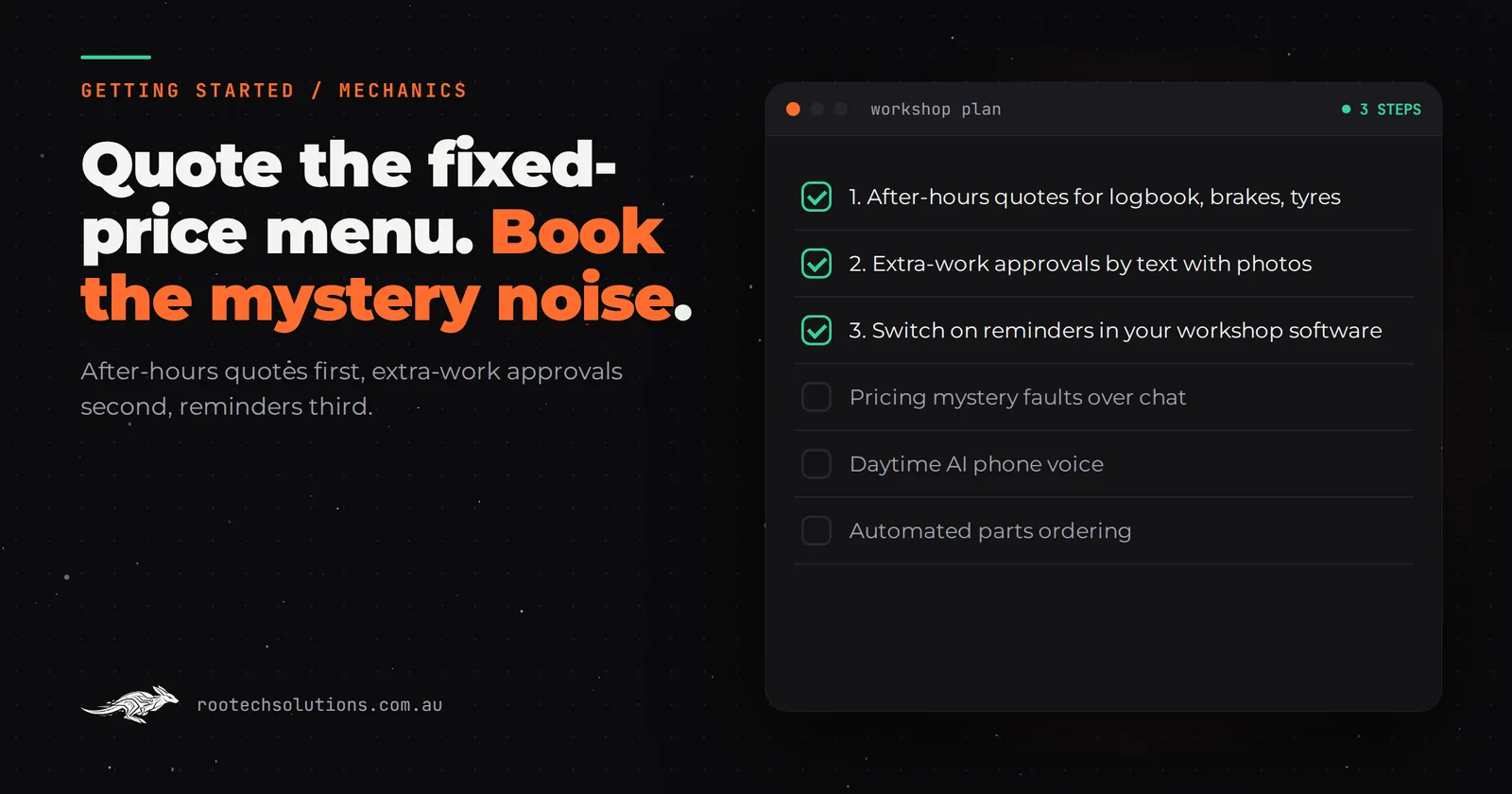
Short answer: For most independent mechanic workshops, the first AI automation is replying to after-hours enquiries for fixed-price jobs (logbook services, brakes, tyres) with a price range and a booking. Second is extra-work approval by text, with photos and a price, so cars don't sit waiting on a callback. Service reminders are third and usually already built into your workshop software. Leave diagnosis and parts ordering alone.
Why is a mechanic's first automation different from other trades?
Because a workshop has two kinds of work, and only one of them can be quoted by a machine. A logbook service for a 2019 Corolla has a price you could print on the wall. "There's a clunk from the front left over speed bumps" does not, and anyone who tries to price that over chat will be pulling quotes back by Friday.
That split decides everything. AI handles the fixed-price menu and the admin around the car being in the shop. Your technicians keep anything that needs their eyes, ears or a scan tool: warning lights, strange noises, a car that won't start.
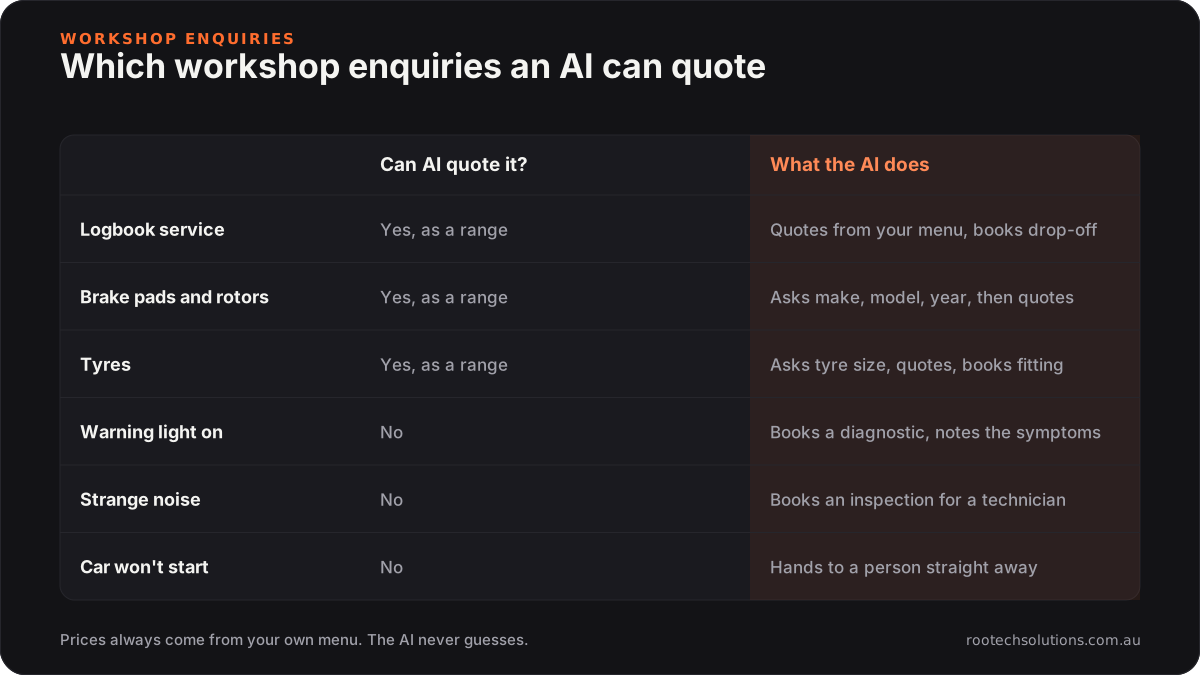
Caption: If the price depends on what you find under the car, the AI books the inspection instead of guessing.
What should AI for mechanic workshops do first, second and third?
Rank by how often the job happens and how much it costs you when it is slow. For most independents the order looks like this.
- After-hours enquiries for fixed-price jobs. A customer messages at 8pm asking what a service costs. The AI asks make, model, year and kilometres, gives the range from your own price list, explains what is included, and offers the next available drop-off. Anything outside the menu gets an inspection booking and a note for you. This is first because the customer who hears back at 8pm books; the one who hears back at 9am has often booked elsewhere.
- Extra-work approvals by text. When a technician finds something during a job, they snap two photos, pick the parts and labour from your system, and the AI sends the customer a plain-English message: what was found, why it matters, the price, and "reply YES to go ahead". The reply is logged against the job card. If the customer asks a question, it goes to the service adviser.
- Service-due and rego reminders. Worth having, but check your software before building anything. Mechanic Desk, for example, advertises service reminders and day-before booking reminders by email or SMS, and other workshop systems such as Workshop Software and MotorOne cover similar ground. Switch those on first.
Skip for now:
- Pricing mystery faults. Let the AI gather symptoms and book the diagnosis. Never let it guess.
- A daytime AI phone voice. Regulars ring because they want to talk to someone who knows their car. An after-hours text-back is low risk; replacing your daytime phone is not.
- Automated parts ordering. It is tempting because you order the same parts all day, but supplier integrations are fiddly and the payoff is time saved, not work won. Do it after the customer-facing pieces run.
What should the AI say when a customer asks about their new car warranty?
It should give your approved answer, which needs to be accurate. Customers still ask whether a non-dealer logbook service will affect their warranty. The ACCC's guide to Australian Consumer Law for motor vehicle sales and repairs says there is no requirement under the ACL for a vehicle to be serviced by a dealer for the consumer guarantees to apply, and that an independent repairer can service a vehicle without affecting them.
That is a question worth scripting carefully, in your words, with the work done to the manufacturer's specifications as the condition. It comes up in after-hours enquiries constantly, and a clear answer at 8pm is often what turns a price shopper into a booking. Anything about a specific manufacturer's extended warranty terms goes to a person.
Is your workshop software enough, or do you need a custom AI quoting tool?
Your workshop software is enough for reminders, job cards, invoicing and booking a customer you are already talking to. A custom AI layer earns its keep for the conversation before the booking and the approvals during the job.
| Job | Workshop software (Mechanic Desk, Workshop Software, MotorOne) | Custom AI layer |
|---|---|---|
| Service and booking reminders | Built in on many plans | Not needed |
| Job cards, invoicing, Xero or MYOB sync | Built in | Not needed |
| Answer a price question at 8pm in plain English | Limited to whatever your booking widget shows | Asks the right questions, quotes from your menu, books |
| Know when a job is outside the fixed-price menu | No | Recognises it and books an inspection instead |
| Extra-work approval with photos and a YES reply | Varies, often manual | Sends it, logs the reply against the job |
| Answer warranty and "do you do Euro cars?" questions | No | Answers from your approved wording |
Check current features and pricing with your provider; workshop systems add features regularly, and the cheapest automation is the one you already pay for.
What can you do this week without spending anything?
Two small changes cover a surprising amount of the gap.
- Publish your fixed-price menu. Put your logbook service, brake pad and common tyre prices (as ranges) on your website and Google Business Profile. A visible price answers the most common question before anyone has to ask it, and the menu becomes the AI's price list later.
- Create an approval text template. Write one message your team sends from the workshop phone when they find extra work: "Hi [name], we found [issue] on your [car]. Photos attached. Price to fix today: $[x]. Reply YES to go ahead or call us on [number]." Track for one week how long cars wait for approval before and after.
If after-hours enquiries keep piling up even with the menu published, that is your first build. If cars on hoists waiting for approval is the bigger cost, start there.
What does a custom AI build look like for a workshop?
An AI layer that sits in front of your workshop software, live in two to four weeks. You keep your system, your phone number and your price list.
- Scope: an after-hours assistant on your website and Facebook messages that quotes from your fixed-price menu and books; optionally, the extra-work approval flow.
- Integrations: your workshop software's booking diary, your SMS provider, and a shared inbox where every conversation lands.
- Cost, as estimates: a first build for a one or two bay workshop typically costs between $2,500 and $5,000 depending on how many systems it talks to. Running costs are usually $100 to $300 a month for hosting, AI usage and SMS.
- Human in the loop: every quote outside the menu, every customer question about an approval, and every complaint goes to a person. For the first two weeks, you approve each quote before it sends.
A worked example: if the assistant wins one extra service a week that would otherwise have gone elsewhere, at an average bill of around $400, that is roughly $1,600 a month against a running cost in the low hundreds. If you already convert nearly every enquiry, the maths is different, and you should not build it.
We go deeper on quoting in how mechanics can automate quotes with AI, and if your regulars worry about talking to a bot, the common AI myths for Melbourne mechanics covers what customers actually object to.
Frequently asked questions
Will an AI quoting tool give customers the wrong price?
Only if it is allowed to guess. A properly built tool quotes only from your menu, gives ranges where the price depends on the car, and hands anything outside the menu to a person as an inspection booking. You set the prices and the boundaries.
Is a text reply good enough as approval for extra work?
For most workshops it is a better record than a phone call nobody wrote down, because it captures what was found, the price and the customer's answer in one place. If you are unsure what your workshop needs for consent, check with your industry association or adviser. Keep the photos and the reply on the job card, and have a person handle any customer who disputes it.
Does this work for a single-bay workshop?
Often, because the owner is usually the one under the car and on the phone. If you get more than a handful of after-hours enquiries a week and regularly lose them, a small build pays. If most of your work is regulars who ring you directly, start with the free steps above.
Do I have to change workshop software?
No. The AI layer reads your diary and writes bookings back into the system you already use. Changing workshop software is a much bigger decision and is rarely needed to automate quoting.
Want a straight answer on what to automate first?
We will look at your enquiries, your price menu and how approvals happen in your workshop, and tell you the single automation worth building first, or that your current software already covers it. Book a free AI workflow audit. The audit fee comes off your first project if you go ahead.