Why Your Google Business Profile Is Your Best GEO Tactic
Google Business Profile GEO for Melbourne businesses: which fields feed AI Overviews, how to set them, and the review rules most owners break.
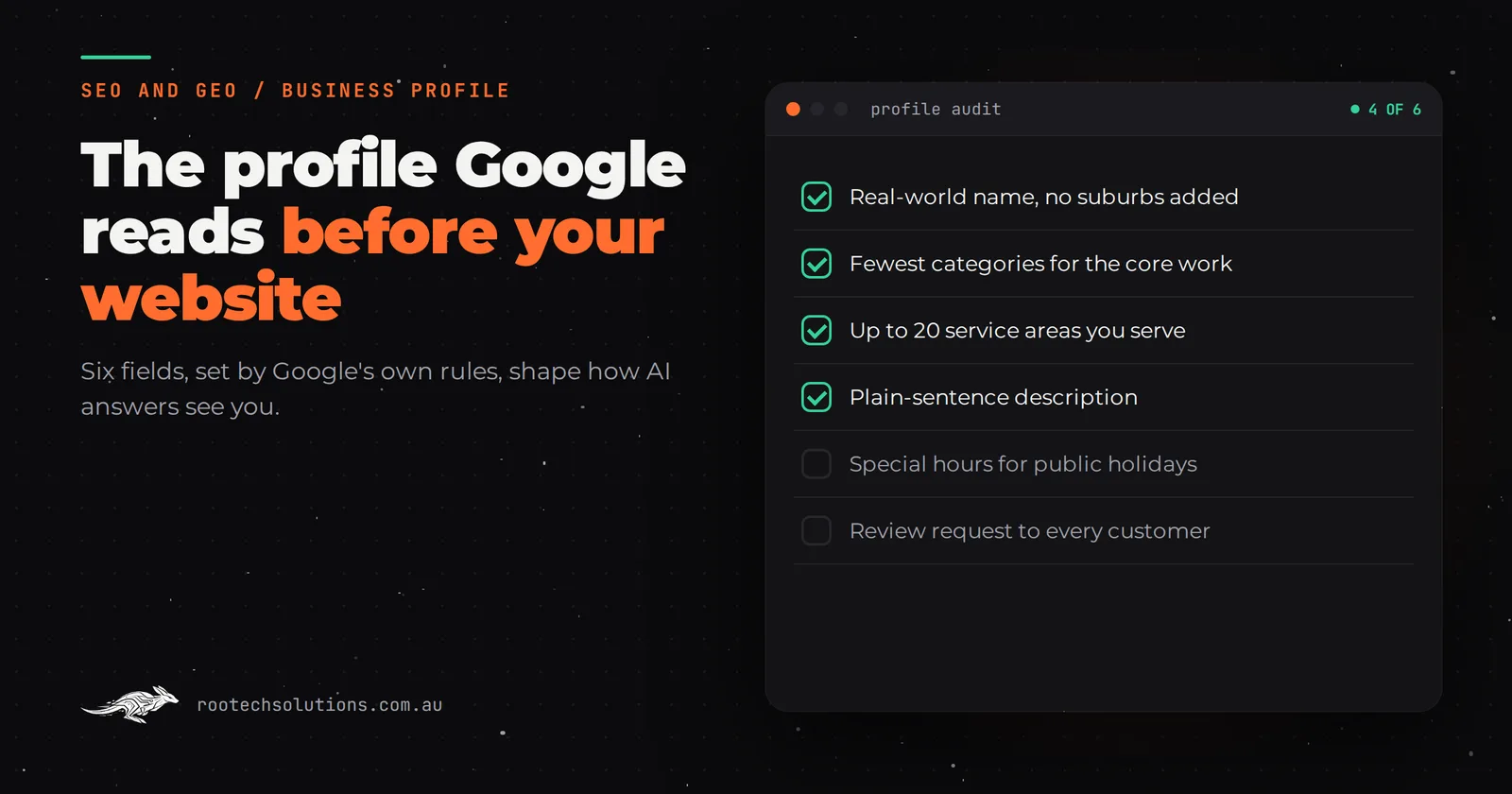
Someone in Coburg asks Google for a plumber who can come today, and the AI Overview names three businesses. You are not one of them, even though your website is decent and your work is better. Most of the time the gap is not the website at all. It is a Google Business Profile that was filled in once, years ago, and never touched again.
Short answer: Your Google Business Profile is the most direct GEO lever a local business has, because Google says Business Profiles can help businesses appear in its AI responses as well as in normal results. It works when the profile is complete, accurate and backed by genuine reviews. It does not replace a website: AI Overviews still link to indexed pages.
Does your Google Business Profile actually feed AI answers?
Yes, for Google, and Google says so in writing. Its guide to optimising for generative AI features says that where appropriate, AI responses can include information about local businesses, and that Google Business Profiles can help your services be visible in both AI responses and other Search results.
That matters because the same guide is blunt about everything else: there is no special markup, no AI text file and no "GEO hack" you need for AI Overviews. The profile is one of the few local inputs Google names directly.
For ChatGPT, Perplexity and Claude the honest answer is less tidy. Those tools build answers from web pages they can search and fetch, and none of them publishes a rule that says "we read Business Profiles". What they can see is everything your profile pushes out into the open web: your name, suburb, category, hours and reviews showing up consistently across Maps, directories and your own site. A clean profile is the anchor that keeps all of that consistent.
Which profile fields matter most for AI search?
The fields that decide whether you match a query are the ones Google's local ranking help page describes as relevance: how well the profile matches what someone searched. Google's Business Profile guidelines set the rules for each one, and several of them contradict common advice.
| Field | What Google asks for | The common mistake |
|---|---|---|
| Business name | Your real-world name, as on your signage and invoices | Adding "Plumber Brunswick" to the name |
| Categories | The fewest categories that describe your core business | Ticking every loosely related category |
| Service area | Up to 20 areas, within about two hours' drive | "Melbourne" only, or the whole state |
| Description | Honest detail on services, history and what you do | A list of keywords and suburbs |
| Hours | Accurate hours, plus special hours for holidays | Christmas and Melbourne Cup Day left on normal hours |
| Reviews | Genuine reviews, asked for from every customer | Asking only happy customers, or offering a discount |
Most profile problems are not missing fields. They are fields filled in against Google's own rules.
Two of these deserve more than a line.
Categories. The guideline is to choose the fewest categories it takes to describe your overall core business. An electrician who does mostly residential work should pick "Electrician" and maybe one close secondary, not twelve. A sprawling category list blurs what you are, which is the opposite of what an AI summary needs.
Service area. Google lets a service-area business set up to 20 areas based on suburbs, postcodes or regions, and says the overall boundary should not extend much past two hours of driving from your base. Pick the 20 suburbs and regions you genuinely want work in. "Northern suburbs" plus a handful of named suburbs you actually service beats "Victoria".
How do you get more reviews without breaking the rules?
Ask every customer, the same way, straight after the job, and never offer anything for it. That is the whole method, and it is also where most businesses get into trouble.
Google's Maps content policy says businesses must not offer incentives for reviews, must not selectively ask only happy customers (often called review gating), and should not request that specific content be included in a review. That last one surprises people, because a lot of local SEO advice says to ask customers to "mention the suburb and the job". Under Google's policy, you should not.
Australian law adds its own layer. The ACCC's guidance on online reviews says it is against the law to create fake or misleading reviews, and that any incentive offered for reviews must apply regardless of whether the review is positive or negative.
What works within those rules:
- Timing. Send the request within an hour or two of the job being finished, while the new hot water system is still a pleasant surprise.
- Every customer. The awkward job gets the same message as the easy one. A 4.6 average from 90 honest reviews reads as more credible than a perfect 5.0 from 11.
- One tap. Link straight to your review form. Every extra step loses people.
- Reply to all of them. Google's ranking help page says replying to reviews shows you value feedback, and a calm reply to a bad review tells the next reader more than the review itself.
Should review requests come from your job software or a custom integration?
Start with what you already pay for. Most job management tools Melbourne service businesses run, such as ServiceM8, Tradify, Fergus and simPRO, can send customer SMS or email messages at points in a job. If yours can send a message with your review link when a job is marked complete, use it and stop there.
A small custom integration earns its keep when the rules get specific:
- The trigger is in another system. You want the request sent when the invoice is paid in Xero or MYOB, not when the job is closed, so nobody gets a review request for a job they are disputing.
- You run several profiles. A business with two locations needs each customer sent to the right profile.
- You want replies drafted for you. An AI step can draft a reply to each new review in your voice for you to approve or edit. The owner still presses send. Nothing about a complaint goes out unread.
- You want one log. Every request, every review and every reply in one place, so you can see who was asked and when.
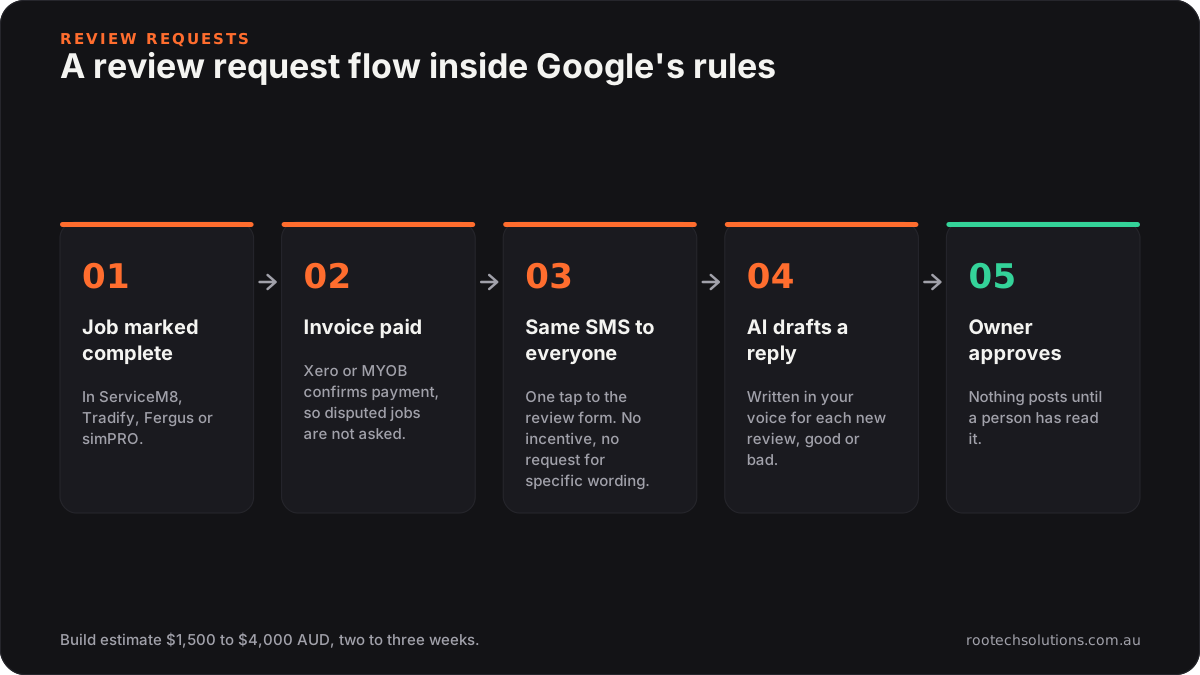
Caption: The AI drafts, the owner approves, and every customer gets the same request.
A build like that is typically two to three weeks and, as an estimate, $1,500 to $4,000 at a fixed price depending on how many systems it connects. Running costs are usually hosting under $50 a month plus AI usage at the low end of $20 to $200 a month, because drafting a few review replies a week is light work.
What does a description an AI can quote look like?
A good description reads like the paragraph you would want an assistant to repeat: who you are, what you do, where, and what you are known for, in plain sentences.
Instead of: "Plumbing Brunswick, plumber Coburg, hot water, gas fitting, blocked drains, best plumber Melbourne."
Write: "Ridge Plumbing is a family-run plumbing business based in Brunswick, working across Melbourne's inner north since 2009. Most of our work is hot water replacements, gas fitting and blocked drains for homes and small shops. We offer same-day callouts on weekdays."
The second version is honest, specific and quotable. It also matches what your website should say on its home page, word for word where it can. When your profile, your site and your directory listings describe you the same way, there is nothing for an AI summary to second-guess.
What can a Business Profile not do on its own?
It cannot answer the questions people ask before they choose. "How much does a hot water replacement cost?", "do you service Glenroy?" and "is a heat pump worth it?" are answered by pages, and an AI Overview's supporting links point to indexed pages on websites, not to profile fields.
That is why the profile and the site work as a pair. The profile wins the "who" query. Your service pages, and a small number of genuinely useful suburb pages, win the "how much" and "can you" queries. We cover the page side in how Melbourne businesses get recommended by AI, and the site work itself on our Melbourne custom software page.
What should you fix this week?
- Check your business name matches your signage exactly, with no suburbs or services added.
- Cut your categories back to the fewest that describe your core work.
- Set up to 20 service areas you genuinely serve.
- Rewrite the description in plain sentences, and copy the same wording to your home page.
- Load special hours for the next three public holidays.
- Decide where review requests will come from, and make sure they go to every customer.
Frequently asked questions
Can I pay Google to rank higher in local results or AI Overviews?
No. Google's local ranking help page states there is no way to request or pay for a better local ranking. Ads can appear around results, but the organic local results and the businesses named in AI Overviews are not for sale.
Should I create a separate profile for each suburb I work in?
No. Google allows one profile per business, with an exception for genuinely separate locations that have their own staff and service areas. Extra profiles for suburbs you only drive to break the guidelines, and duplicate profiles cause problems with how your business shows on Maps.
Do I need to show my home address if I run a service-area business?
Not if customers do not visit you. Google's guidelines say a service-area business that serves customers at their location should hide its address and set a service area instead.
How long do profile changes take to show?
Google says approved service area edits can take up to 48 hours to appear. Other edits can be reviewed before they go live, so make changes deliberately rather than tweaking the profile every day.
Want a second pair of eyes on your profile?
We will go through your Business Profile, your site and how both read to AI search, then tell you the three changes worth making first, including where a review integration would or would not pay. Book a free AI workflow audit. The audit fee comes off your first project.