What Melbourne Event Planners Should Automate First with AI
AI automation for event planners and venues: answer the date check first, chase final numbers and dietaries second, release expired holds third.
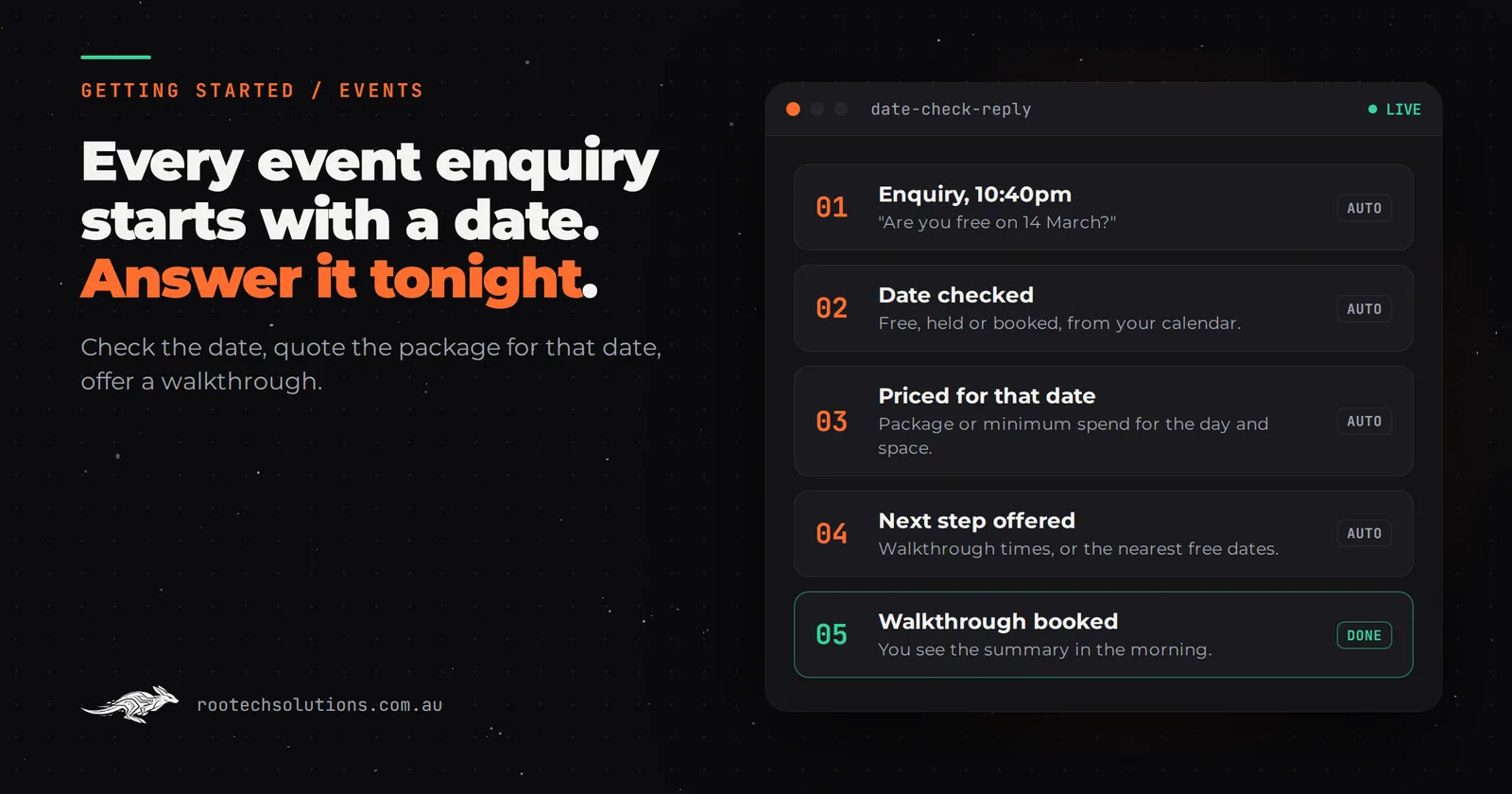
Every event enquiry starts with the same question: "Are you free on the 14th of March?" A venue or planner can only sell each date once, so the answer to that one question decides whether the rest of the conversation is worth having. Most event businesses still answer it by hand, the next morning, after the couple has already emailed three other venues.
Short answer: The first AI automation for most event planners and venues is a date-check reply: an agent that reads the enquiry, checks the date against your calendar, answers capacity and package or minimum spend for that date, and offers a walkthrough or alternative dates. Second is chasing final numbers and dietaries before each event. Third is managing provisional holds.
Why does the date matter more than anything else in an event enquiry?
Because your inventory is dates, and every date is a one-off. A café can sell a hundred coffees on a Saturday. A venue sells that Saturday once. So an event enquiry is really two questions: is my date free, and what will it cost on that date?
That shapes the first automation in a way that is specific to events. A generic "thanks for your enquiry" auto-reply answers neither question. A useful first reply does three things:
- Answers the date. Free, held provisionally by someone else, or booked, straight from your calendar.
- Answers the price for that date. A Saturday night in spring and a Tuesday lunch in winter are different products. The reply quotes the package or minimum spend that applies to that day, that space and that guest count, from your own rules.
- Offers the next step. A walkthrough time if the date is free, or the nearest free dates if it is not.
The second point is where most off-the-shelf auto-replies fall down, and where an AI agent with your pricing rules earns its keep.
What should an event business automate first, second and third?
The date-check reply first, pre-event detail collection second, and provisional hold management third. The first wins bookings; the second and third give you back the weeks of admin between booking and event day.
- The date-check reply. Covered above. It is first because it is where bookings are won or lost, and because enquiries for popular dates arrive at night and on weekends when nobody is at a desk.
- Final numbers, dietaries and run sheet details. In the weeks before every event, someone chases the client for final guest numbers, dietary requirements, the running order, speeches and supplier contacts, usually by email, often several times. An automation sends a form at the right time, reminds the client before your deadline, and collates the answers into the format your kitchen and floor team already use. You review it; you do not chase it.
- Provisional holds. Clients ask you to hold a date "while we think about it". Holds that never expire block dates you could sell. An automation reminds the client before the hold lapses, tells you when it does, and offers the date to the next enquiry on the waitlist after you approve.
What to keep human:
- Bespoke proposals and creative design. Themed events, custom menus and styling need you.
- Negotiation and contracts. The AI quotes your published packages and rules; anything outside them comes to you.
- Relationships with repeat corporate clients. They want to talk to you.
- Event day. Nothing about running the event itself should be automated.
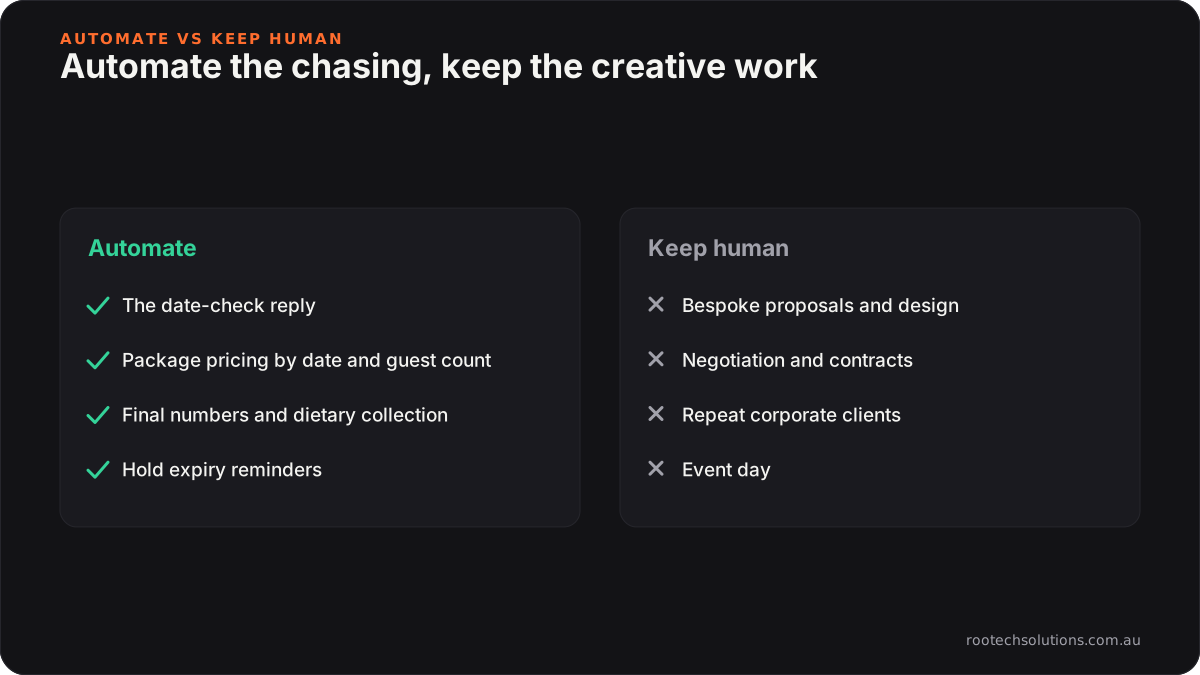
Caption: Automate the repeat questions and the chasing. Keep the creative and the relationship work.
How can I test this myself before building anything?
Write a one-page date answer sheet. It takes an afternoon, costs nothing, and it is exactly what an AI agent would need, so it is useful whether you automate or not.
- For each space or package: capacity seated and standing, and what is included.
- For each type of date: the package price or minimum spend by day of the week and season, as you actually charge it.
- Your rules: minimum guest numbers, deposit to confirm, how long you hold a date provisionally.
- The top ten questions you answer every week (parking, accessibility, outside catering, BYO, curfew), with your answers.
Then pull your last 30 enquiries and check two things: how many could have been answered completely from that sheet, and how long each took to get a reply. If most could have been answered from the sheet and many waited overnight, the date-check reply is your first automation. If most enquiries are bespoke and need a conversation, start with pre-event detail collection instead.
Is event management software enough, or do I need custom AI?
Event and venue management platforms are good systems of record, and most venues should run on one. Tripleseat, for example, is built for restaurants, hotels and venues to capture leads, send proposals, take payments and organise event details in one place. Other planners run on a CRM and a shared calendar. Check what your platform offers and its current pricing before building anything.
Off-the-shelf is the right call when:
- your packages are simple and the platform's lead form and proposal templates cover them;
- you are happy for the first reply to be a template and the real answer to follow from a person.
A custom AI integration earns its keep when:
- pricing depends on the date, the space and the guest count, and you want that answered in the first reply, not the second;
- availability lives in more than one place, such as several spaces, a planner's calendar and supplier availability;
- you want detail collection to feed straight into your own run sheet or kitchen sheet, in your format.
We compare the options in detail in event software vs AI for Melbourne event planners. If you are wondering whether a simple autoresponder would do, read AI lead agent vs an email autoresponder.
What does the build look like, and what does it cost?
A date-check reply agent is typically a two to four week build. It sits on top of your existing calendar, website and inbox; you do not need a new website or CRM.
| Stage | What happens | Typical time |
|---|---|---|
| Rules | Your date answer sheet becomes the agent's rules: spaces, capacity, pricing by date, holds | Week 1 |
| Build | Agent connected to your enquiry form, inbox and calendar; walkthrough booking added | Weeks 2 and 3 |
| Test | Run against your last 30 real enquiries before it replies to anyone new | Week 3 |
| Go live | You approve every reply for the first week, then only the ones it flags | Week 4 |
What it costs: a fixed-price build of this kind typically lands between $3,000 and $6,000, depending on how many channels it covers and how complex your pricing rules are. Running costs are typically $150 to $400 a month all up, covering hosting, AI usage and light maintenance. These are estimates; your scope sets the number.
As a rule of thumb, a single wedding or corporate function is usually worth thousands of dollars, so one booking won that a slow reply would have lost covers a lot of the build.
Where a human stays in the loop: every enquiry outside your published packages, every price that needs a judgement call, and every hold release comes to you. The agent tells clients a person will confirm the details.
Frequently asked questions
Will couples and corporate bookers mind an AI reply?
Most mind waiting more. A reply that answers their date and price question in minutes, says it comes from your assistant, and offers a walkthrough with a real person reads as organised, not robotic. Keep the tone close to how you write yourself.
What if two people enquire about the same date at once?
The agent should never confirm a booking. It tells both the date is available and offers a provisional hold or a walkthrough, and your rules decide what happens next, usually first deposit wins. You see both enquiries flagged against the same date.
Can the AI handle dietary requirements safely?
It can collect them and collate them into your kitchen's format, which reduces the chance of one getting lost in an email thread. It should not decide what a guest with an allergy can eat. That stays with your chef and the client.
Do I need to replace my event management software?
No. The agent writes into the platform or calendar you already use. Changing platforms is a separate decision and rarely the first one to make.
Losing dates to slow replies?
We run a free AI workflow audit: we look at your last month of enquiries, your calendar and your pricing rules, and tell you plainly whether the date-check reply, detail collection or the tools you already pay for will win you the most back. Book a free AI workflow audit. The audit fee comes off your first project if you go ahead.