The First AI Automation Melbourne Landscapers Should Build
AI automation for landscapers, in order: photo-first enquiries that cut wasted site visits, rain-day rescheduling, then before-and-after photos sent.
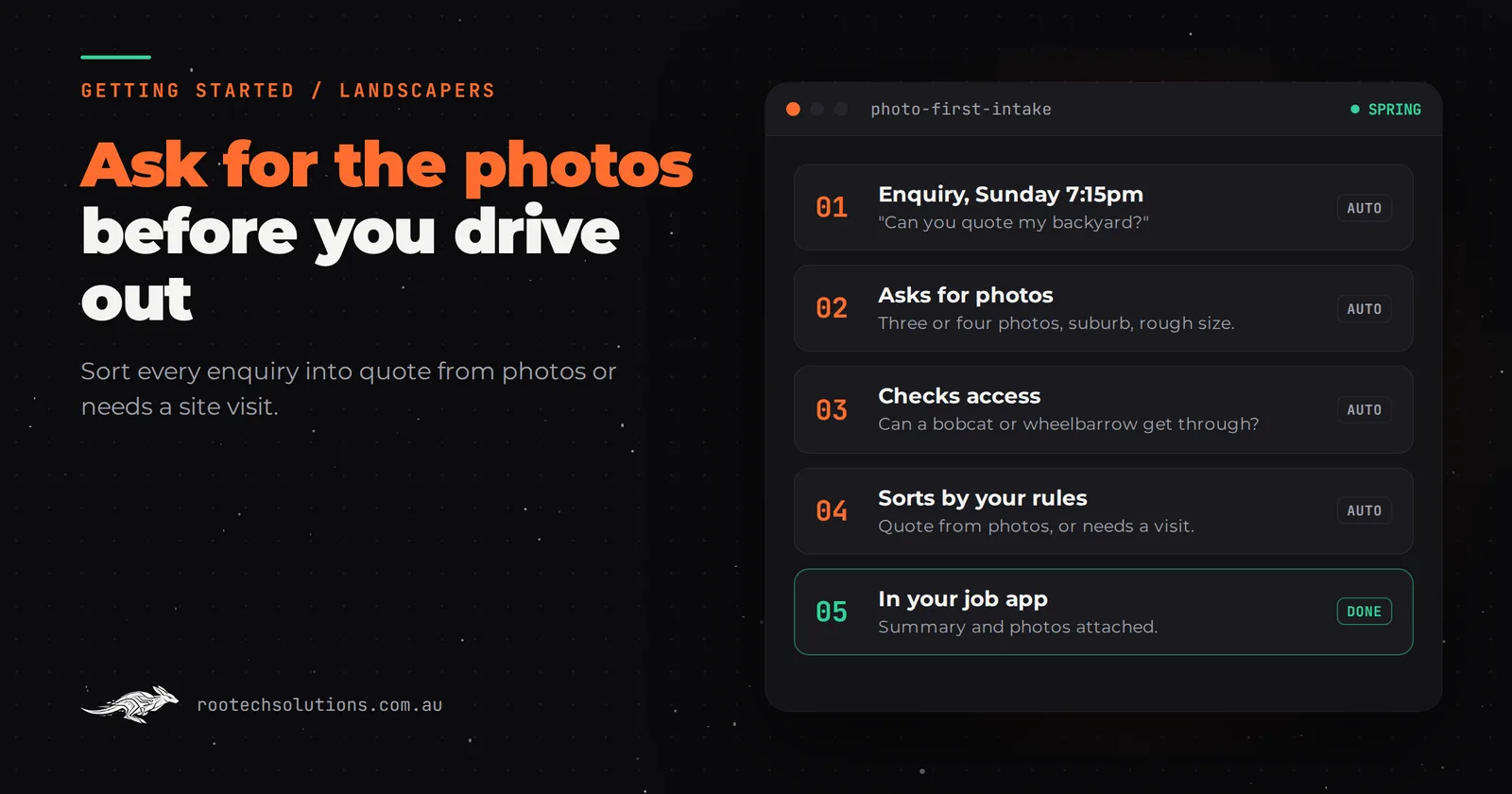
Landscaping has two problems most trades do not. Half your enquiries arrive in the same few spring weeks, and a wet week can wipe out a whole schedule at once. So the admin that hurts is not a steady drip, it is a flood of "can you quote my backyard?" in September and a dozen clients to reschedule after three days of rain.
Short answer: The first AI automation for most landscapers is photo-first enquiry intake: an agent that replies straight away, asks for photos, rough size and access, and sorts each job into "quote from photos" or "needs a site visit". Second is rain-day rescheduling, where affected clients get new times for you to approve. Third is sending before-and-after photos when a job closes.
What makes landscaping admin different from other trades?
Three things: the work is visual, the season is lumpy, and the weather moves your schedule for you. A plumber can price a tap washer over the phone. You cannot price a garden makeover without seeing it, but you can price a lot of smaller jobs from good photos.
That is why the first automation for a landscaper is not just a fast reply. It is a reply that collects the photos and details you need to decide whether to drive out at all. In spring, when every enquiry wants a site visit and you have crews to run, that decision is worth more than the reply time.
What should a landscaper automate first, second and third?
Photo-first enquiry intake first, rain-day rescheduling second, before-and-after photos and review requests at job close third. All three sit on top of the job management app you already use.
- Photo-first enquiry intake. When an enquiry comes in from your website, Google Business Profile or Instagram, the agent replies, asks what the client wants done, the suburb, rough size, side access (can a bobcat or wheelbarrow get through?), and for three or four photos. It then sorts the job by your rules: small and clear enough to quote from photos, or big enough to need a site visit.
- Rain-day rescheduling. When rain wipes out a day, someone has to text every affected client, find new slots and update the schedule. An automation finds the affected jobs, proposes new times from your schedule, and sends the messages once you approve them. You make the call on the weather; it does the texting.
- Before-and-after photos at job close. Clients love seeing the transformation, and the photos usually sit on a crew member's phone. When a job closes, the client automatically gets their before-and-after photos and a polite review request.
What to skip for now:
- AI-generated garden designs for clients. A design is a promise about plants, levels and drainage. Keep a human eye on anything client-facing.
- Automatic pricing of hardscape or design work. Retaining walls, paving and drainage depend on soil, levels and access that photos cannot show. Let AI collect the information; you write the number.
- Automated social posting. Your before-and-after photos and your own voice do more than a scheduler ever will.
Which jobs can you quote from photos, and which need a visit?
Small, visible, repeatable jobs can usually be quoted from good photos; anything involving levels, structure or design needs a visit. Your own rules decide the line, and writing them down is the most useful hour you can spend before automating anything.
| Job type | Quote from photos? | What the agent asks for |
|---|---|---|
| Mowing and regular maintenance | Usually yes | Photos of each area, block size, access, frequency wanted |
| Hedge trimming and pruning | Usually yes | Photos with something for scale, height, green waste removal |
| Mulching and garden bed refresh | Usually yes | Photos, rough bed area, mulch type wanted |
| Turf replacement | Often, with measurements | Photos, rough area in square metres, access for pallets |
| Garden makeover or redesign | No, visit needed | Photos, budget range, timing, whether plans exist |
| Paving, retaining walls, drainage | No, visit needed | Photos, what the problem is, budget range |
These are a starting point. A landscaper who does a lot of turf might quote it from photos every time; another might always want to see the soil first.
Can I test this before paying for anything?
Yes. Change your own first reply this week. Next time an enquiry arrives, reply with a short message asking for three or four photos, the suburb, a rough size and the access. Save it as a text template on your phone.
Then track, for two weeks:
- how many clients sent photos (most will, if you ask clearly);
- how many jobs you could quote without a visit;
- how many site visits you avoided, and the hours that saved.
If photo replies let you skip a few visits a week in busy season, you have proved the value of the first automation for free. The automated version does the same thing, but instantly, at 9pm, and sorts the job for you. Look back at your last 12 months as well: if rain days cost you a morning of rescheduling texts more than a few times a year, rain-day rescheduling earns its place as the second automation.
Is ServiceM8 or Tradify enough, or do I need custom software?
Your job management app is the backbone and you should keep it. Field service apps such as ServiceM8, Tradify and Jobber handle scheduling, quotes, invoices and job photos, and many have online booking forms and client messaging. Check what your plan includes and their current pricing; a feature you already pay for beats a build.
Off-the-shelf is the right call when:
- your enquiries come mostly through one booking form and you are happy to sort them yourself;
- you reschedule rarely, or your app's bulk messaging already covers it.
Custom software or an AI integration earns its keep when:
- you want enquiries sorted by your rules, with photos attached, before they reach your schedule;
- rain-day rescheduling means juggling several crews and dozens of clients, and you want proposed new slots, not just a blank message;
- you run franchisees or several crews and each needs their own view of the day, with the client getting proof of the finished work automatically.
That last point is what we built for Bugaboo Landscaping: a booking system that gives each franchisee their own view of what is on today, a content system where crews upload before-and-after photos from site, and automatic delivery of those photos to the client once the job is closed. If you are weighing up whether to hire admin help or automate, read admin staff vs AI automation for landscapers.
How does rain-day rescheduling work?
The automation does the finding and the texting; you make the weather call and approve the new times. That keeps the judgement with you and takes the hour of messages away.
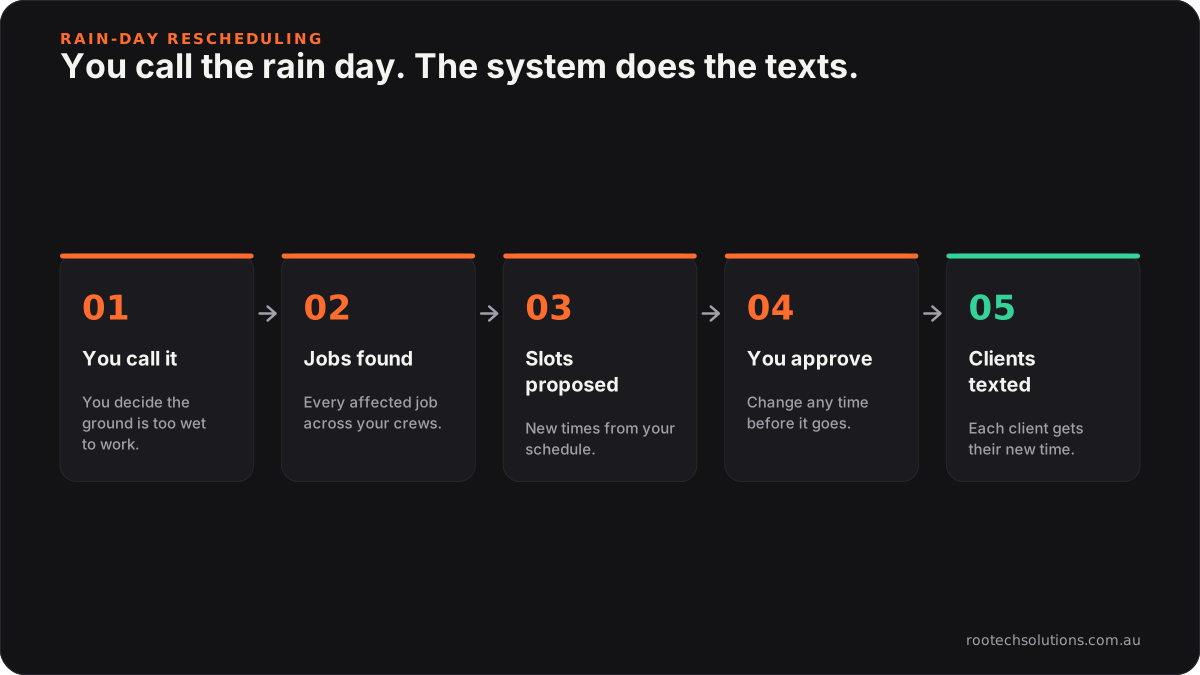
Caption: You decide it is too wet. The system finds the jobs and sends the texts.
What does the build look like, and what does it cost?
A photo-first intake agent is typically a two to four week build at a fixed price. It connects to your website form, Google Business Profile and Instagram messages, and creates the enquiry in your job management app with photos attached.
What gets built:
- an intake agent that asks your questions and collects photos;
- a rules sheet you can edit: job types, which can be quoted from photos, service area by suburb;
- the hand-off into your job management app, with a summary and the photos;
- optionally, the rain-day rescheduler and job-close photo delivery as later stages.
What it costs: a first intake automation typically lands between $1,500 and $4,000, depending on channels and how deeply it connects to your job management app. Running costs are estimates: hosting usually under $50 a month, plus AI usage of roughly $20 to $200 a month depending on volume, which for a landscaper climbs in spring and drops in winter.
Where a human stays in the loop: you price every job, you decide which ones need a visit when the rules are unsure, you call rain days, and you approve rescheduled times before clients hear about them.
Frequently asked questions
Will clients bother sending photos?
Most will if you ask clearly and say why: "so we can give you a price without waiting for a visit". People like getting a faster answer. If a client does not send photos, the agent books a site visit instead.
Can AI measure a garden from photos?
Not reliably enough to price structural work. It can read a rough size the client gives, flag photos that are too dark or too close, and ask for something for scale. For anything where a few square metres change the price a lot, measure it yourself or ask the client to.
Does this work for maintenance rounds as well as one-off jobs?
Yes, and maintenance is often where it pays first, because those jobs are the easiest to quote from photos and the most affected by rain. The rescheduler matters most for businesses with full weekly rounds.
Do I need to change my job management software?
No. Everything here writes into the app you already use. If your app cannot accept new jobs from outside, that is worth knowing before you build, and we check it in the audit.
Drowning in spring enquiries?
We run a free AI workflow audit: we look at your enquiries, your job management app and last season's rain days, and tell you which of these three will save the most hours, including when the answer is a feature you already pay for. Book a free AI workflow audit. The audit fee comes off your first project if you go ahead.