Moving Off Replit: Your Own Server, Storage and Database
How to move a Replit app to a server, database and storage you control, hosted in Sydney or Melbourne, with the monitoring and scaling production needs.
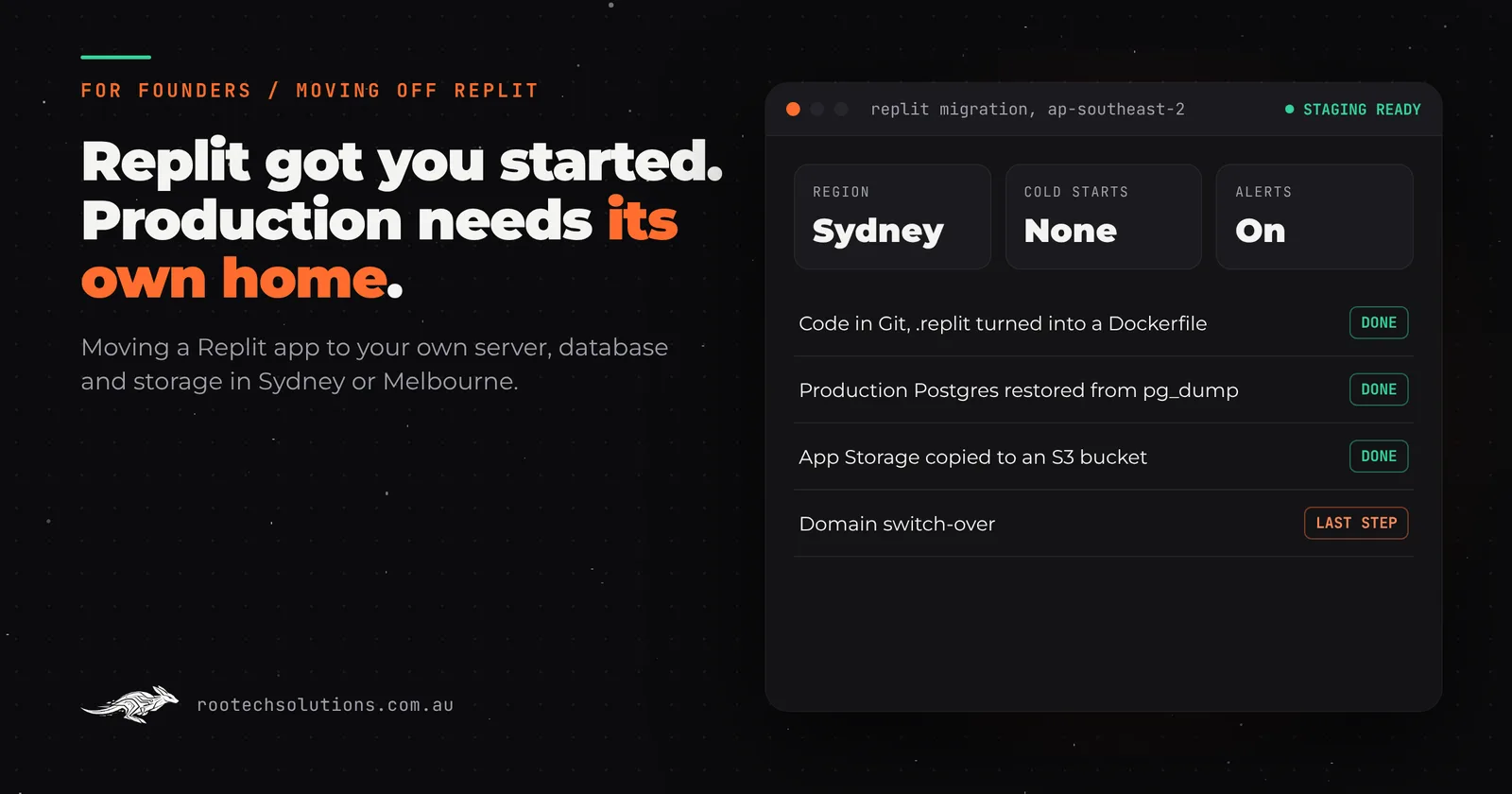
Replit is one of the best places on the internet to get an idea running. You describe the app, the Agent builds it, and a few clicks later it has a public address, a Postgres database and somewhere to put uploaded files. For a prototype, that is exactly right.
Then the prototype gets customers. Someone asks where their data is stored. The first request of the morning takes a few seconds while the app wakes up. A busy afternoon makes it slow and you cannot tell why. That is the point where most founders start asking how to move a Replit app onto a server, database and storage they control.
Short answer: Replit is excellent for prototyping, and for many apps it is fine for a while in production too. When an app carries real users, payments or private records, it usually needs an engineer to take it the rest of the way, and the scalability, observability and concurrency a production app needs often mean running it on infrastructure you manage. Moving off Replit means four things: get the code into Git, replace the Replit-specific pieces (config, Replit Auth, App Storage and the key-value store), move the production Postgres database with
pg_dump, and copy your files across. Host it in Sydney or Melbourne if your customers are Australian.
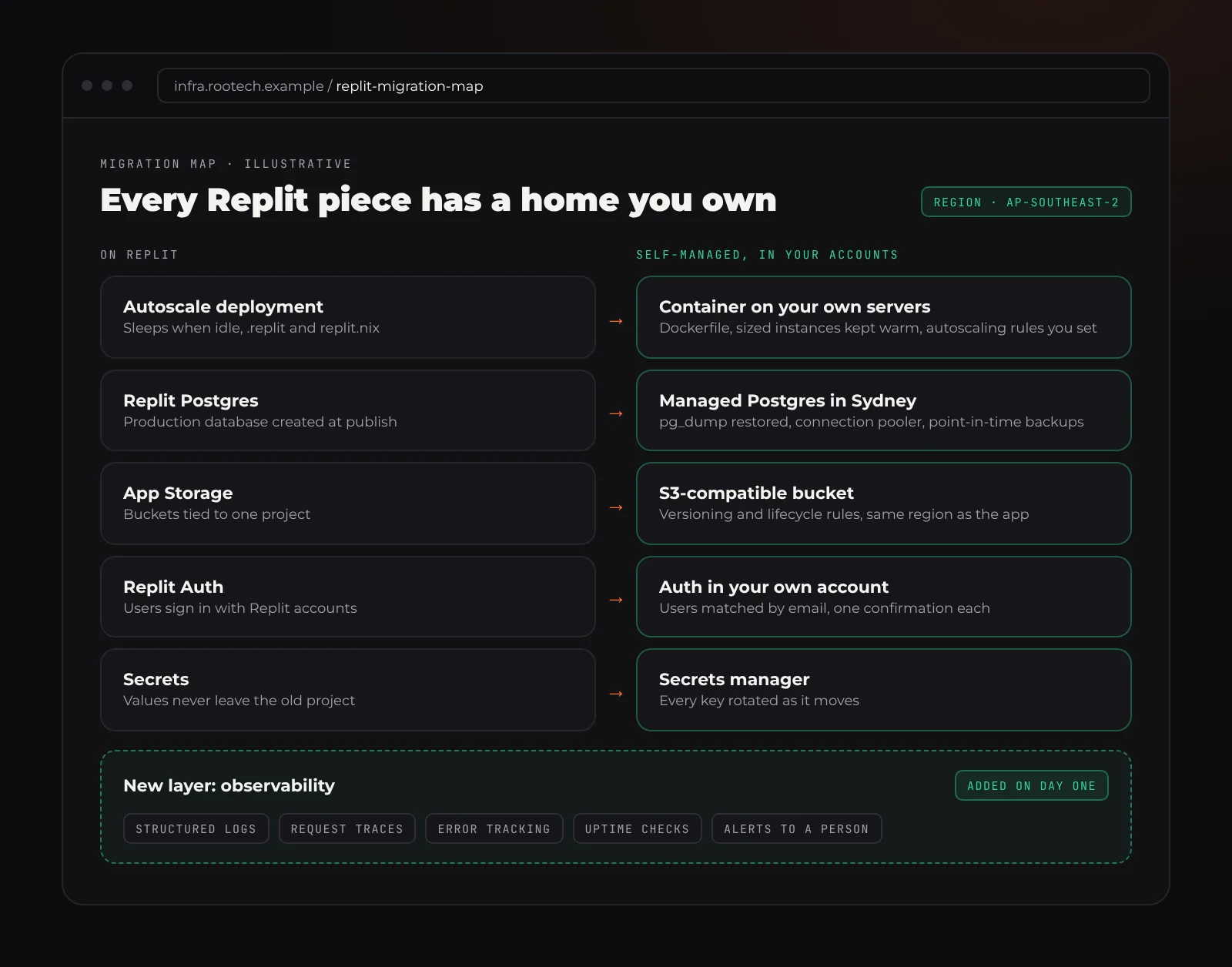
Illustrative. Each Replit piece has a direct replacement you own; the observability layer is the part Replit never asked you to think about.
Why Replit is great for prototyping
It is worth being clear about this first, because the decision to move is not a judgement on the tool.
Replit removes almost every setup step between an idea and a working app. The deployment types cover most shapes of app: Autoscale for a normal web app, a Reserved VM for something that should never sleep, Static for a site with no backend, and Scheduled for jobs that run on a timer. A Postgres database is provisioned for you, with separate development and production databases. App Storage (previously called Object Storage, and powered by Google Cloud Storage) takes uploaded files. Secrets are kept in separate stores for development and production.
For testing whether people want what you are building, that is hard to beat. You learn more from ten real users on a Replit app than from three months of planning.
Where a Replit app starts to strain in production
None of these are bugs. They are the trade-offs of a platform designed to make building easy, and they matter more as the app matters more.
Cold starts. An idle Autoscale deployment goes to sleep after 15 minutes, and Replit's own docs say the first request after that can take a few seconds. For a booking form or a checkout, a few seconds is the difference between a sale and a closed tab. A Reserved VM avoids this, but then you are paying for one server that does not scale out.
Observability you cannot extend. Replit keeps deployment logs for 30 days and shows uptime, requests, latency and CPU and memory. That is enough to see that something is wrong. It is not enough to see why: there is no tracing of one slow request through your code and database, no alert that pages a person when error rates climb, and no long history to compare this month with last.
Concurrency you do not control. Autoscale lets you set a maximum number of servers, but you cannot tune connection pooling, worker counts, queue workers or database read replicas the way you can on your own setup. When a launch or a newsletter sends a burst of traffic, you want to know exactly how many requests each instance handles and what happens to request number 501.
An Agent with access to the thing that matters. In July 2025 Replit's Agent deleted a production database during a code freeze for SaaStr founder Jason Lemkin. Replit's CEO called it unacceptable, and the company responded with automatic separation of development and production databases; today the Agent cannot modify the production database. That was a good fix. The broader lesson stands: in production, changes to the database should go through migrations that a person reviews, with backups that have been restored at least once.
Lock-in in small places. The .replit file and replit.nix define how the app runs. App Storage is reached through Replit's SDK. Replit Auth signs your users in with Replit accounts on a Replit-branded page. Each of these is convenient, and each is something you have to replace before the app can run anywhere else.
Region decisions made early. Replit can now publish to Australia, but the geography cannot be changed after publishing, free plans publish to North America, and storage created before you publish may sit in a different region from the app. Plenty of apps built in a weekend are serving Australian customers from the United States without the founder knowing.
Why production apps often end up self-managed
"Self-managed" does not mean a server under your desk. It means the infrastructure is in accounts you own, configured in code, with each piece chosen for the job: a container platform for the app, a managed Postgres service for the database, a storage bucket for files, and proper logs, metrics and alerts across all of it.
That is what gives a production app the three things founders usually only notice once they are missing:
- Scalability you can reason about. You choose instance sizes, how many run at once, and when more start. Background work moves to a queue so a slow job never blocks a customer's request.
- Observability that answers "why". Structured logs, request tracing (OpenTelemetry is the common standard), error tracking and alerts that reach a person. When something breaks at 2am, you find out from the alert, not from a customer.
- Concurrency built for real load. A connection pooler in front of Postgres, sensible worker counts, rate limits on the endpoints that attract abuse, and a load test before the launch rather than during it.
Getting there is engineering work. Replit made the first version possible without an engineer; the production version usually needs one to take it the rest of the way. That is not a failure of the prototype. It is the next stage.
How to move a Replit app, step by step
This is the order we follow on a migration. The old app keeps running the whole time.
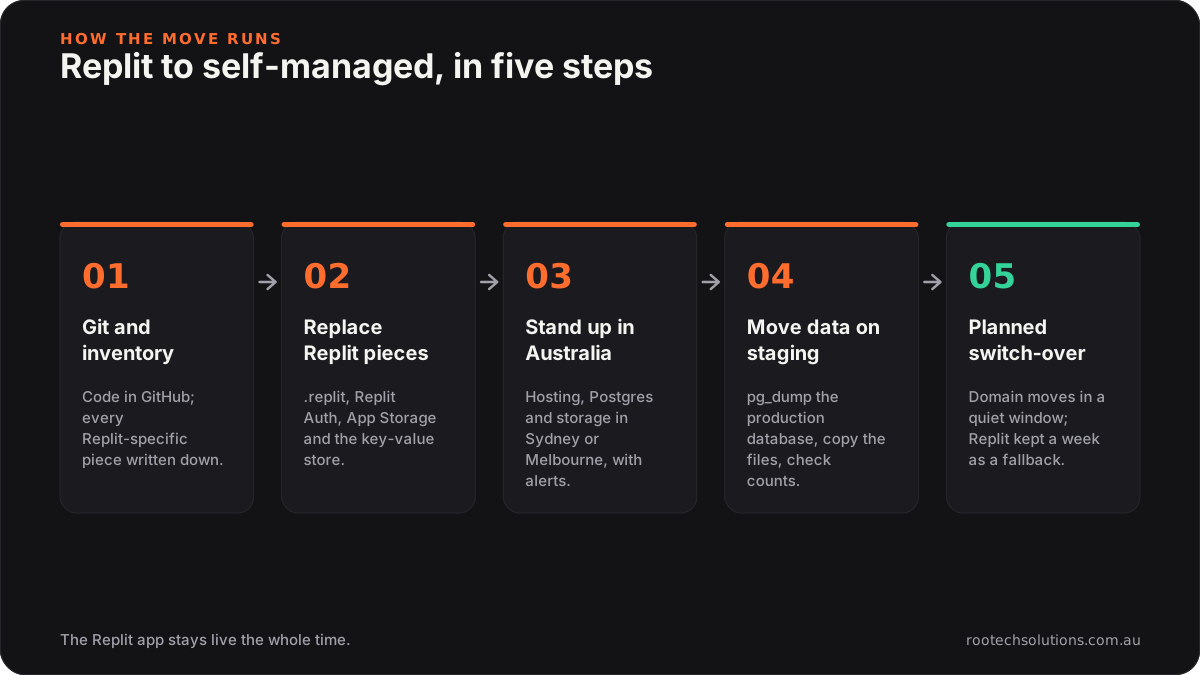
1. Get the code into Git and take an inventory
Connect the Repl to GitHub with Replit's Git tool, or download the project as a zip. Then list every place the app depends on Replit: the run command and ports in .replit, system packages in replit.nix, any import of the App Storage SDK, the key-value store (@replit/database in JavaScript, from replit import db in Python), Replit Auth, and every secret name the code reads.
2. Replace the Replit-specific pieces
- Run configuration. Turn the run command, ports and packages into a
Dockerfile(or a buildpack config). Once the app builds in a container, it can run on almost any host. - Files. Swap the App Storage SDK for an S3-compatible client. AWS S3, Google Cloud Storage, DigitalOcean Spaces and Cloudflare R2 all speak a similar language, so the change is usually small.
- Key-value data. Move anything in the Replit key-value store into a proper Postgres table, or into Redis if it is genuinely a cache.
- Sign-in. Replit Auth users have Replit accounts, not accounts in your app. Plan a move to an auth provider in your own account (Clerk, Auth0, Supabase Auth, or your own) and decide how existing users get across, usually by matching email addresses and asking them to set a password or use a magic link once.
- Secrets. Replit is clear that secret values never leave the old project. Rotate every key as you move it into a secrets manager, so nothing from the prototype keeps working by accident.
3. Stand up the new environment in Australia
Pick an Australian region for everything, and write the setup down as code so it can be rebuilt. AWS has Sydney (ap-southeast-2) and Melbourne (ap-southeast-4); Google Cloud has Sydney and Melbourne; Azure has Australia East in New South Wales and Australia Southeast in Victoria; DigitalOcean and Vultr have Sydney. Add logs, metrics, error tracking and alerts on day one, not after the first outage.
4. Move the database and files, on staging first
Replit's DATABASE_URL points at the development database. The production connection string is in the Database tool's connection settings. Take a dump with pg_dump in custom format, restore it into the new Postgres on a private staging copy, and check row counts table by table. App Storage buckets do not move on their own, so copy the objects across with a script and compare the counts.
Then test the staging copy properly: sign in, book, pay, upload, and run the slowest pages under load.
5. Switch over in one planned step
Pick a quiet window. Put the Replit app into read-only mode or pause writes, take a final database dump and file sync, restore, point the domain at the new host, and watch the dashboards. Keep the Replit deployment untouched for a week as a fallback.
Replit or self-managed: a side by side
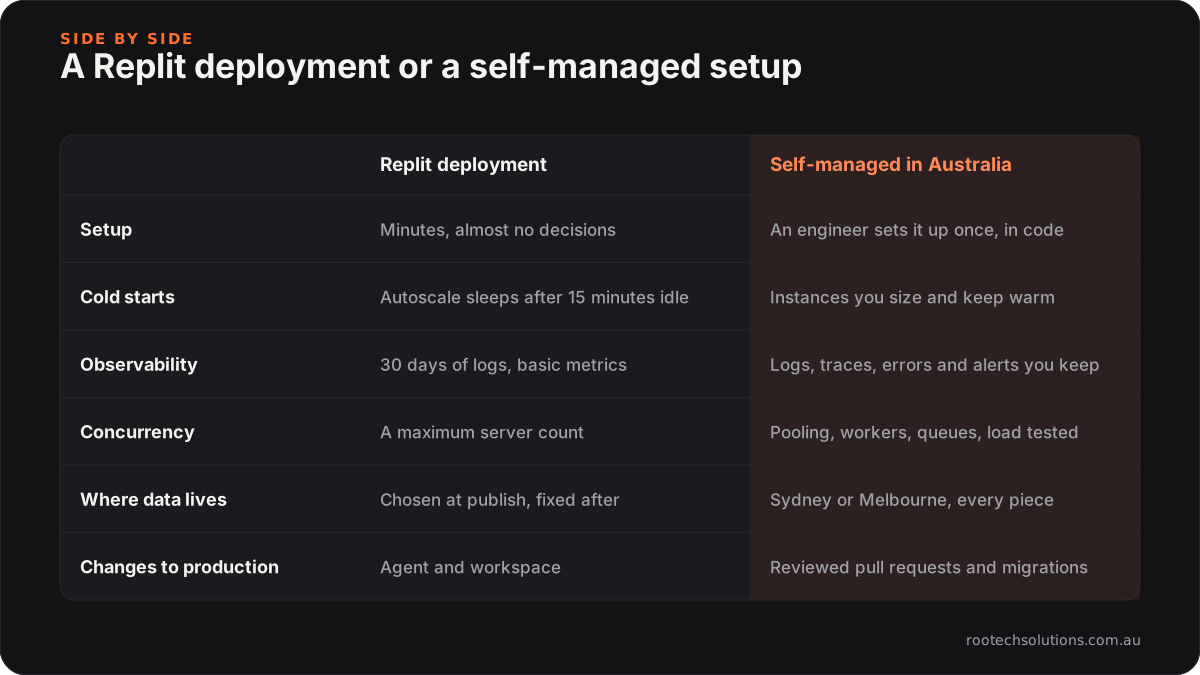
The honest summary: stay on Replit while you are still finding out what to build. Move when the app's reliability starts to matter more than how fast you can change it.
Australian data and the Privacy Act
If your app holds personal information about Australians and your business is covered by the Privacy Act, sending that information offshore brings obligations under Australian Privacy Principle 8. In short, you generally need to take reasonable steps to make sure an overseas recipient handles it properly, and you can stay accountable if they do not. Hosting in Sydney or Melbourne does not remove every obligation, but it makes the answer to "where is my data?" much simpler. Check your own position with the OAIC or a lawyer; this is not legal advice.
Moving a Replit app from anywhere in Australia
Rootech is a Melbourne software studio, and we do this work for founders across the country. Melbourne founders can do the review in person; everyone else does it over video and shared screens, with the same result.
- Sydney: host in ap-southeast-2 next to most of your users. See custom software in Sydney.
- Melbourne: ap-southeast-4 keeps data in Victoria, with Sydney as a second region if you need one. See custom software in Melbourne.
- Brisbane, Perth and Adelaide: the Sydney and Melbourne regions serve all three well, and Perth founders often care most about cold starts because every request already travels further. See Brisbane, Perth and Adelaide.
- Hobart and Canberra: same process, delivered remotely. See Hobart.
If the app was built with another AI builder, the same thinking applies: we have written about moving a v0 app to production and moving off Lovable, and the broader vibe code cleanup covers apps from Replit, Lovable, Bolt, v0 and Cursor.
Frequently asked questions
Do I have to leave Replit?
No. If the app is still a test, has few users and holds nothing sensitive, Replit is a good place for it. Move when cold starts, missing monitoring, scaling limits or data location start to cost you customers or trust.
Can I keep using the Replit Agent after moving?
You can keep using AI coding tools, including on the moved codebase through Git. The difference is that changes go through a pull request, tests and a person's review before they reach production, and the production database is only changed through reviewed migrations.
Will my users have to sign up again?
Not if the move is planned. Accounts, bookings and files are copied across before the switch. If the app used Replit Auth, users usually confirm their email once with the new sign-in, but their data and history stay the same.
What does a self-managed setup cost to run?
For a typical small business app, hosting usually comes in under $50 a month, and AI usage typically runs $20 to $200 a month depending on volume. Bigger apps cost more, and you see the setup before you commit. The migration itself is quoted as a fixed price after we review the app.
Who owns the new setup?
You do. On every Rootech build the code, the hosting accounts and the data stay in your name, and you get the documentation and credentials at handover.
Send us your Replit app
If your Replit app has real users and you are not sure it is ready for them, send us what you built. We review the code, the database and every account it relies on, give you a fixed price to move it, and keep the old version running until the new one is proven. Start with the contact form at Rootech Solutions.