Moving a v0 App to Production: Self-Hosting Next.js in Australia
Built your app in v0? What changes when it goes to production: auth on every server action, migrations, monitoring, and self-hosting Next.js in Sydney or Melbourne.
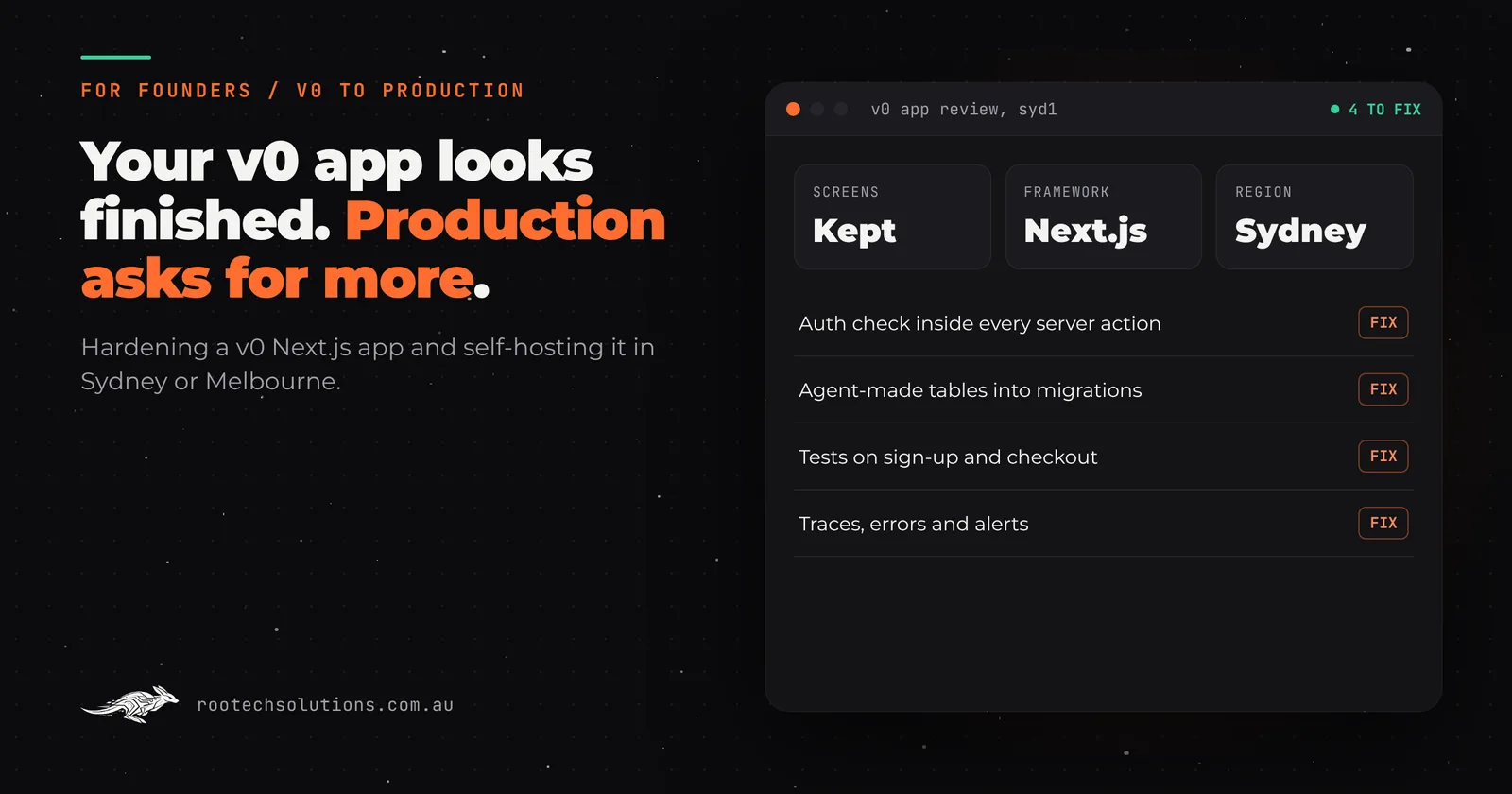
v0 is a remarkable way to start. You describe a screen, and it hands back a clean Next.js app with Tailwind and shadcn/ui components that look like a designer touched them. Since Vercel moved it from v0.dev to v0.app in August 2025, it builds full-stack apps too: databases, server actions, sign-in, one-click publishing.
So why would anyone move off it? Usually because the app worked. Customers arrived, the data started to matter, and the founder realised nobody had checked who can call which server action, where the database lives, or what happens when a hundred people use it at once.
Short answer: v0 is excellent for prototyping, and the Next.js code it writes is a genuinely good starting point. Going to production usually needs an engineer to take it the rest of the way: an authorisation check inside every server action, real database migrations instead of tables the agent created, tests, and monitoring. For many apps, getting the scalability, observability and concurrency production needs, plus data kept in Australia, means self-managing: running Next.js in a container in Sydney or Melbourne, with a database, storage and monitoring in accounts you own.
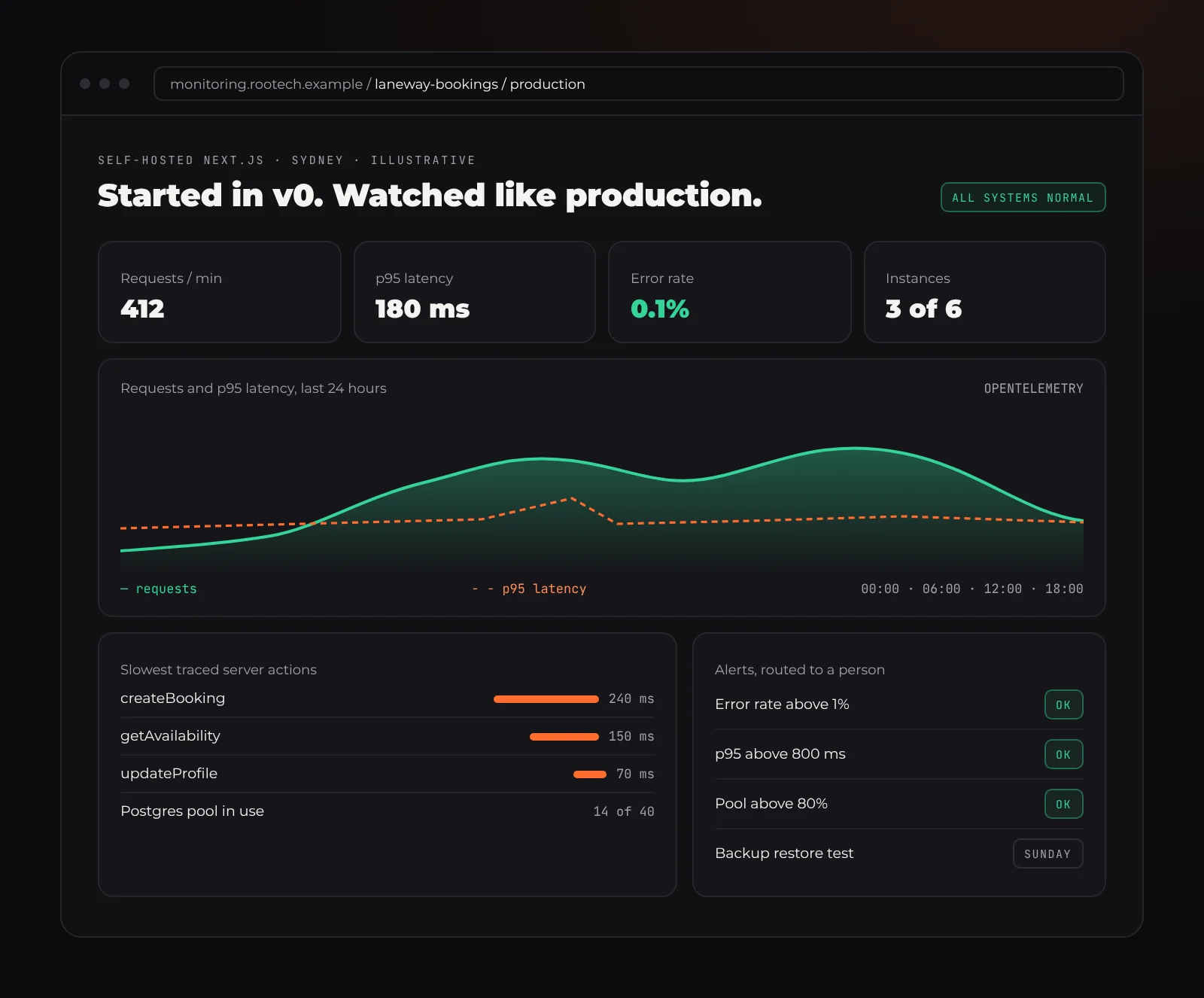
Illustrative. What a v0 app looks like once it has the monitoring production needs: you see a slow server action before your customers do.
Why v0 is great for prototyping
v0's output is closer to production code than most AI builders. It writes Next.js with Tailwind and shadcn/ui, the same stack many professional teams choose, and the full-stack docs describe server components, route handlers and server actions talking to Supabase, Neon or Upstash. GitHub sync is two-way, so the code lives in a repository you can take anywhere, and v0's own docs say plainly that you can export the code and deploy elsewhere.
For a founder testing an idea, that is the best of both worlds: a prototype in an afternoon, built on a framework an engineer will recognise.
What v0 leaves for production
The gaps are not about how the app looks. They are about what happens behind it.
Server actions that trust the page. In Next.js, a server action is a function the browser can call directly with a POST request. The Next.js data security guide is explicit: checking that a user is logged in on the page does not protect the actions on that page. Each action has to check, again, who is calling and whether they are allowed to touch that record. Prototypes rarely do this everywhere, and the gap is invisible until someone changes an ID in a request and sees another customer's data.
Secrets in the wrong place. Anything in an environment variable starting with NEXT_PUBLIC_ is baked into the JavaScript every visitor downloads. One misnamed key is a public key.
Tables made by the agent, not by migrations. When you add a database integration, v0 can create, update and drop tables by running SQL itself. That is fast. It also means there is no reviewed, repeatable record of how the database got its shape, and no clean way to roll a change back.
No safety net for change. In our experience reviewing AI-built apps, tests are thin or missing, so every new prompt can quietly break a flow that worked yesterday. A production app needs tests on the paths that earn money: sign-up, booking, checkout.
A platform you did not choose on purpose. Publishing from v0 deploys to Vercel, and v0 says its code is optimised for the Vercel platform. Vercel is a strong host and plenty of production apps should stay there. But functions default to the Washington, D.C. region unless you change it, Vercel's only Australian region is Sydney, and usage beyond what your plan includes is billed on demand. Those are choices worth making deliberately rather than inheriting.
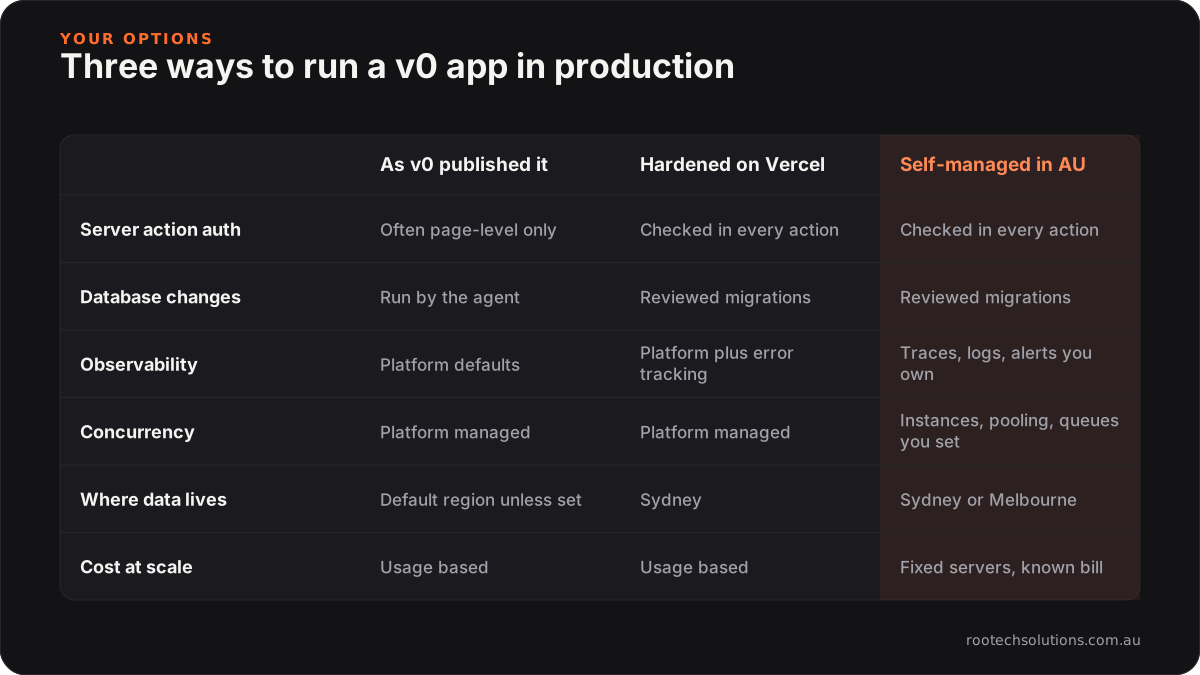
Stay on Vercel, or self-manage?
This is a real decision, not a foregone conclusion.
Staying on Vercel makes sense when the app is mostly pages and light server work, your traffic is predictable, and you are happy with Sydney as your region. Fix the security gaps, set the function region to syd1, add monitoring, and you have a good production setup.
Self-managing makes sense when you need the levers a managed platform keeps for itself:
- Concurrency you control. How many requests each instance handles, how many instances run, a connection pooler in front of Postgres, and background work moved to a queue so a slow job never holds up a customer.
- Observability end to end. One trace from the browser click, through the server action, into the database query, with logs and metrics in the same place and alerts that reach a person.
- Data residency. Your app, database, files and logs all in Australia, including Melbourne, which Vercel does not offer.
- Predictable cost at scale. Fixed-size servers and a known database bill, instead of usage that grows with every request.
What to replace when you leave Vercel
Most of a v0 app is plain Next.js and moves without changes. A few Vercel-specific pieces need a home:
| On Vercel | Self-managed replacement |
|---|---|
| Vercel Postgres (now Neon) or Supabase via the Marketplace | Managed Postgres in an Australian region, or keep Neon or Supabase in Sydney under your own account |
| Vercel KV (now Upstash Redis) | Redis in the same region as the app |
| Vercel Blob | An S3-compatible bucket |
| Cron jobs | A scheduler on your platform, or a worker with a queue |
| Image optimisation and middleware | Both work under next start with no extra setup |
| Vercel Observability | OpenTelemetry and error tracking you run or choose |
How to self-host a v0 app, step by step
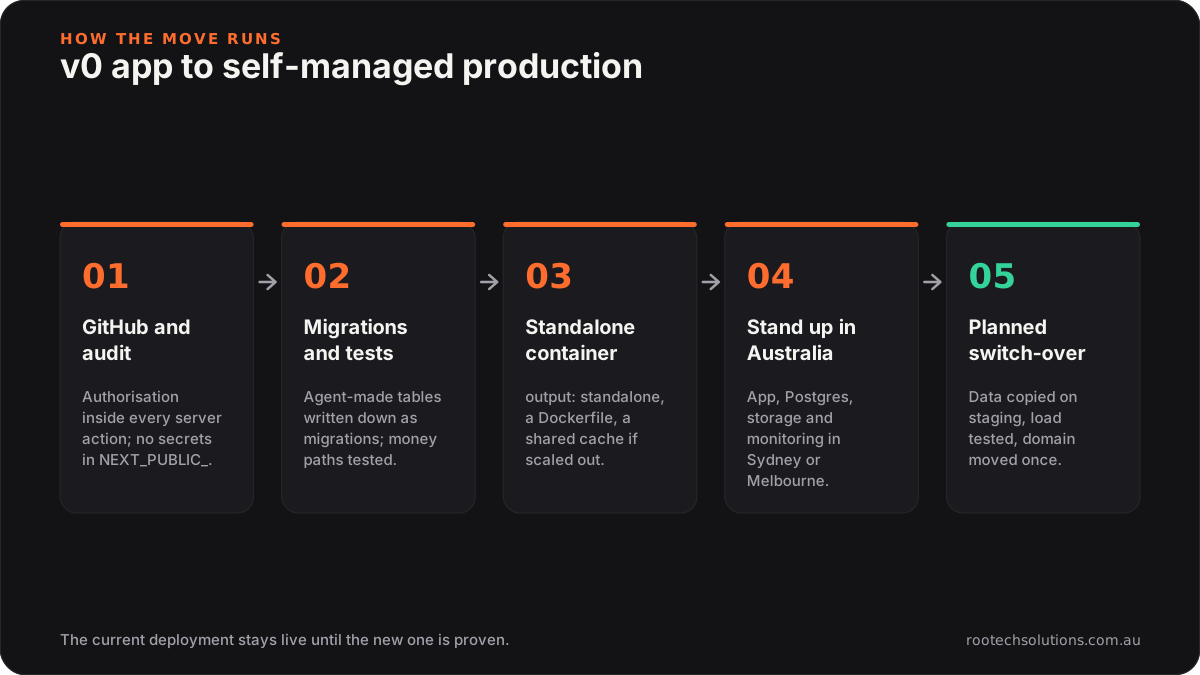
1. Get the code and audit it
Connect the v0 project to GitHub so every change is in a repository you own. Then read every server action and route handler and add an authorisation check inside each one: who is calling, and do they own this record? Search for NEXT_PUBLIC_ and make sure nothing secret is behind it.
2. Make the database reproducible
Write the current schema out as migration files (Drizzle, Prisma or plain SQL all work), check them against the live database, and from now on change the schema only through a reviewed migration. Add tests for the flows that matter before you change anything else.
3. Build Next.js as a container
Set output: 'standalone' in next.config, and the build produces a small Node server. Copy public and .next/static in alongside it (they are not included by default), wrap it in a Dockerfile, and it runs on any container platform. If you run more than one instance, the Next.js self-hosting guide explains the extra pieces: a shared cache handler (Redis works) and a fixed NEXT_SERVER_ACTIONS_ENCRYPTION_KEY so every instance agrees. Next.js 16.2 also made the Deployment Adapter API stable, which is making other hosts easier, and open-source platforms like Coolify give you a Vercel-style deploy button on your own server.
4. Stand it up in Australia, with monitoring on day one
AWS has Sydney and Melbourne regions; Google Cloud has Sydney and Melbourne; Azure has Australia East, Australia Southeast and Australia Central; DigitalOcean has Sydney. Put the app, database, storage and logs in the same region.
For observability, Next.js supports OpenTelemetry through instrumentation.ts, so traces can go to any compatible backend, and error tracking such as Sentry sets up with one command. Then add the alerts: error rate, slow responses, database connections, disk.
5. Move the data and switch over
Restore the database into the new Postgres on a private staging copy, copy files across, and check counts. Test sign-in, payments and uploads, then run a load test on the busiest pages. Switch the domain in a quiet window and keep the Vercel deployment untouched for a week as a fallback.
Your data and the Privacy Act
If your app holds personal information about Australians and your business is covered by the Privacy Act, sending it offshore brings obligations under Australian Privacy Principle 8: you generally need to take reasonable steps so an overseas recipient handles it properly, and you can stay accountable if they do not. Keeping the app, database, files and logs in Sydney or Melbourne makes "where is our data?" a one-line answer. This is not legal advice; check your own position with the OAIC or a lawyer.
Taking a v0 app to production from anywhere in Australia
Rootech is a Melbourne software studio working with founders around the country. Melbourne founders can meet in person; everyone else works with us over video, with the same process.
- Sydney: Vercel's
syd1and AWS ap-southeast-2 both sit close to your users. See custom software in Sydney. - Melbourne: self-managing is the way to keep everything in Victoria, on AWS ap-southeast-4 or Google Cloud's Melbourne region. See custom software in Melbourne.
- Brisbane, Perth and Adelaide: served well from Sydney or Melbourne; Perth teams in particular should make sure nothing is still running in the United States by default. See Brisbane, Perth and Adelaide.
- Hobart and Canberra: the same process, delivered remotely. See Hobart.
Built with a different AI builder? Read moving off Replit and moving off Lovable, or see the vibe code cleanup page.
Frequently asked questions
Is the code v0 writes good enough to keep?
Often, yes. It is standard Next.js with widely used components, so the screens and most of the structure can stay. What usually needs work is underneath: authorisation in every server action, migrations, tests and monitoring.
Do I have to leave Vercel to go to production?
No. Many apps run well on Vercel in production once the security gaps are fixed and the region is set to Sydney. Self-managing is worth it when you need control over concurrency, deeper monitoring, data kept in Melbourne, or more predictable costs at scale.
Can I keep using v0 after moving?
Yes. With the code in GitHub you can keep generating screens and components in v0 and bring them in through a pull request, where tests and a person review them before they reach production.
What does it cost to run once it is self-managed?
For a typical small business app, hosting usually comes in under $50 a month, and AI usage typically runs $20 to $200 a month depending on volume. The move itself is quoted as a fixed price after we review the app.
Who owns the result?
You do. On every Rootech build the code, the hosting accounts and the data stay in your name, with documentation and credentials handed over at launch.
Send us your v0 app
If your v0 app has real users and you are not sure what is behind the screens, send us what you built. We review the code, the server actions, the database and the hosting, give you a fixed price to take it to production, and keep the current version live until the new one is proven. Start with the contact form at Rootech Solutions.