Moving Off Lovable: Self-Hosting Your App in Australia
How to move a Lovable app to your own Supabase, server and storage in Sydney or Melbourne: the export, row level security, monitoring and the switch-over.
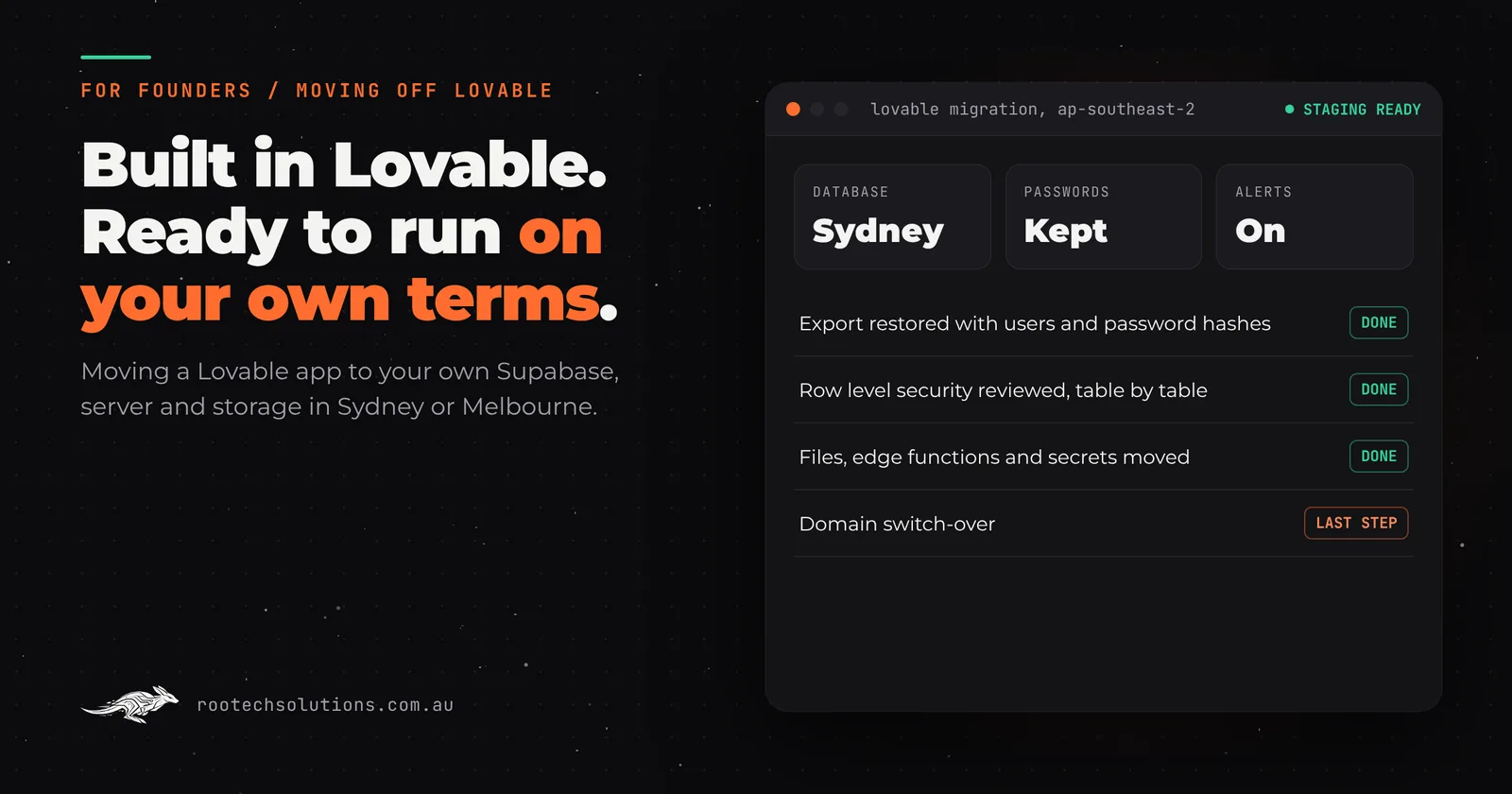
Lovable might be the fastest way there has ever been for a non-technical founder to get a real app in front of people. You type what you want, it builds the screens, wires up a Supabase backend with sign-in, a database and file storage, and publishes it to a live address. For a lot of founders it was the first time an idea became something customers could actually use.
The question we hear next is always some version of: it works, people are paying, now how do I run this properly? That usually means moving the app onto a database, server and storage the business controls.
Short answer: Lovable is excellent for prototyping. For production, most apps need an engineer to take them the rest of the way, and getting the scalability, observability and concurrency a real business needs often means self-managing. Moving off Lovable means four things: sync the code to GitHub, export the database (it includes users and their password hashes), stand up your own Supabase in Sydney with storage, edge functions and secrets recreated, then host the front end yourself. Lovable's own docs walk through it, and Lovable says plainly that it does not move a project off its built-in backend in one step.
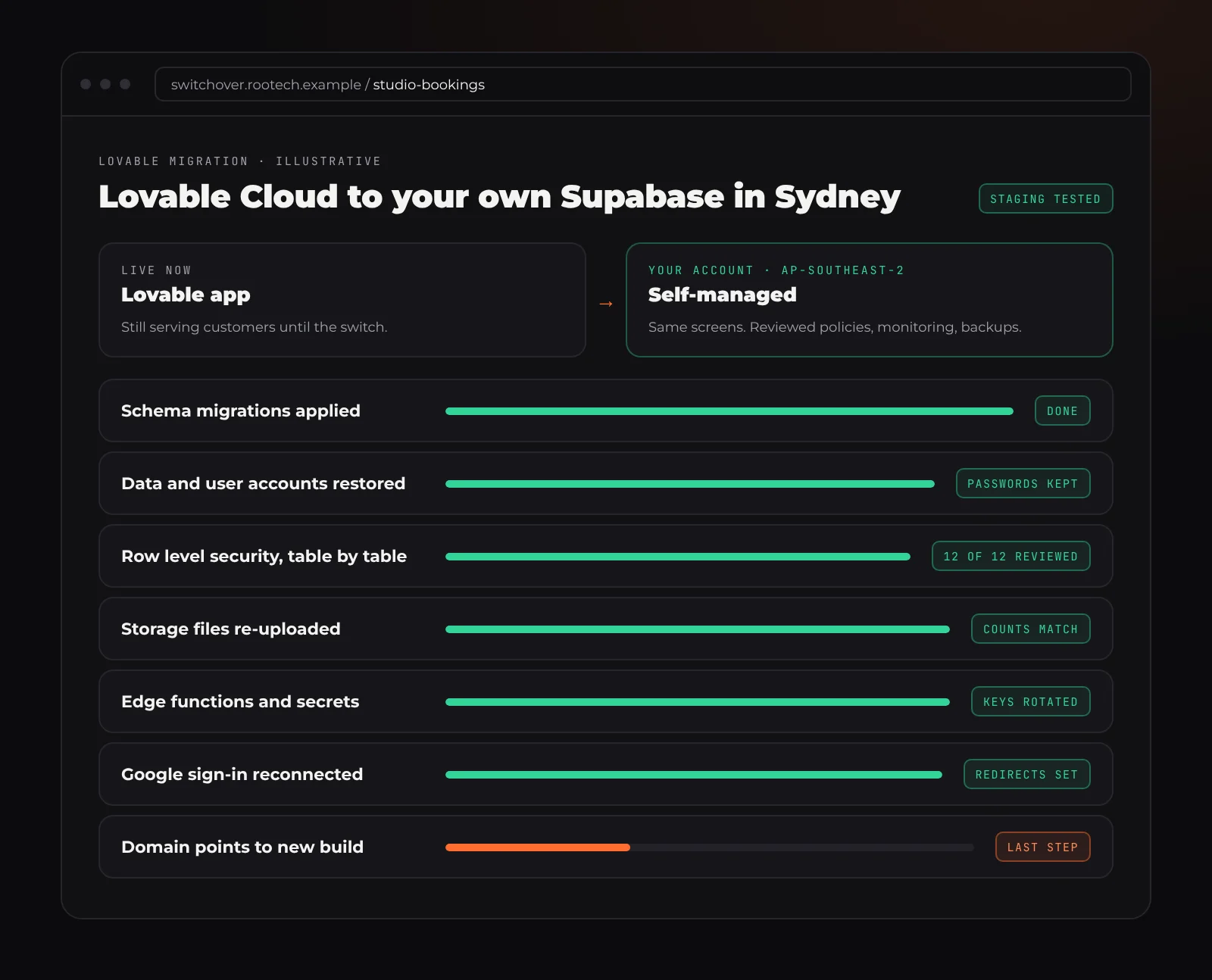
Illustrative. The export carries your data and accounts; files, functions, secrets and sign-in settings have to be moved on purpose.
Why Lovable is great for prototyping
Lovable takes away nearly every decision that slows a first version down. The front end is React, the backend is Supabase (through Lovable Cloud since September 2025, or your own Supabase project), hosting is built in, and two-way GitHub sync is available on every plan. Lovable says in its docs that you own your code and data.
Since May 2026, new Lovable projects are built on TanStack Start with server-side rendering, which helps search engines and makes it easier to keep logic on the server. Older projects are a single-page React app built with Vite. Both can be moved.
For testing an idea with real people, that is exactly what you want. The problems come later, and they come from success.
Where Lovable apps struggle in production
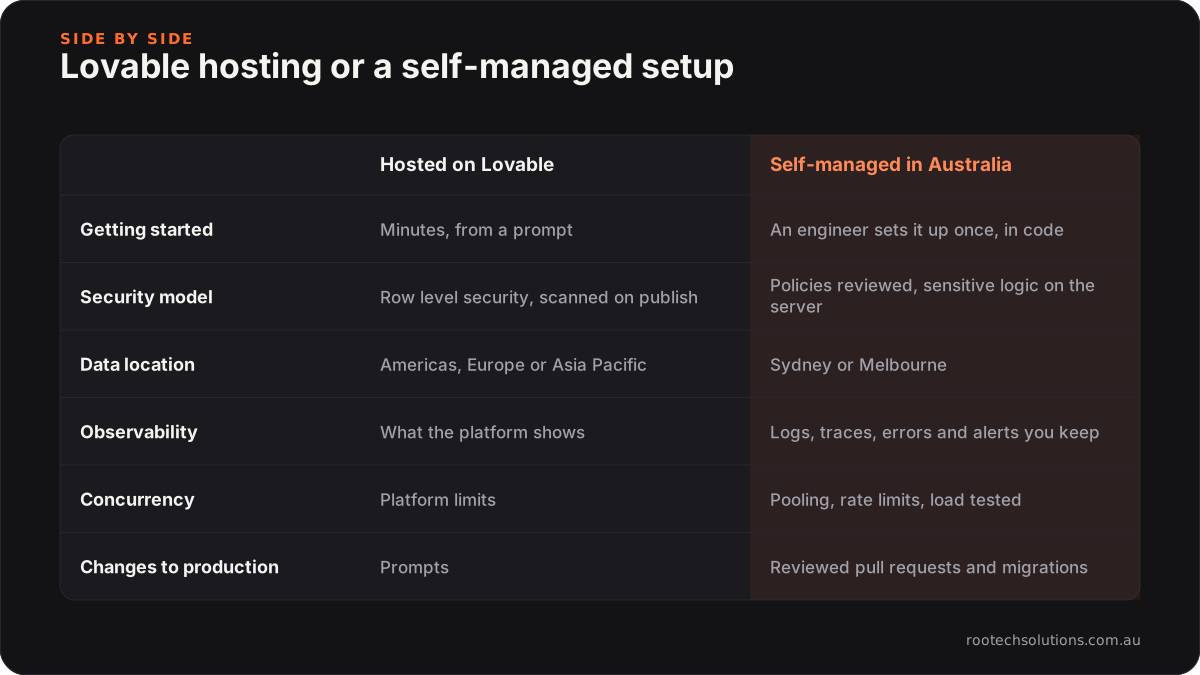
Row level security is the whole security model. A Lovable app's browser talks to Supabase with a publishable key that is safe to expose by design, because it can only reach what row level security allows. That makes the security of every table depend on its policies being correct, not just present. In 2025 a researcher found 170 of 1,645 Lovable projects exposing data through missing or weak policies, recorded as CVE-2025-48757 (Lovable disputes that it is a platform flaw, saying each customer is responsible for their app's data). Lovable now runs a security scan on publish and says itself that scans cannot guarantee complete security.
The platform is part of your attack surface. In April 2026, a flaw in Lovable's own API was reported to have exposed other users' source code and credentials for older projects. It was fixed, but it shows the trade-off: when your code and keys sit on a shared platform, its incidents become yours.
A region you picked once, maybe without noticing. Lovable Cloud offers Americas, Europe or Asia Pacific, and the region cannot be changed after Cloud is enabled. Lovable does not say which city its Asia Pacific region is in, so you cannot assume your customers' data is in Australia.
Observability stops at the platform's edge. You can see what Lovable and Supabase show you. You cannot trace one slow request from the browser through an edge function into a query, set your own alerts, or keep logs as long as you need.
Concurrency and limits you do not set. Free-plan apps are limited to 1,000 server requests per project every 10 seconds. Whatever the plan, those dials belong to the platform, not to you. Production apps need connection pooling tuned to their traffic (Supabase's Supavisor uses transaction mode on port 6543 for short-lived connections), rate limits on sign-in and forms, and a load test before launch day.
Changes with no record. Prompting changes the app and the database quickly. Without tests and reviewed migrations, every change risks breaking something that worked yesterday, and there is no reliable way back.
Why production apps end up self-managed
Self-managed does not mean doing everything by hand. It means the app runs in accounts you own, in a region you chose, configured in code, with the parts that matter under your control:
- Scalability: you choose server sizes, how many run, and how the database pool is set.
- Observability: logs, traces, error tracking and alerts that tell a person something is wrong before a customer does.
- Concurrency: pooling, queues for slow work, and rate limits, tested under load.
That is engineering work. Lovable got you to a product people want without an engineer; the production version is usually where one earns their keep.
How to move a Lovable app, step by step
Lovable documents the move in its external deployment guide. This is that process, in the order we run it, with the old app live throughout.
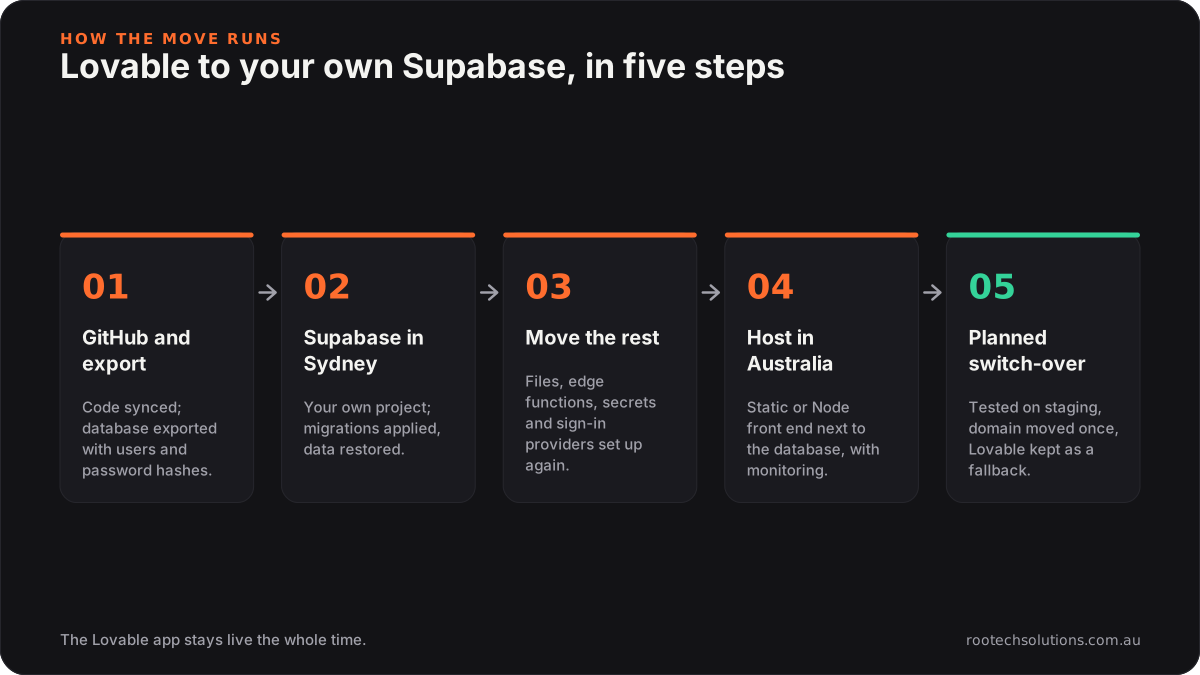
1. Get the code and the data out
Connect GitHub from Lovable (it creates a new repository; it cannot connect to an existing one). Then take a database export: a compressed Postgres archive with your schema, data, user accounts and password hashes. Note what it does not include: storage files, edge function code, secrets, sign-in provider settings and API keys. Each of those has its own step.
2. Create your own Supabase project in Sydney
Supabase has a Sydney region (ap-southeast-2), which is where we would put an app with Australian customers. Lovable's guide supports managed or self-hosted Supabase as the destination. Self-hosting Supabase on Docker is possible on your own server in Sydney or Melbourne, but you take on HTTPS, email, backups and high availability yourself, so for most small teams managed Supabase in Sydney is the better trade.
Apply the migrations in supabase/migrations/ (or npx supabase db push), then restore the data with pg_restore.
3. Rebuild what the export leaves behind
- Users keep their passwords, but everyone signs in again once.
- Sign-in providers such as Google need their settings and redirect URLs set up again on the new project.
- Files are re-uploaded bucket by bucket, and the counts checked.
- Edge functions are redeployed with
npx supabase functions deploy; they are Deno code, so they can also run on other Deno platforms if you would rather. Scheduled jobs are recreated. - Secrets are set again, and every key is rotated as it moves.
- Lovable's AI features and connectors are swapped for your own provider accounts.
This is also the moment to review every row level security policy table by table, and to move anything sensitive out of the browser and onto the server.
4. Host the front end in Australia, with monitoring from day one
For an older Vite project, npm run build produces static files that any host can serve, as long as every route falls back to index.html. For a TanStack Start project, the guide's NITRO_PRESET=node-server build gives you a Node server to run in a container. Either way, host it in Sydney or Melbourne next to the database, and add error tracking, request tracing, logs and alerts before you switch anything.
5. Test on staging, then switch over
Run the new setup on a private staging address and test sign-in, payments, uploads and the busiest pages under load. Then pick a quiet window, pause writes on the old app, take a final export and file sync, point the domain at the new host, and watch the dashboards. Keep the Lovable project untouched for a week as a fallback.
Australian data and the Privacy Act
If your app holds personal information about Australians and your business is covered by the Privacy Act, sending it overseas brings obligations under Australian Privacy Principle 8: you generally need reasonable steps to make sure an overseas recipient handles it properly, and you can stay accountable if they do not. A move to Sydney or Melbourne lets you answer "where is our data?" in one line. This is not legal advice; check your position with the OAIC or a lawyer.
Moving a Lovable app from anywhere in Australia
Rootech is a Melbourne software studio, and founders across the country send us Lovable apps. Melbourne founders can meet in person; everyone else works with us over video.
- Sydney: Supabase and AWS both run in ap-southeast-2, close to your users. See custom software in Sydney.
- Melbourne: keep the database in Sydney and the app and backups in AWS ap-southeast-4, or self-host Supabase in Melbourne if everything must stay in Victoria. See custom software in Melbourne.
- Brisbane, Perth and Adelaide: served well from Sydney, and a long way better than a region on another continent. See Brisbane, Perth and Adelaide.
- Hobart and Canberra: the same process, delivered remotely. See Hobart.
We have also written about whether to fix or rebuild a Lovable app with real users, moving off Replit and taking a v0 app to production. The vibe code cleanup page covers the whole service.
Frequently asked questions
Will my users have to sign up again?
No. The database export includes user accounts and password hashes, so people keep their passwords. They sign in once on the new setup, and sign-in providers like Google have to be reconnected on your side.
Can I keep building in Lovable after moving?
You can keep the GitHub repository in sync for building screens, but production changes should go through a pull request, tests and a person's review. Many founders keep prototyping new features in Lovable and have them brought into the production app properly.
Should I self-host Supabase or use Supabase's managed service?
For most small businesses, managed Supabase in Sydney is the right answer: you get the same tools with backups and upgrades handled. Self-hosting makes sense when everything must stay in Melbourne or on your own servers, and you are ready to run backups, email and security updates yourself.
What does it cost to run afterwards?
For a typical small business app, hosting usually comes in under $50 a month, and AI usage typically runs $20 to $200 a month depending on volume. The move is quoted as a fixed price after we review the app.
Who owns everything after the move?
You do. On every Rootech build the code, the Supabase and hosting accounts and the data are in your name, with documentation and credentials handed over at launch.
Send us your Lovable app
If your Lovable app has real users and you are not sure the foundation is ready for them, send us what you built. We review the code, the row level security policies, the data and the hosting, quote a fixed price to move it, and keep the current app live until the new one is proven. Start with the contact form at Rootech Solutions.