AI Receptionist for Clinics: Catch After-Hours Bookings
An AI receptionist for clinics answers new patients' questions after 6pm, picks the right appointment type and books into Cliniko or Nookal. Costs inside.
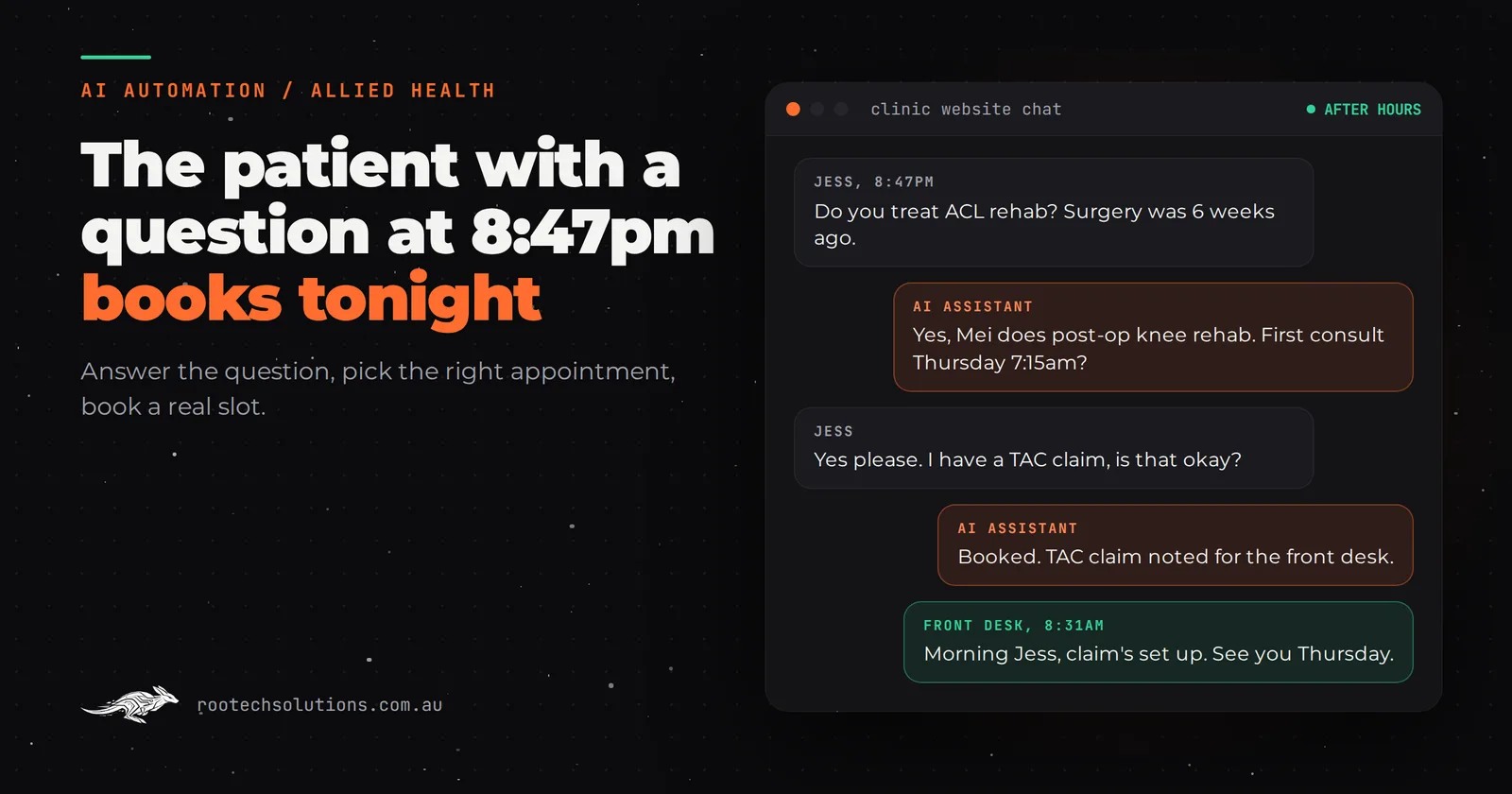
Your front desk closes at 6pm. New patients start looking for a physio, osteo or podiatrist after dinner, on their phone, with a sore knee and a question. By the time someone returns the call at 9am, the patient has booked with the clinic whose website answered at 8:47pm.
Short answer: An AI receptionist for clinics answers new-patient questions after hours, works out which appointment type and practitioner fits, and books straight into your practice management software, such as Cliniko or Nookal. It never gives clinical advice and hands anything urgent or sensitive to staff. It suits clinics that get enquiries at night but lose them before morning.
Why doesn't online booking already solve after-hours enquiries?
Because online booking only works for patients who already know what to book. Cliniko, Nookal and Halaxy all offer online booking, and for returning patients it is the right tool. New patients are different: most have a question before they will commit.
The questions that stall an after-hours booking are predictable:
- "Do you treat ACL rehab, or is that a different kind of physio?"
- "Do I need a referral?"
- "I have a GP plan, a TAC claim or NDIS funding. Can I use it with you?"
- "Is the 30-minute or the 45-minute appointment the one I need?"
- "Can I see a female practitioner?"
A booking widget cannot answer any of them. Voicemail cannot either, and many callers will not leave a message at all. So the patient with a question goes back to Google, and the next clinic that answers gets them.
What does an AI receptionist for clinics actually do?
It answers the question, then books the right appointment. That second half is where most generic chatbots fail and where the value is for a clinic.
- Answers from your clinic's information. Services, which practitioner treats what, fees, funding you accept, parking, what to bring. Nothing improvised.
- Chooses the appointment type. New patient or returning, initial or standard consult, which practitioner has the right interest, using your rules.
- Books into your practice management software. It offers real slots from your live calendar, so there is no "we'll confirm tomorrow".
- Collects only what the booking needs. Name, contact details, the appointment reason in the patient's own words, referral details if they have one.
- Hands off what it should not handle. Anything that sounds urgent gets your urgent-care message (for example, to call 000 or see a GP). Complaints, billing disputes and complex funding questions go to the front desk with the conversation attached.
When the front desk arrives at 8:30am, they start with a list of captured and booked patients, not a voicemail backlog.
How do a voicemail, a booking widget and an AI receptionist compare?
Each has a place. The useful question is which one handles the patient who arrives at 9pm with a question.
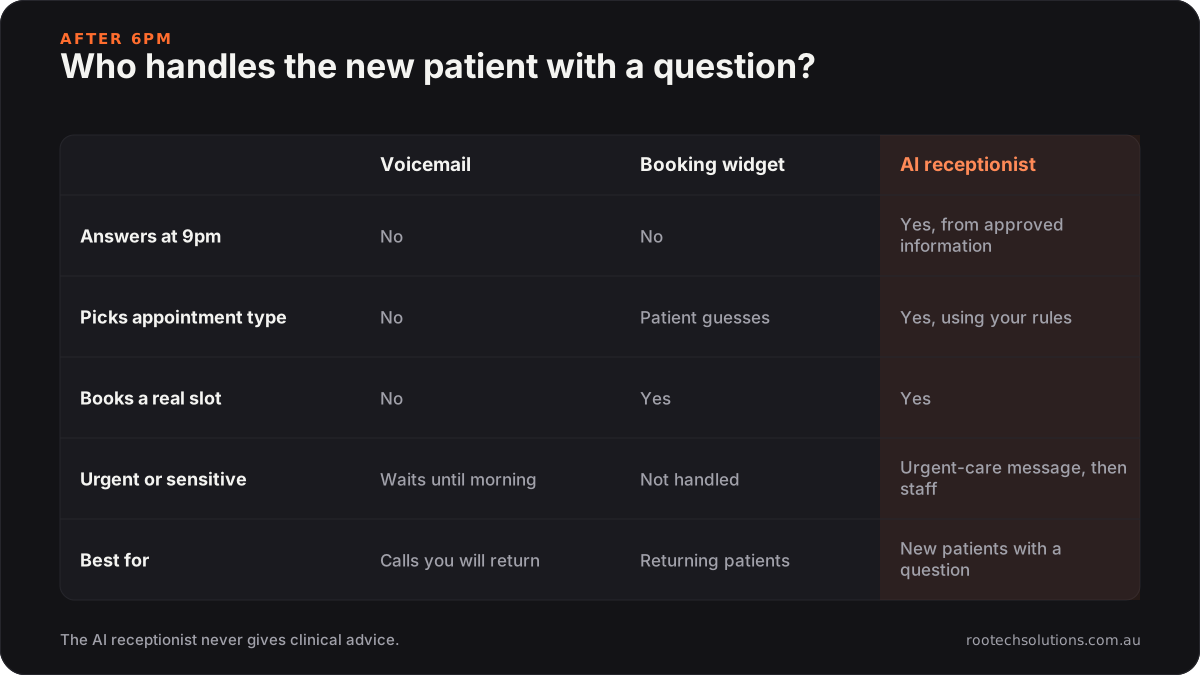
Caption: Online booking serves patients who already know what they want. The AI receptionist serves the ones who have a question first.
| Voicemail | Online booking widget | AI receptionist | |
|---|---|---|---|
| Answers "do you treat this?" at 9pm | No | No | Yes, from your approved information |
| Chooses the right appointment type | No | Patient guesses | Yes, using your rules |
| Books a real slot | No | Yes | Yes |
| Urgent or sensitive enquiries | Waits until morning | Not handled | Urgent-care message, then to staff |
| Best for | Calls you will return | Returning patients | New patients with a question |
Is an off-the-shelf tool enough, or does a clinic need a custom AI integration?
Start with what your practice management software already does. Cliniko, Nookal and Halaxy cover scheduling, notes, invoicing and online booking, and some offer their own add-ons or integrations. Check their current features and pricing, because these change often.
Off-the-shelf is the right call when:
- most of your after-hours traffic is returning patients rebooking;
- your appointment types are simple, with one or two kinds of consult;
- your website gets only a handful of new-patient enquiries a week.
A custom AI integration earns its keep when:
- new patients regularly ask what you treat, what funding you take or which practitioner to see;
- you run several appointment types, practitioners with different interests, or multiple locations;
- you want one assistant across your website chat, Facebook and Instagram messages, and optionally the phone.
The custom part is the clinic-specific logic: your practitioners, your appointment rules, your funding answers and your hand-off rules, connected to the booking system you already use. If calls matter more than web chat for your clinic, read our comparison of AI phone answering and a website chatbot before you choose a channel.
How should a clinic handle privacy with an AI receptionist?
Collect as little as the booking needs, and keep it in your practice management software rather than in a chatbot log. Australian privacy law sets strict rules on how a health service provider collects, uses and discloses health information, and an enquiry that mentions an injury or condition can be health information.
In practice, a sound build:
- asks for the reason for the visit in a sentence, not a medical history;
- tells the patient up front that they are talking to an AI and how their details are used;
- writes the booking and notes into your practice software, and keeps the chat transcript only as long as you decide;
- never offers a diagnosis, a treatment recommendation or a likely outcome.
That last point is also good marketing hygiene. An assistant that promises results is a liability; one that answers practical questions and books the right appointment is simply good service.
What does it cost, and what does the build look like?
As an estimate, an AI receptionist for a single clinic costs $3,000 to $8,000 to build at a fixed price, depending on the number of practitioners, appointment rules and channels, and is usually live in two to three weeks. Running costs are hosting, usually under $50 a month, plus AI usage of roughly $20 to $150 a month at typical clinic volumes. Adding an after-hours phone agent adds per-minute call costs.
- Week 1: your knowledge base and rules. What each practitioner treats, appointment types, funding answers, the urgent-care message and the list of things the assistant must never answer.
- Week 2: connection to your practice management software and website chat, then testing against real past enquiries.
- Week 3: a soft launch with the front desk reviewing every overnight conversation, then normal running.
To size the leak, use your own numbers. As an illustration: if your clinic loses three new patients a week to after-hours silence, and an initial consult is $95 to $140, that is roughly $285 to $420 a week in first appointments alone, before any follow-up treatment. Your figures will differ, so count last month's after-hours enquiries before deciding. Our guides to what AI automation costs a physio clinic and what a physio clinic should automate first go deeper on both.
When is an AI receptionist the wrong fix?
When the clinic is already full. If your practitioners are booked out three weeks ahead, faster replies just create a longer waitlist; that is a capacity problem. It is also not worth building if your site gets fewer than a few new-patient enquiries a week, or if nearly all your bookings come through referrers who call during the day.
Frequently asked questions
Will patients know they are talking to an AI?
They should, and the assistant should say so in its first message. Patients care much more about getting a correct answer and a booking at 9pm than about whether a person typed it. Being upfront also makes the hand-off to staff feel natural.
Can the AI receptionist book directly into Cliniko or Nookal?
In most cases, yes, through the software's booking links or integration options. Week one of the build confirms exactly what your system allows, and where direct booking is not possible the assistant holds a requested slot for the front desk to confirm first thing.
What happens if a patient describes something urgent?
The assistant does not assess it. It gives your clinic's urgent-care message, for example to call 000 or see a GP or emergency department, and flags the conversation for staff. Those rules are written and signed off by the clinic before launch.
Does it work for multi-location clinics?
Yes, and that is often where it helps most, because patients ask which location has which practitioner and the earliest slot. The assistant checks availability across locations and books the one that suits the patient.
See how many patients you are losing after 6pm
We will go through last month's enquiries with you, count what arrived after hours and what happened to it, and tell you plainly whether an AI receptionist is worth it at your volume. Book a free AI workflow audit. If you go ahead, the audit fee comes off your first project.