AI Automation for Physio Clinics: What to Automate First
AI automation for physio clinics, in order: reminder replies and waitlist fill, care-plan follow-up, then intake. What Cliniko already does, what to skip.
A physio clinic's diary leaks in two places: the patient who doesn't turn up on Tuesday, and the patient who came twice for a sore knee and quietly never booked the third session. Your practice software already sends reminders, so the question is what AI automation for a physio clinic adds on top, and in what order.
Short answer: The first AI automation for most physio clinics is handling replies to appointment reminders: rescheduling by text and filling the freed slot from a waitlist. Second is following up patients who drop out of an agreed care plan. Third is turning intake forms into a ready-to-read summary. Keep diagnosis, exercise prescription and claim submission with clinicians and admin staff.
What does Cliniko, Nookal or Halaxy already handle?
More than most clinics use. Cliniko, Nookal and Halaxy all advertise automated appointment reminders, and most clinics have online booking switched on. If your reminders are not going out automatically today, fix that first: it costs nothing extra to build.
The gap is not the reminder. It is what happens after it:
- A patient replies "can I do Thursday at 4 instead?" and the message sits in an inbox until reception gets to it, or the patient calls and waits on hold.
- A patient cancels at 7am, the 10am slot opens, and nobody has time to ring the three people who wanted an earlier appointment.
- A patient finishes two of the six sessions you recommended, feels a bit better, and drops out. Nothing in the system flags it until they reappear in four months with the same knee.
That is where AI earns a place in a physio clinic: the conversations and follow-ups your software starts but cannot finish.
Which AI automation for physio clinics comes first, second and third?
Start with whatever turns an existing message into a booking with no human touch. Then work outward to follow-up, then to paperwork.
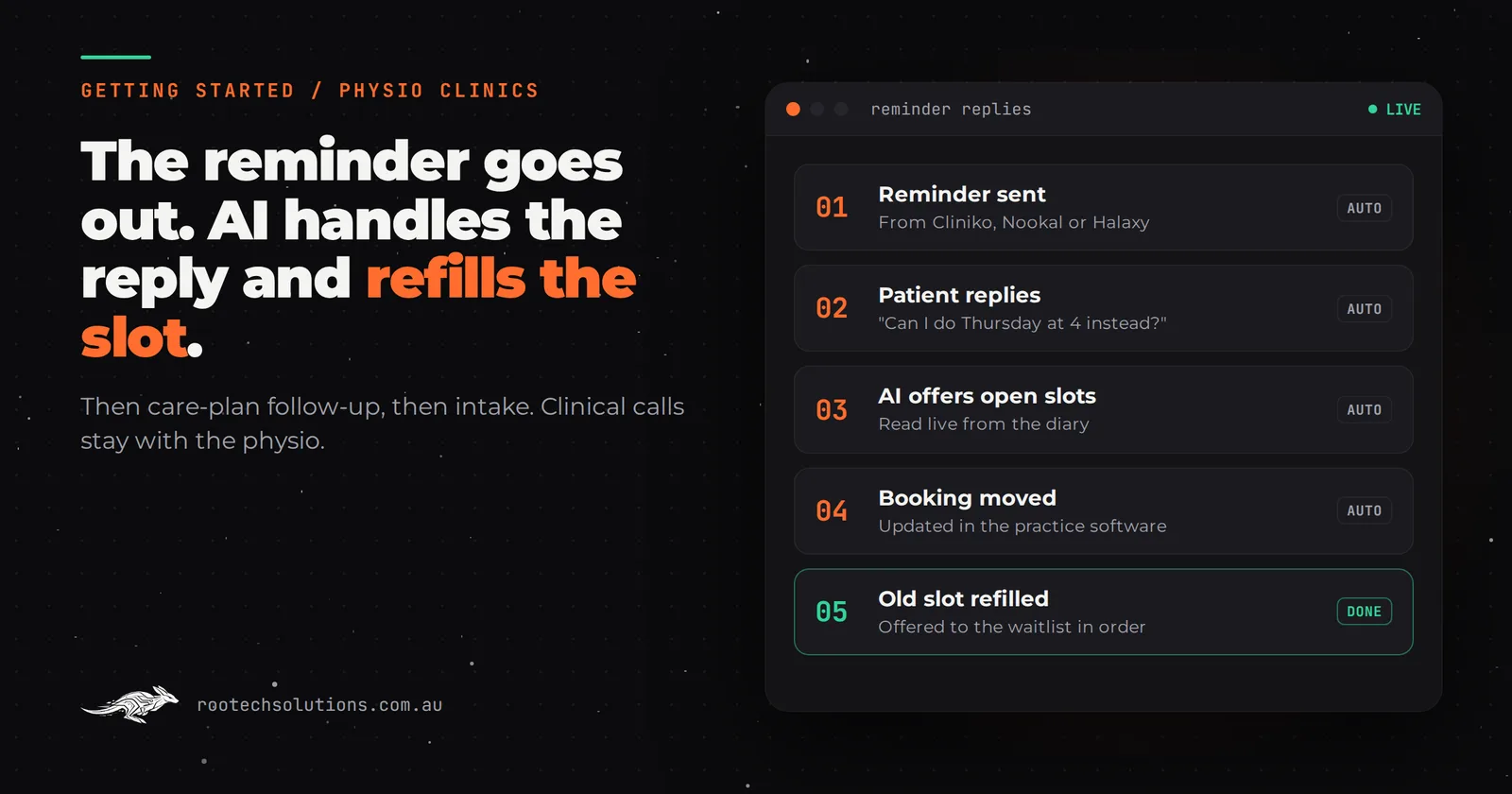
- Reminder replies and waitlist fill. The AI reads replies to your existing reminders, offers real open slots from the diary, moves the booking, and texts the next person on the waitlist when a slot frees up. This is first because it protects revenue you have already earned the right to: these patients are booked.
- Care-plan follow-up. When a patient has an agreed plan of, say, six sessions and has no next appointment booked, the AI sends a short personal check-in a few days later with booking options. If they reply with a question about pain or symptoms, it goes to their physio, not the bot.
- Intake to summary. New patients complete the clinic's online form before their first visit. The AI turns the answers into a one-paragraph summary for the physio, flags anything that needs attention before the session (recent surgery, nerve symptoms, red-flag answers you define), and prepares the TAC, WorkSafe, NDIS or Medicare referral details for admin to check.
Skip for now: anything that decides clinical content. AI can tidy a dictated note, but exercise prescription, progressions and diagnosis stay with the physiotherapist who carries the registration. Claim submission also stays with a person: let automation pre-fill, never lodge.
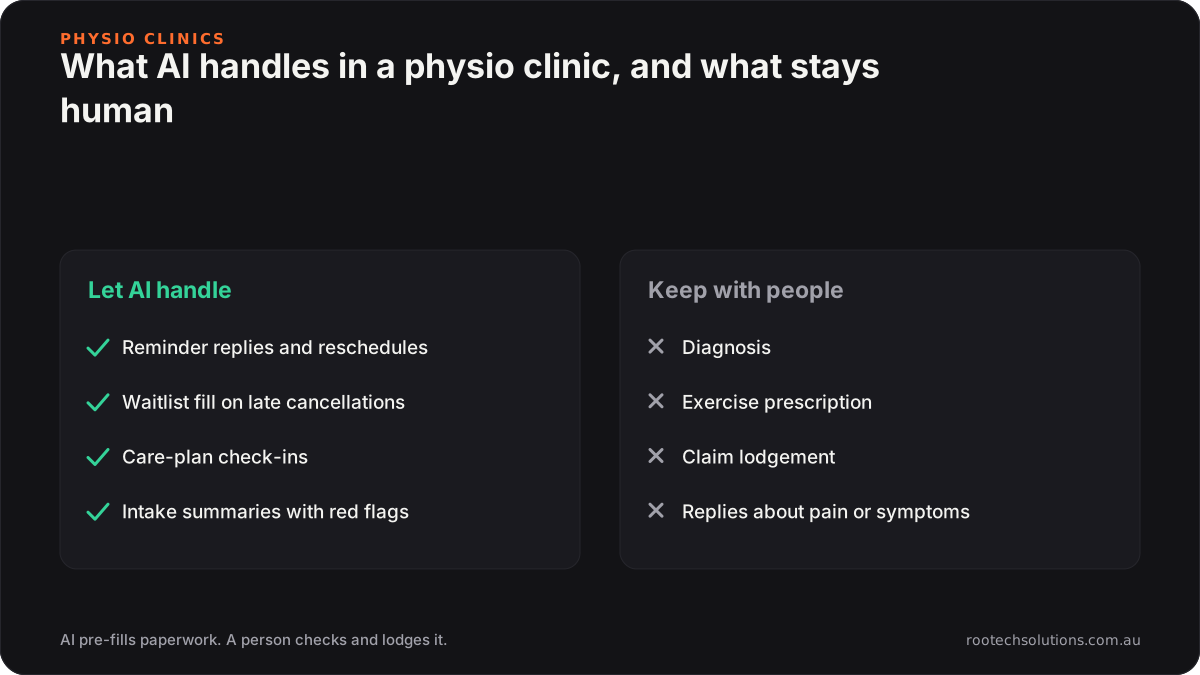
Caption: Automate the conversations and paperwork around care, never the clinical decisions.
What does a missed physio appointment actually cost?
Roughly the fee of the session, because the physio's time cannot be sold twice. At a standard consult of around $90 to $120, a clinic with two or three unfilled late cancellations a week is losing somewhere between $180 and $360 a week, and that is before counting the patients who drift out of their care plan. These are estimates; run the numbers with your own fees and your own cancellation report.
The reason reminder replies come first is that the slot is only lost if nobody refills it. A late cancellation that gets rebooked from the waitlist within the hour costs you nothing.
Off-the-shelf features or a custom AI integration?
Use the built-in features until they run out, then add a custom layer on top rather than replacing anything. The practice management system stays the source of truth for the diary and the clinical record.
| Job | Practice software out of the box | Custom AI layer on top |
|---|---|---|
| Send a reminder | Yes, automated | Not needed |
| Understand a free-text reply ("can I do Thursday?") | Usually limited | Reads it, offers real slots, moves the booking |
| Fill a late cancellation from a waitlist | Depends on the system and your setup | Texts the waitlist in order until someone accepts |
| Notice a patient has dropped out of a care plan | Needs someone to run a report | Checks daily, sends a check-in, routes clinical replies to the physio |
| Turn intake answers into a summary with red flags | Stores the form | Writes the summary and flags what you defined |
| Answer "do you treat jaw pain?" on the website at 9pm | No | Answers from your approved service list, books, never diagnoses |
Check what your current plan includes before paying for any of the right-hand column.
What does the privacy side look like for a physio clinic?
Stricter than for most small businesses. The Privacy Act covers every health service provider regardless of turnover, so the small business exemption that lets a café ignore it does not apply to you. Three practical consequences for any automation:
- Keep patient details out of public AI chatbots. The OAIC's guidance on commercially available AI products recommends that organisations do not enter personal information, and particularly sensitive information, into publicly available generative AI tools. A receptionist pasting intake answers into a free chatbot to "summarise this" is exactly what it means.
- The automation should read and write through the practice software, not copy patient data into spreadsheets or third-party inboxes it doesn't need to touch.
- Messages should be about the patient's own care. A reminder or a check-in on their current plan is different from a promotional blast to the whole database. If you want to market to your list, get advice on consent first.
None of this stops you automating. It shapes how the build is done, and it is a good question to ask any provider before you sign.
What can you do this week without building anything?
Find out where your diary actually leaks. It takes about an hour.
- Run your practice software's cancellation and no-show report for the last eight weeks.
- Mark each one: was the slot refilled, yes or no?
- Run a report of patients with no future appointment who were seen in the last six weeks. Read down the list with your physios and count the ones who stopped mid-plan.
- Check your reminder settings. Is the reminder going out early enough for a slot to be refilled? Does it tell the patient how to reschedule?
If unfilled late cancellations are the bigger number, start with reminder replies and the waitlist. If mid-plan drop-outs are bigger, start with care-plan follow-up. Either way, you now know.
What does the build look like?
A custom layer connected to your practice software and an SMS gateway, usually live in two to four weeks.
- Scope: reminder reply handling, waitlist fill and care-plan check-ins, with escalation rules your physios sign off.
- Integrations: Cliniko, Nookal or Halaxy through their supported connections, your SMS provider, and a simple screen showing everything the AI did each day.
- Cost, as estimates: a reminder and waitlist build typically lands between $2,500 and $4,500 depending on integrations. Intake summaries are usually a separate $1,500 to $3,000 because of the form mapping and extra privacy care. Running costs are hosting (usually under $50 a month), AI usage typically $20 to $200 a month, and SMS charges from your gateway.
- Human in the loop: any reply mentioning pain, symptoms, a complaint or a fee dispute goes to a person. Physios review the flagged intake summaries before the first session.
For a fuller cost breakdown see what AI automation costs a Melbourne physio clinic, and for the after-hours side of booking, how clinics lose after-hours bookings.
Frequently asked questions
Will patients mind getting texts from an AI?
Most patients care that the reply is fast and correct. Tell them it is an automated assistant, keep messages short and in the clinic's voice, and make it easy to reach a person. Anything about pain or treatment should always reach a human.
Can AI write my physio clinical notes?
AI can turn a dictation into a tidy draft, but the clinical reasoning, findings and plan are the physiotherapist's responsibility and must be reviewed before they are saved. Treat it as a typing aid, and only use tools whose handling of health information you have checked.
Do we need to change practice management software?
No. A custom layer works with the system you have and keeps it as the record of truth. Changing software is a much bigger decision than adding automation, and rarely the first step.
Is this worth it for a two-physio clinic?
Sometimes. If one person does reception between other work and late cancellations regularly go unfilled, a small build pays back. If your diary is already full with a waiting list that refills itself by phone, the built-in reminders are probably enough for now.
Want to know where your clinic's diary leaks?
We will go through your cancellation reports, your reminder setup and your intake process with you, and tell you which single automation is worth building first, or whether your current software already covers it. Book a free AI workflow audit. The audit fee comes off your first project if you go ahead.