Where Melbourne Plumbers Should Start with AI Automation
AI automation for plumbers, in order: triage missed calls by urgency, turn site notes into ServiceM8 quotes, then chase quotes. What to skip and costs.
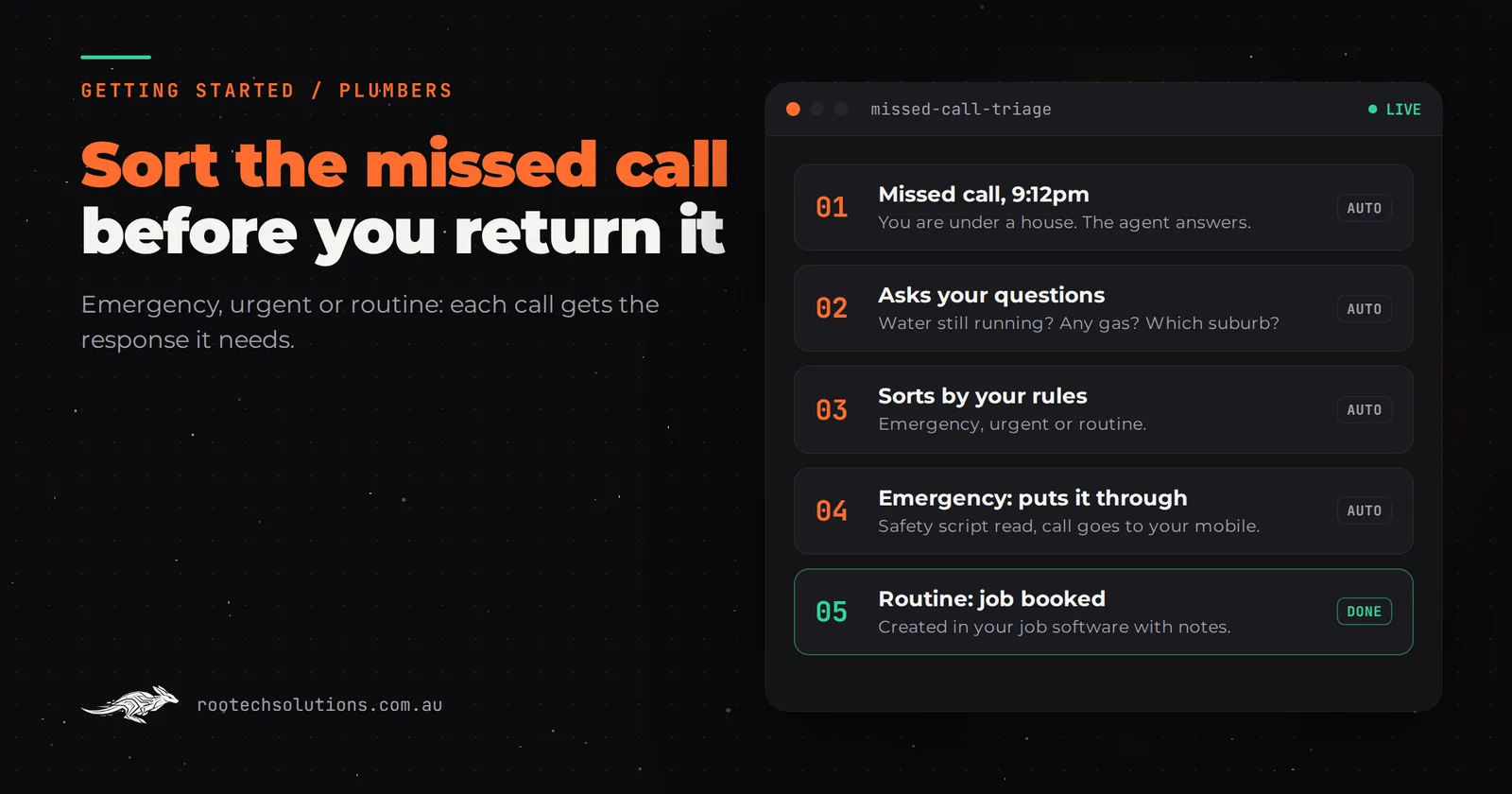
A plumber's enquiries are not all the same job. A burst flexi hose at 9pm, a hot water system that died this morning and a quote for a bathroom next autumn all ring the same mobile while you are under a house in Coburg, and a voicemail treats them all the same. That is the problem your first AI automation should solve.
Short answer: The first AI automation for most plumbers is missed-call triage: an AI receptionist that answers when you cannot, sorts the caller into emergency, urgent or routine by your rules, puts emergencies straight through to you and books the rest into your job management software. Second is turning on-site notes into quotes and invoices. Third is quote follow-up.
Why does urgency change what a plumber automates first?
Because in plumbing, the cost of a slow reply depends on what the caller has. An emergency caller rings down the Google list until someone answers. A routine caller will wait a day. A generic "thanks, we'll call you back" message fails the first and wastes the second.
So the first automation is not just "answer the phone". It is sorting. The agent asks the questions you already ask on every call (what is happening, is water still running, is there gas involved, which suburb), then follows your rules for each kind of job.
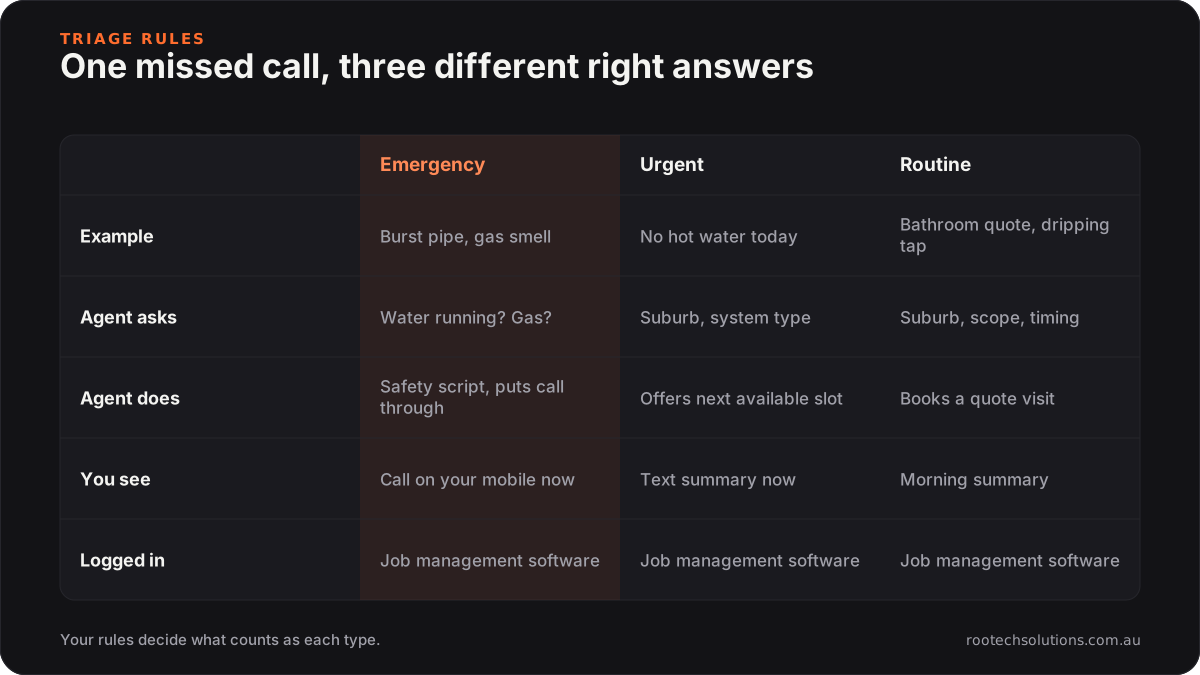
Caption: The value is in the sorting. Each kind of call gets the response it needs, not the same voicemail.
In practice: an emergency gets your safety script and is put through to your mobile. An urgent job, such as no hot water today, is offered the next available slot and you get a text straight away. A routine job, such as a bathroom quote or a dripping tap, is booked as a quote visit and shows up in your morning summary. All three land in your job management software.
The rules are yours. Some plumbers want every emergency put through no matter what. Others only take emergencies from existing customers after 8pm. Some do not service certain suburbs. Writing those rules down is the first week of the build, and doing it is useful even if you never automate anything.
What should a plumber automate first, second and third?
Missed-call triage first, site notes into quotes and invoices second, quote follow-up third. Each one fixes a different leak, and they build on each other.
- Missed-call triage. This is where jobs walk out the door. Calls you miss while on the tools, after hours and on weekends go to whoever answers next. An AI receptionist, or at minimum a missed-call text-back, closes that gap.
- Site notes into quotes and invoices. Once the phone is covered, the next leak is your evenings. You finish a job, then retype the parts, labour and notes into your job management app at 8pm. A voice note or a photo of your notes can become a draft quote or invoice line items for you to check.
- Quote follow-up. Bigger jobs, such as hot water replacements, bathroom rough-ins and re-pipes, get quoted and then go quiet. A polite follow-up a few days later, plus answers to simple questions about the quote, wins some of them back.
What to skip for now:
- Anything that diagnoses or gives safety advice. The agent should never troubleshoot a gas smell or tell someone how to fix a leak. For gas, it reads your scripted safety message and gets you on the line.
- Compliance paperwork. Certificates and anything that carries your licence stays with you.
- Replacing your job management software. It already holds your jobs, quotes and invoices. Automate around it.
Can I find my own biggest leak this week, without paying anyone?
Yes. Run a seven-day call log. It costs nothing and tells you which automation to build, or whether you need one at all.
Every time you miss a call or a lead goes cold, write down:
- The channel: call, text, website form, Google Business Profile message.
- The type: emergency, urgent, routine or quote.
- How long until you replied, in hours, honestly.
- What happened: booked, went elsewhere, never heard back.
At the end of the week, count the emergencies and urgent jobs you replied to more than an hour late. If there are several, missed-call triage is your first automation. If you caught every call but spent every night on paperwork, start with site notes into quotes instead. A plumber who answers everything and still loses evenings has a data entry problem, not a phone problem. We go through that one in automating data entry for tradies.
Is ServiceM8 or simPRO enough, or do I need a custom AI integration?
Your job management software is the system of record and you should keep it. Apps such as ServiceM8, simPRO, Fergus and Tradify hold your jobs, schedule, quotes and invoices, and most have booking forms, SMS and integrations of their own. Check what yours already offers, and its current pricing, before you build anything.
What they are not built to do is hold a phone conversation, decide on the spot whether a caller's problem is an emergency by your rules, and act on that decision. That is the piece a custom AI integration adds.
Off-the-shelf is the right call when:
- most of your work comes through a booking form, not the phone;
- a plain missed-call text-back ("Sorry I missed you, reply with what's happening and your suburb") already gets you a reply quickly enough. For many sole operators, it does. We compare the two in missed-call text-back vs AI receptionist.
A custom AI integration earns its keep when:
- you lose emergency or urgent work to slow replies, and the caller needs a real answer, not a text;
- you want the agent to create the job, with the caller's details and notes, straight into your job management software instead of you retyping it;
- your rules are specific: service area by suburb, after-hours call-out policy, which customers get put through at night.
What does the build look like, and what does it cost?
A first missed-call triage agent is typically a two to four week build at a fixed price. It answers on your existing number when you do not pick up, and writes into the tools you already use.
| Part of the build | What it does | Connects to |
|---|---|---|
| Call answering | Answers missed and after-hours calls in a natural voice, says it is an AI assistant | Your existing number, by call forwarding |
| Triage rules | Sorts emergency, urgent and routine by your questions and your service area | A rules sheet you can edit |
| Emergency handoff | Reads your safety script, puts the call through or texts you the details | Your mobile |
| Booking and job creation | Offers slots for routine work and creates the job with notes | Your calendar and job management software |
| Morning summary | Lists every call, what it was and what the agent did | Text or email |
What it costs: a first lead-capture automation for a plumber typically costs between $1,500 and $3,500 to set up, depending on the channels covered (phone, SMS, web chat, Google messages) and how tightly it connects to your job management software. Running costs are estimates of roughly $100 to $300 a month for the voice and messaging platform, hosting and AI usage, depending on call volume.
Where a human stays in the loop: every emergency comes to you, every quote is yours to price, and you can read or listen back to every conversation the agent had. Week one of running it, you check them all. After that, the morning summary is usually enough.
What does the first month look like?
Week one is your rules: the questions you ask on every call, your service area, what counts as an emergency, and your after-hours policy. Week two is building and test calls, including the awkward ones (wrong numbers, existing customers chasing an invoice, a caller who will not stop talking). Week three, the agent covers after-hours calls only, so you can check it on real callers without touching your daytime flow. Week four, it covers every missed call.
The thing to measure is simple: missed calls that turned into booked jobs, compared with your seven-day call log from before. If you want the full cost and payback picture, see what AI automation costs a Melbourne plumber.
Frequently asked questions
Will callers hang up on an AI receptionist?
Some will, the same way some hang up on voicemail. Most callers with a problem want to know someone has it in hand, and a quick, clear answer with a booked time or a promise of a call back does that. The agent should say it is an AI assistant at the start of the call.
Can the AI give a price over the phone?
It should only say what you would say: your call-out fee and how your pricing works, if you choose to share them. It should not estimate a job it has not seen. Anything beyond your published policy waits for you.
Do I need a new phone number?
Usually not. Calls you do not answer are forwarded to the agent, so customers keep ringing the number on your van. If your number is tied to an old phone system that cannot forward calls, sort that first.
What happens if the agent gets an emergency wrong?
That is why the triage rules lean cautious: if the caller mentions gas, flooding or anything the agent is unsure of, it treats it as an emergency and gets you on the line. You review the first few weeks of calls and tighten the rules where it over or under reacted.
Not sure which leak to fix first?
We run a free AI workflow audit: we go through your call log and your job management setup, and tell you whether a text-back, an AI receptionist or a data entry fix will win you the most back. Book a free AI workflow audit. The audit fee comes off your first project if you go ahead.