Computer Vision Solutions in Melbourne and Across Australia
What computer vision can do for a Melbourne or Australian business: tracking, counting, measuring and reading plans, how a project runs, privacy and cost.
Computer vision is software that understands what a camera, a photo or a drawing shows. Not just recording it, but answering a question about it: how many people walked in, where is that person's arm, which room on this plan is the kitchen and how big is it, is this part the right shape. A few years ago that took a research team. Today the models are good enough, and cheap enough to run, that a Melbourne manufacturer, retailer, builder or events company can put one to work on a real problem.
This guide explains what computer vision is good at, where it earns its keep for Australian businesses, how a project runs, what the privacy rules mean for cameras, and what it costs. It is written from Melbourne, where we build it, for businesses anywhere in Australia.
Short answer: Computer vision solutions use AI models to track people and poses, cut objects out of a scene, count, measure, read drawings and check quality from camera feeds, photos or plans. Rootech is a Melbourne software studio that builds them as custom software: interactive installations that react to people, and practical tools such as an AI estimator that reads construction plans. Projects start by testing the model on your own footage or documents, are fixed price, and are designed for Australian privacy law from the first sketch. Melbourne clients can have us on site; elsewhere in Australia, hardware ships pre-configured and is set up over a call.
What computer vision can actually do
Most useful computer vision work is one of five jobs. Most pictures below are real model output, rendered in-house or taken from shipped work; the two illustrative ones are labelled.
1. Track people and poses
A pose model finds a person in the frame and places a skeleton on them: shoulders, elbows, wrists, hips, knees and ankles, updated every frame. That is enough to turn someone's body into a game controller, check a lifting technique, or notice when someone has fallen.
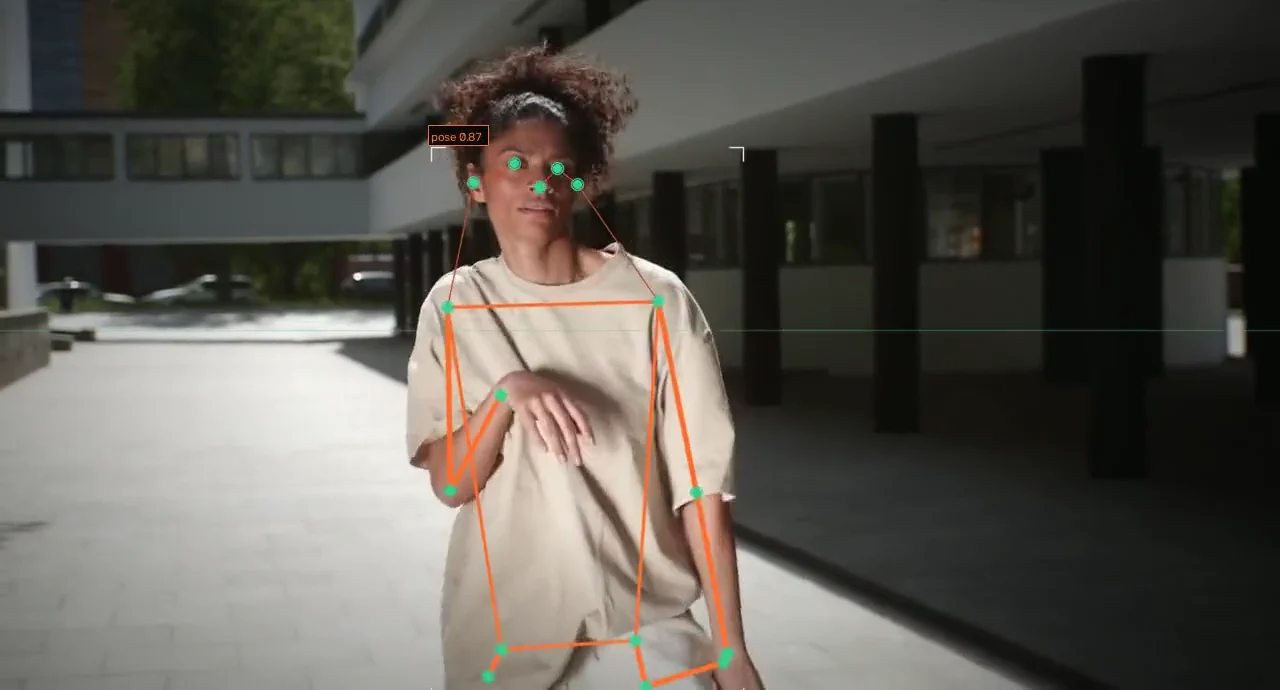
Caption: Pose tracking, rendered in-house with an open-source model on free stock footage. Seventeen joints, smoothed across frames.
We used the same idea in Nutrients 4 Revolution, a computer vision installation for Nutrien delivered through Braveshell, where a camera tracks visitors' bodies and turns their movement into the game. Visitors walk up, move and play, with a camera doing the work a controller used to do.
2. Cut an object or person out of the scene
Segmentation draws an exact outline around something and follows it as it moves. It is what lets an installation put a visitor inside an animated world, a quality system isolate one part on a busy conveyor, or a stock system tell one carton from the next.
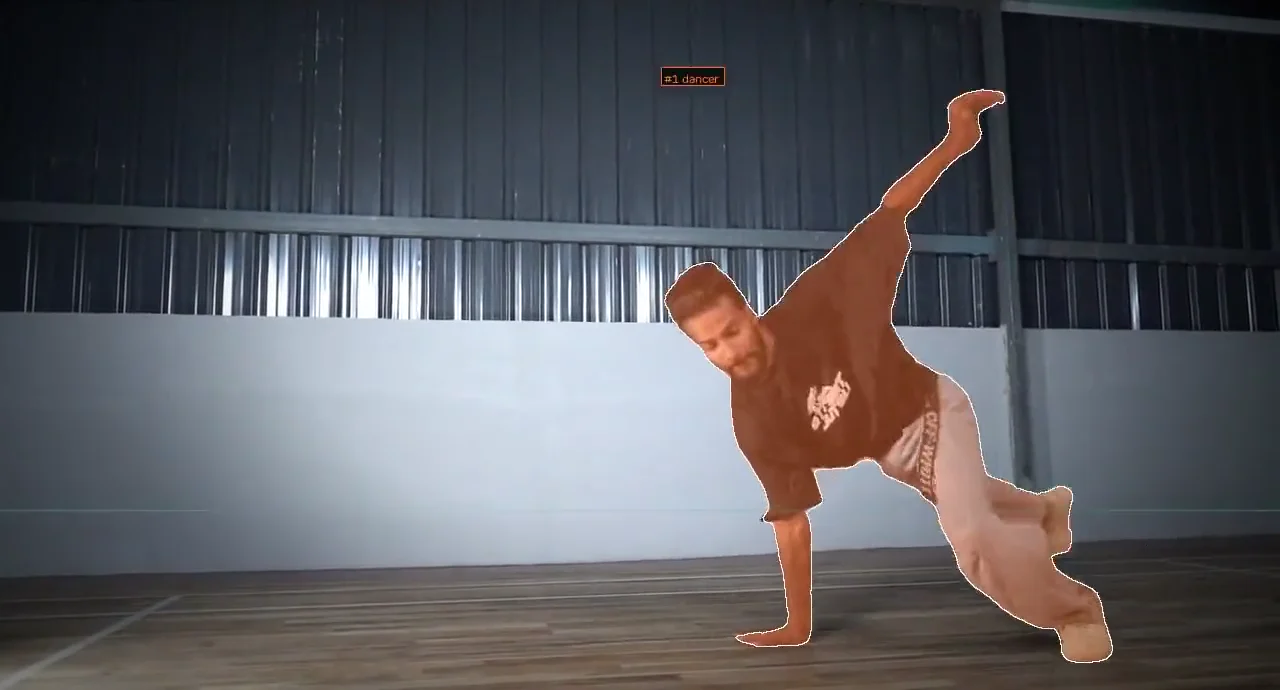
Caption: Video segmentation, rendered in-house. One box on the first frame, then the model follows the dancer through spins and freezes on its own.
3. React to the people in front of the screen
Put tracking and segmentation together and you get software that notices people and responds to them. Sammy the Snowman, built with MammothXR for Southcentre Mall in Calgary, puts a life-size animated snowman on a big screen with the shoppers walking past. Body tracking lets Sammy notice, follow and play with visitors instead of looping on his own, every trading hour of the holiday season with no operator.
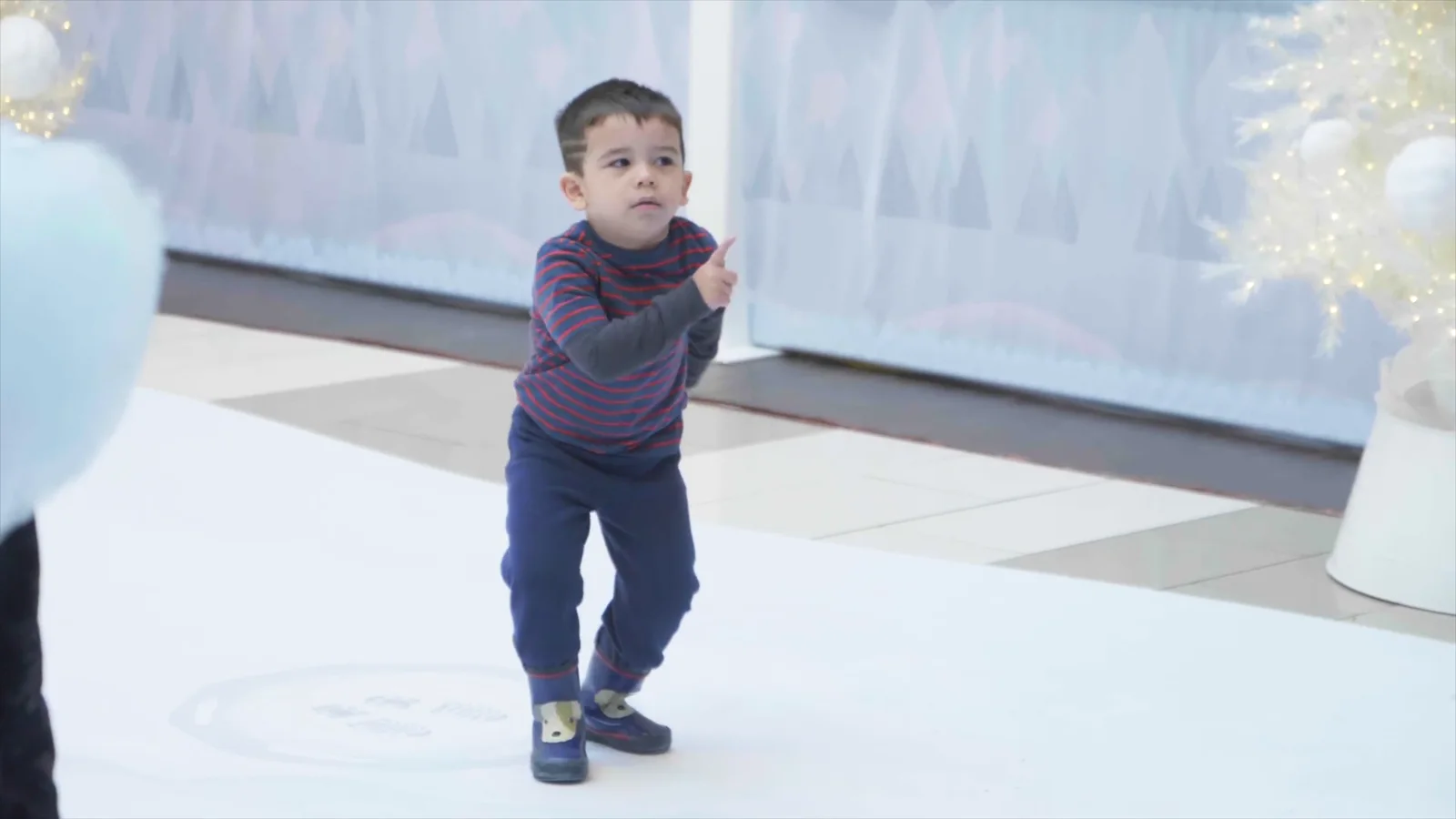
Caption: Sammy the Snowman in the mall. Shoppers stop, wave and take the photo.
4. Read and measure drawings and documents
Computer vision is not only for cameras. A floor plan is an image too, and a model that can find walls, doors and rooms can measure them. For Logic Building Co we built an agentic AI estimator that reads construction plans, extracts every room and area, checks the measurements against each other and turns them into a costed estimate for a person to review. Logic reports that a takeoff on a multi-unit or multi-floor job used to take about a week, and a single unit about half a day. With the estimator, each takes about ten minutes.
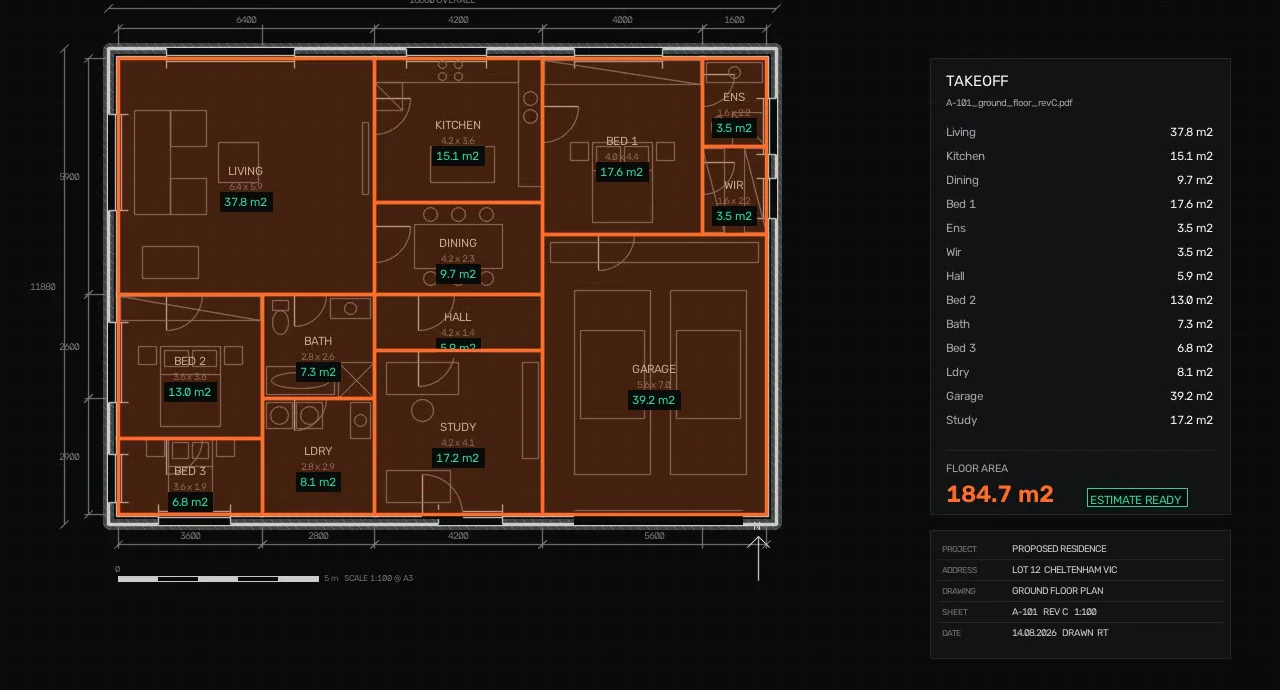
Caption: An illustrative plan takeoff, drawn in code to show the idea: every room found, filled and measured, then totalled.
The full story is in AI takeoff software for estimators.
5. Count, and check quality
The least glamorous job is often the most valuable: counting people through a door, cars into a car park, cartons on a pallet or defects on a line, every minute of the day, without someone holding a clicker. Done properly, counting does not need to identify anyone at all.
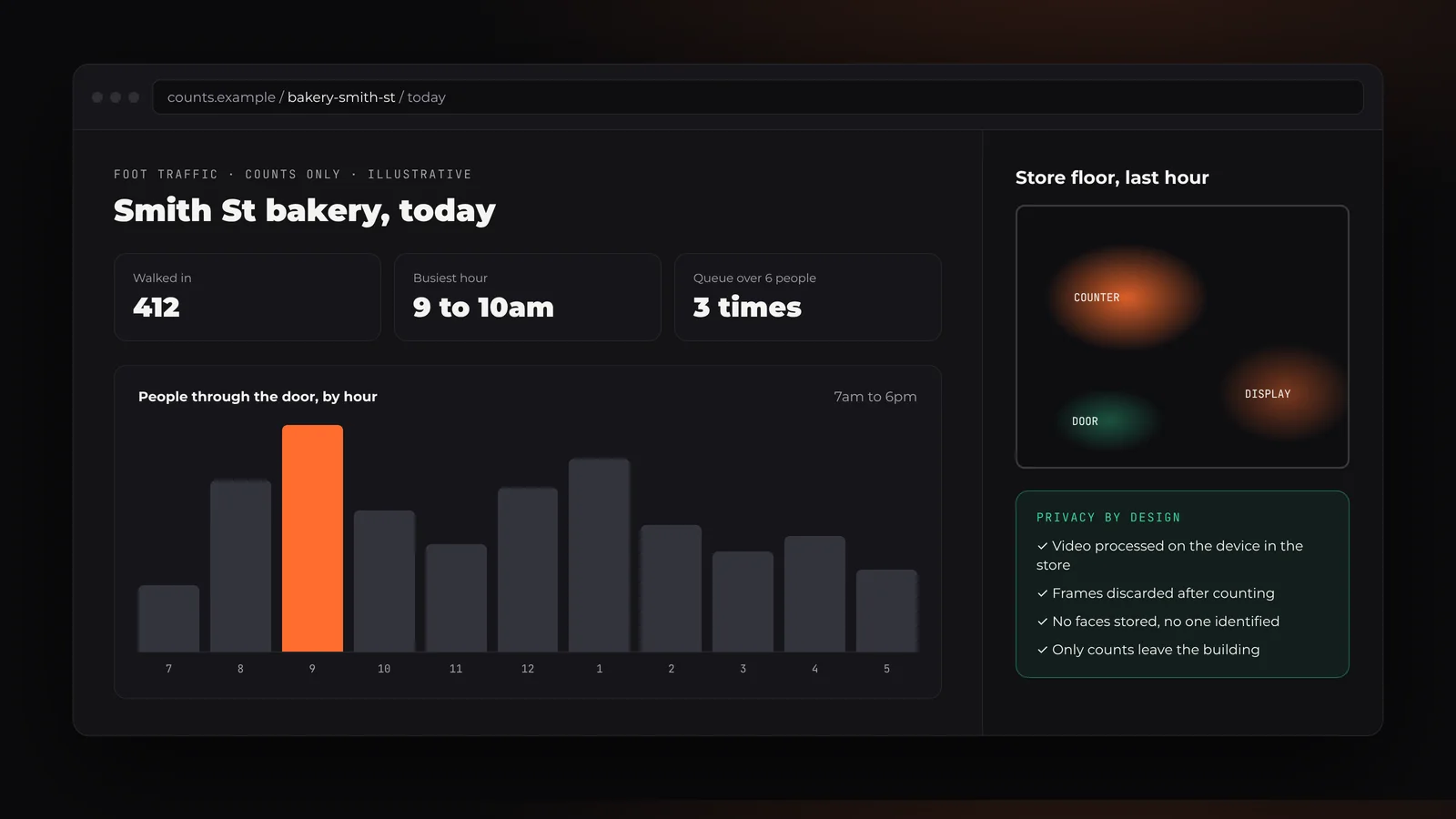
Caption: Illustrative, for a fictional shop. The camera answers how many and where, never who.
Where computer vision earns its keep in Melbourne and Australia
You do not need a computer vision project. You need a problem that a camera, a photo or a drawing could answer faster or more reliably than a person. These are the places we see that most often:
- Manufacturing. Melbourne's manufacturers, from Fishermans Bend to Clayton, check parts, count output and explain complex products. Vision can flag a part that is the wrong shape before it is packed, or count units off a line without a manual tally.
- Construction and trades. Victoria's housing pipeline is stretching estimators thin. Reading plans and measuring areas is exactly the kind of repetitive visual work vision handles well, as the Logic Building Co estimator shows.
- Retail and hospitality. Melbourne's cafes, restaurants and boutiques can count foot traffic, spot queues building and see which part of the floor gets attention, using counts rather than identities.
- Events and trade shows. At the Melbourne Convention and Exhibition Centre, Melbourne Showgrounds, ICC Sydney or a regional field day, a stand that reacts to the people in front of it pulls a crowd. Our guide to trade show touchscreen costs puts camera-driven games alongside the other options.
- Agriculture, mining and logistics across Australia. Counting stock, checking that people are clear of a machine's working area, or reading labels and plates in a yard. These sites are often remote, so the model usually needs to run on a device on site rather than streaming video to the cloud.
How a computer vision project runs
The biggest risk in computer vision is a model that works beautifully on a demo video and falls over in your actual lighting, angles and crowds. So every project we run starts with your footage, not ours.
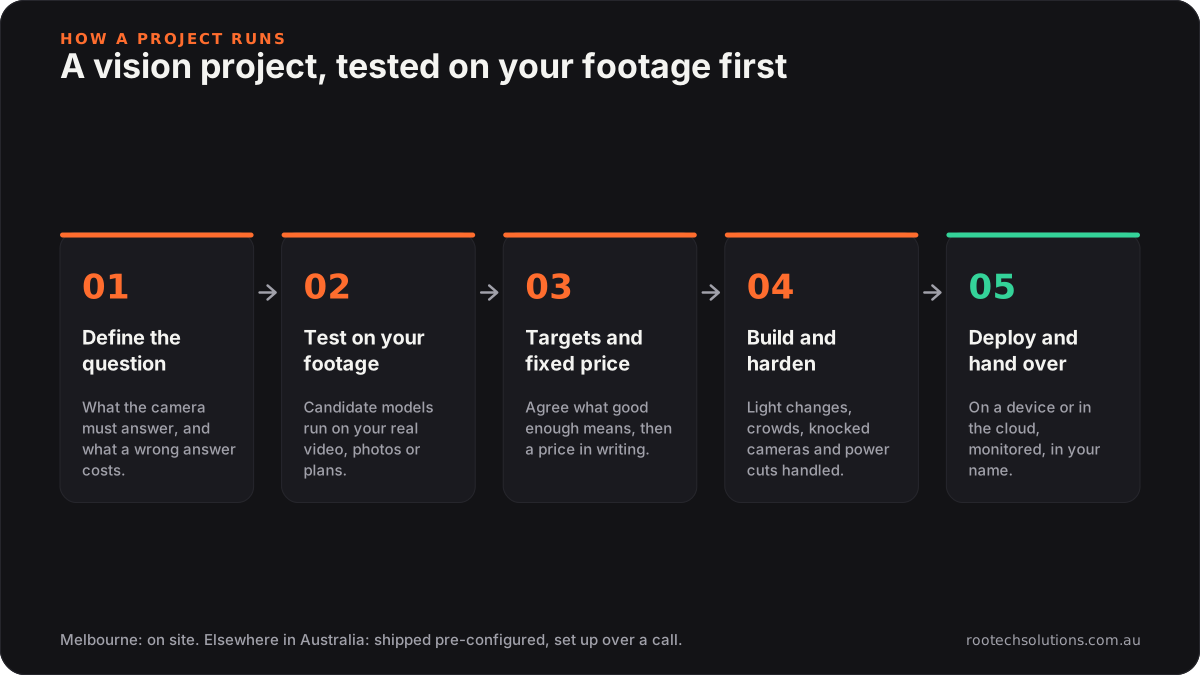
1. Define the question. "How many people came in between 8 and 9" is a computer vision project. "Use AI on our cameras" is not yet. We pin down exactly what the system must answer and what a wrong answer costs.
2. Test on your footage. You send sample video, photos or plans, ideally from the real site and including the awkward cases: bad light, crowds, odd angles. We run candidate models on them and show you what they get right and wrong.
3. Agree targets and a fixed price. With real results in front of us, we agree what "good enough" means and quote a fixed price in writing.
4. Build and harden. The model is wrapped in software that copes with the real world: changing light, people walking through the frame, a camera knocked out of line, a power cut. For installations that means auto-restart and no keyboard; for business tools it means the result lands where your team already works.
5. Deploy and hand over. On a device on site when privacy, bandwidth or remoteness call for it, in the cloud when they do not, with monitoring so you hear about a problem before your customers do. You get the code, documentation and accounts in your name.
Privacy, cameras and Australian law
Cameras raise questions a spreadsheet never does, and a well-designed computer vision system answers them before anyone asks.
Under the Privacy Act, biometric information used for automated identification or verification, and biometric templates, are treated as sensitive information, which carries stricter rules. The Office of the Australian Information Commissioner has published guidance on facial recognition technology including updated guidance for retailers considering it in shops and other public spaces, and it has investigated Australian retailers that used it on shoppers. States add their own rules: Victoria has the Surveillance Devices Act 1999, and New South Wales has a specific Workplace Surveillance Act 2005. What applies to you depends on your business and your site, so check with the OAIC or a lawyer before cameras go up.
The design choices that keep most projects well clear of trouble are simple:
- Answer "how many", not "who". Counting, tracking a body's pose and measuring a part do not require identifying anyone.
- Process on the device. Video is analysed where it is captured and the frames are thrown away. Only counts or results leave the building.
- Store nothing you do not need. No faces, no recordings, unless the job truly requires them and you have the consent and notices to match.
- Tell people. Clear signage about what the camera does and does not do builds trust, and in many situations it is required.
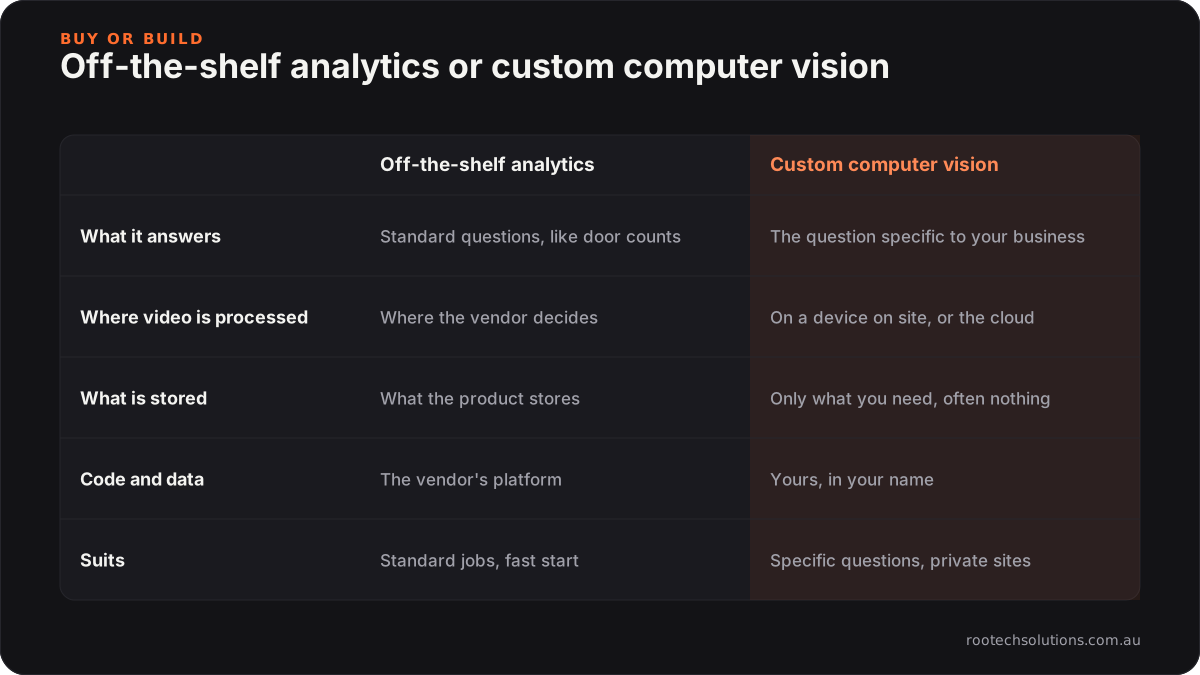
Off-the-shelf camera analytics are worth a look for standard jobs like door counting, and we will tell you if one fits better than a custom build. Name the product and check its current pricing. A custom system makes sense when the question is specific to your business, the result has to land in your own tools, or you want the video never to leave the site.
What computer vision costs
Every Rootech project is fixed price, quoted after we have tested models on your footage, because accuracy on your site is what decides the effort. For trade show and event work we publish indicative ranges: a computer vision or motion game typically runs $30,000 to $80,000, software only and excluding GST, with hardware hired separately. Practical business tools are scoped and quoted the same way, with the running cost of the device or the cloud set out before you sign.
Every project also comes with the same promises: a fixed price before you sign, bug fixes included after launch, a proper handover, no lock-in, and you own all of it, including the code, the accounts and the data.
Melbourne first, Australia-wide
Rootech is based in Melbourne. For Melbourne businesses we can come on site to look at camera positions, lighting and the space the system has to work in, and be there for the install.
Everywhere else in Australia, remote is the default and works well for this kind of work. You send footage from the real site, we test and build in the cloud, and hardware is shipped pre-configured and set up with your team or a local AV partner over a call. We only travel for the rare install that cannot be done any other way. The city pages cover what we build for Sydney, Brisbane, Perth, Adelaide and Hobart businesses, and our services page lists computer vision alongside AR, VR and 3D.
Frequently asked questions
What is computer vision?
Computer vision is software that uses AI models to understand images, video and drawings: finding people and their poses, outlining objects, counting, measuring and reading plans or labels. It turns what a camera sees into an answer your business can act on.
Do you build computer vision solutions in Melbourne?
Yes. Rootech is a Melbourne software studio. We have shipped camera-driven installations such as Nutrients 4 Revolution and Sammy the Snowman, and an AI estimator that reads construction plans for Logic Building Co. Melbourne clients can have us on site for camera placement and installs.
Do you work with businesses outside Melbourne?
Yes, across Australia. Outside Melbourne you send sample footage, we test and build remotely, and hardware is shipped pre-configured and set up with your team over a call. We only travel for the rare install that cannot be done any other way.
How much does a computer vision project cost in Australia?
It is a fixed price quoted after we test models on your own footage or documents. For trade show and event installations, a computer vision or motion game typically runs $30,000 to $80,000, software only and excluding GST, with hardware hired separately.
Is computer vision legal in Australia?
Cameras and computer vision are legal in many situations, but privacy and surveillance laws apply. Biometric information used to identify people is sensitive information under the Privacy Act, and states such as Victoria and New South Wales have their own surveillance laws. Check with the OAIC or a lawyer. Designing the system to count rather than identify, and to process video on the device, avoids most of the risk.
Does it need facial recognition?
Almost never. Counting people, tracking a pose, measuring a part or reading a plan all work without identifying anyone. We design for the smallest amount of personal information that answers the question.
Can it run without internet?
Yes. Many systems run on a device on site and only send results, or nothing at all. That suits trade show halls, remote sites and anywhere you would rather the video never leaves the building.
Tell us what the camera should answer
If there is a question your business keeps answering by eye, with a clicker or with a scale ruler, it may be a computer vision problem. Tell us what you want the camera to answer and send a sample of footage, photos or plans if you have them. We will tell you honestly whether a model can do it, and what it would take. Start through the contact form at Rootech Solutions.